
Table of Contents
- Your Title Tag Is Doing One Job — Make It Count
- Meta Descriptions Don’t Rank You, But They Get You Clicked
- Header Tags Are a Roadmap, Not Decoration
- Image Optimization Isn’t Optional Anymore
- Internal Links Are the Most Underused Ranking Factor
- Content Structure Signals Quality Before Google Reads a Word
- Schema Markup Is Easier Than It Sounds
- The Fixes Nobody Does (But Should)
You don’t need a developer. You don’t need expensive tools. What you need is a systematic approach to the on-page factors Google actually weighs when deciding which page deserves position three versus position twelve.
This isn’t a comprehensive SEO guide. It’s a prioritized checklist of the seventeen fixes that create measurable ranking improvements on WordPress, in order of impact.
Your Title Tag Is Doing One Job — Make It Count
Front-Load Your Primary Keyword
Google reads title tags left to right. If your target keyword appears in position seven instead of position one, you’re diluting relevance signals before the algorithm even finishes parsing the tag.
Bad example: Discover Amazing Tips for WordPress SEO Optimization Success
Better: WordPress SEO Optimization: 11 Fixes That Improve Rankings
The second version places WordPress SEO optimization at the front, eliminates filler words like “discover” and “amazing,” and creates a clear value proposition.
Stop Keyword Stuffing in Titles
Repeating your keyword twice in a 60-character title doesn’t double your relevance — it halves your click-through rate. Write for humans first. If the title sounds awkward when you read it aloud, rewrite it.
One clean mention of your focus keyword is enough. Use the remaining characters to differentiate your page from the nine other results targeting the same term.
Brand Names Belong at the End
Unless you’re Nike, your brand name doesn’t help you rank. Put it after a separator at the end of the title: Primary Keyword - Supporting Context | Brand
Most WordPress SEO plugins add your site name automatically. If yours doesn’t, append it manually — but never sacrifice keyword placement to do it.
Meta Descriptions Don’t Rank You, But They Get You Clicked
Write Descriptions That Answer the Query
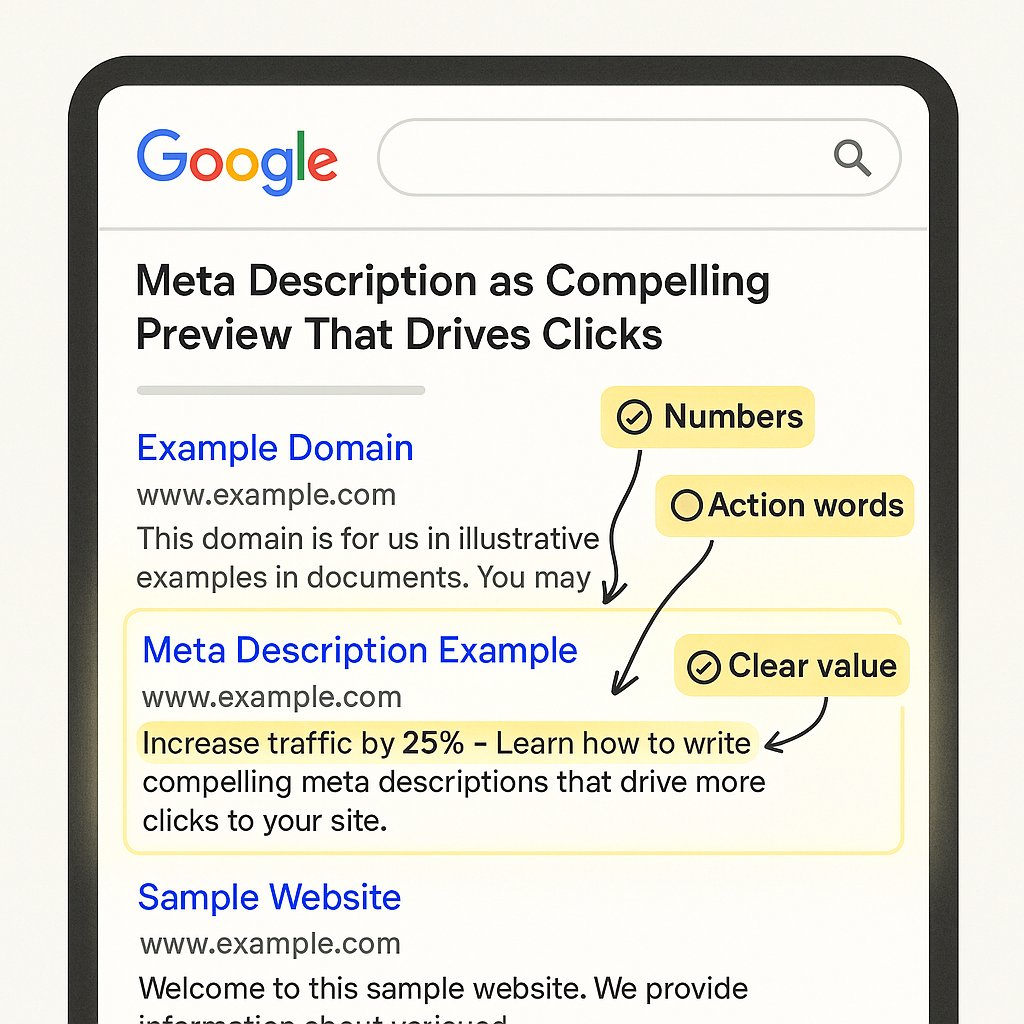
Your meta description is a preview, not a summary. It should tell searchers exactly what they’ll find if they click. Be specific. Use numbers. Address the pain point the query implies.
If someone searches how to optimize WordPress images for SEO, your meta description should mention image compression, alt text, and file naming — not vague promises about “boosting site performance.”
Google often rewrites descriptions that don’t match search intent. The solution isn’t to leave the field blank — it’s to write tighter, more query-aligned copy.
Keep It Under 155 Characters
Google truncates descriptions around 155-160 characters on desktop, fewer on mobile. If your key selling point appears in character 170, most users will never see it.
Test your description in Yoast, Rank Math, or a SERP preview tool before publishing. If the last sentence gets cut off mid-thought, trim it.
Header Tags Are a Roadmap, Not Decoration
One H1, Multiple H2s, Logical Hierarchy
Your H1 is the page title. It should match or closely mirror your title tag. Don’t get creative here — reinforcement beats novelty.
H2 tags break your content into major sections. Each one should be a standalone topic or question. H3 tags subdivide those sections. If you’re nesting H4s and H5s, your content is either too complex or poorly organized.
Most readers skim. Headers tell them where to stop. If your H2s are vague labels like “Introduction” or “Tips,” you’ve wasted the most scannable part of your page.
Include Keywords in Headers Naturally
You don’t need your exact-match keyword in every H2. But semantic variations and related terms signal topical relevance. If your page targets “WordPress SEO optimization,” headers like “On-Page SEO Fixes” or “Optimizing WordPress Content” reinforce the topic without sounding robotic.
Read your headers in sequence, ignoring the body text. They should form a coherent outline of the page’s argument.
Image Optimization Isn’t Optional Anymore
Alt Text Describes the Image, Not Your Keyword
Alt text exists for screen readers and broken image fallbacks. Write a brief, literal description of what the image shows. If your keyword fits naturally, include it. If it doesn’t, leave it out.
Bad: WordPress SEO optimization tips strategies guide
Good: Screenshot of Yoast SEO plugin settings panel in WordPress dashboard
Keyword-stuffed alt text doesn’t improve rankings. It does trigger accessibility penalties and manual reviews.
Compress Before You Upload
A 2MB PNG slows your page load by seconds. Google’s INP and LCP metrics punish slow media-heavy pages, and users bounce before your hero image finishes rendering.
Use compression tools like ShortPixel, Imagify, or TinyPNG before uploading. Aim for under 200KB per image. For logos and icons, switch to SVG.
WordPress generates multiple sizes of every uploaded image. If you’re running a five-year-old site, your media library is bloated with unused thumbnails. Clean it periodically.
Lazy Load Everything Below the Fold
Lazy loading defers image loading until the user scrolls near them. It’s built into WordPress 5.5+ for images, but you’ll need a plugin or theme setting to enable it for iframes and videos.
Don’t lazy load your hero image or anything visible on page load. That defeats the purpose and can actually hurt LCP.
Internal Links Are the Most Underused Ranking Factor
Link Deep, Not Just to Your Homepage
Most WordPress sites link obsessively to their homepage and top-level category pages, leaving 80% of their content orphaned or three clicks deep.
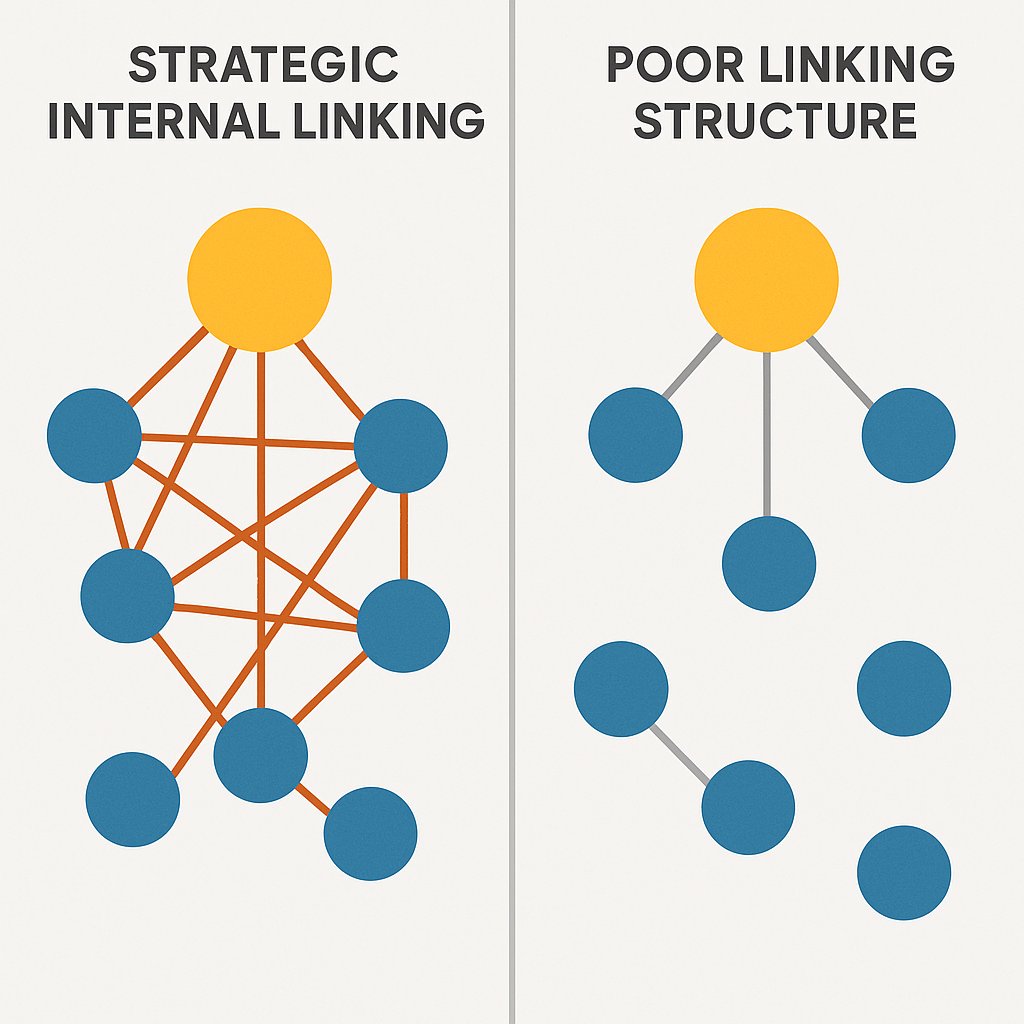
Every piece of content should link to at least two related articles and receive links from at least two others. This distributes PageRank, reduces crawl depth, and signals topical relationships Google uses to assess authority.
If you published fifty blog posts last year and never interlinked them, you’ve built fifty separate islands instead of one cohesive site.
Anchor Text Should Be Specific and Descriptive
Generic anchors like “click here” or “read more” waste link equity. Descriptive anchors like how to optimize title tags for SEO tell Google exactly what the target page covers.
Don’t over-optimize. If every internal link to a page uses the exact same keyword-rich anchor, it looks manipulative. Vary your phrasing: title tag best practices, optimizing title tags, writing better page titles.
Automate Internal Linking as Your Site Grows
Manually adding internal links to every new post is sustainable when you publish twice a month. When you hit fifty posts, it becomes guesswork. At two hundred posts, it’s impossible.
Tools like AI Internal Links scan your content, identify semantic relationships, and suggest or insert contextual links automatically. This keeps your site interconnected without the manual overhead of auditing every page after each publish.
The goal isn’t perfect linking — it’s consistent linking. A mediocre internal link structure applied across your entire site beats a perfect structure applied to 10% of your pages.
Content Structure Signals Quality Before Google Reads a Word
Paragraph Length Matters More Than You Think
Five-sentence paragraphs are a wall of text on mobile. Break every paragraph after two or three sentences. If a paragraph runs past four lines on your phone screen, split it.
White space isn’t wasted space. It’s breathing room. Readers skim until something catches their eye. Dense blocks of text never catch anyone’s eye.
Use Lists to Break Up Monotony
Bulleted and numbered lists create visual breaks and improve scannability. They also increase your chances of earning a featured snippet.
But don’t force it. A three-item list can often be rewritten as a single sentence. Use lists when each item genuinely needs its own weight.
Answer the Query in the First 100 Words
If someone searches how to add alt text in WordPress, tell them how in the first paragraph. Then explain why, show variations, and add context.
Google evaluates how quickly a page satisfies intent. If your answer is buried in paragraph six, you’re training users to bounce back to the SERP.
Front-load value. Reward the click immediately.
Schema Markup Is Easier Than It Sounds
Start with Article Schema
Article schema tells Google your content is editorial, not commercial. It enables rich results like publication dates, author bylines, and article snippets in search.
Most WordPress SEO plugins generate basic article schema automatically. Check it in Google’s Rich Results Test. If you see errors, fix them — missing or incorrect schema can disqualify you from rich results entirely.
FAQ and HowTo Schema Earn Featured Snippets
If your post answers multiple related questions, mark them up with FAQ schema. If it’s a step-by-step guide, use HowTo schema.
Both formats increase your SERP real estate and improve click-through rates. They’re also trivial to implement with plugins like Rank Math or Schema Pro.
The Fixes Nobody Does (But Should)
Update Old Content Instead of Publishing New Posts
A four-year-old post ranking on page two will benefit more from a content refresh than a brand new post on the same topic. Update statistics, rewrite outdated sections, add new internal links, and change the publish date.
Google rewards freshness. Updated content often jumps five to ten positions within days.
Noindex Thin Pages That Dilute Authority
Your tag archive pages, author pages, and search result pages are thin content. If they’re indexed, they compete with your real content for crawl budget and rankings.
Set them to noindex, follow unless they contain unique, valuable content.
Fix Broken Internal Links Immediately
Every 404 is a dead end for users and crawlers. Run a broken link check quarterly. Fix or redirect every broken internal link.
External links break over time — that’s unavoidable. Internal links breaking means you deleted or renamed a page and didn’t update the links pointing to it. That’s sloppiness.
WordPress SEO optimization isn’t about doing a hundred things poorly. It’s about doing seventeen things well, consistently, across every page you publish. The difference between position eight and position three is rarely one dramatic fix — it’s the compound effect of small improvements applied site-wide.