
Table of Contents
- Why Most WooCommerce SEO Advice Misses the Mark
- Product Page Optimization That Actually Moves Rankings
- Category Pages Are Your Secret Ranking Weapon
- Building an Internal Linking System That Scales
- Technical SEO Elements That E-commerce Sites Can’t Ignore
- Conversion Optimization Meets SEO
- Measuring What Actually Matters
- The Competitive Advantage of Systematic Linking
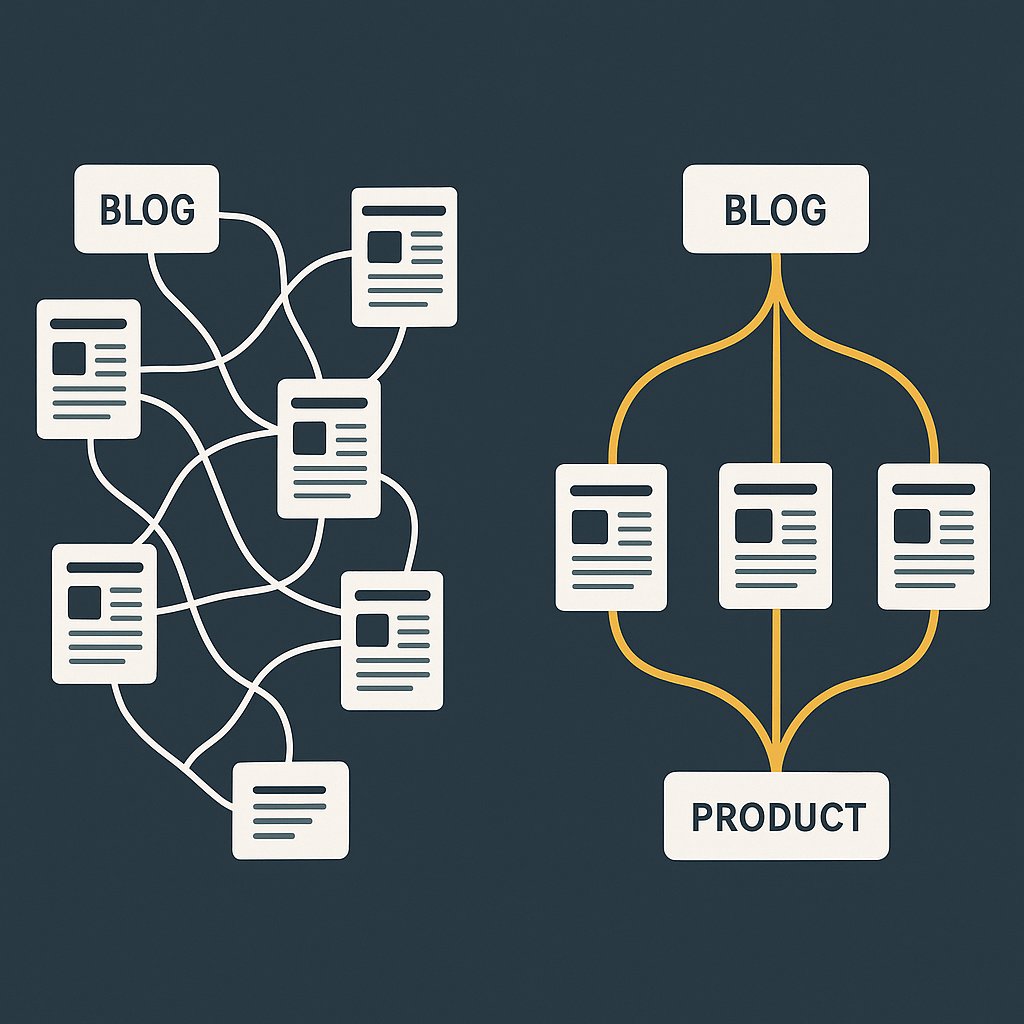
The culprit? Poor internal linking architecture.
Your product pages sit in isolation. Your blog posts don’t funnel traffic to your top sellers. Your category pages compete with each other instead of reinforcing topical authority. Google sees a disconnected mess, not a strategic e-commerce machine.
Here’s the truth: SEO for e-commerce WordPress sites is fundamentally different from blog SEO. You’re not just ranking content — you’re ranking products that need to convert. Every internal link should serve a dual purpose: help Google understand your site structure AND push visitors toward purchase decisions.
This guide shows you exactly how to build that system.
Why Most WooCommerce SEO Advice Misses the Mark
Search for WooCommerce SEO tips and you’ll find the same tired checklist: install Yoast, optimize meta descriptions, add alt text to images.
That’s table stakes. Everyone does that.
What separates stores that dominate organic search from those fighting for scraps? Strategic information architecture. The winners understand that e-commerce SEO isn’t about optimizing individual pages — it’s about creating a web of interconnected content that guides both users and search crawlers toward your most valuable pages.
Think about it. When someone lands on your blog post about “best running shoes for flat feet,” where do they go next? If you’re only linking to related blog posts, you’re wasting that traffic. That visitor should land on a category page or specific product within two clicks.
Yet most stores treat their blog and their product catalog as separate entities.
The E-commerce Link Equity Problem
Here’s what happens when your internal linking is weak: your homepage accumulates authority from backlinks, but that link equity never flows to the product pages that actually need to rank.
Your running shoe category page should be a ranking powerhouse. Instead, it’s buried three clicks deep with no internal links pointing to it from your most authoritative pages.
Meanwhile, your “About Us” page sits in the main navigation, hogging link equity it doesn’t need.
This isn’t a technical problem. It’s a strategic one.
The Real Competition Isn’t Other Stores
When you search for product keywords, who dominates the first page?
Amazon. Obviously. But also: review sites, comparison blogs, and editorial content.
These sites don’t sell products directly, yet they outrank actual stores because they’ve mastered topical authority. They publish dozens of interconnected articles around product categories, each one linking strategically to cornerstone content.
Your WooCommerce store can do the same thing. Better, actually, because you have the product pages to back it up.
You just need to connect the dots.
Product Page Optimization That Actually Moves Rankings
Let’s get tactical. Your product pages need more than good photos and a buy button.
Title Tags That Balance Keywords and Conversions
Most stores make one of two mistakes:
1. Stuff keywords until the title reads like spam: “Buy Best Cheap Running Shoes Sneakers Men Women Online”
2. Optimize for branding but ignore search: “Nike Air Zoom Pegasus 39”
The right approach? Lead with the keyword searchers actually use, then add the brand or differentiator.
Good: “Running Shoes for Flat Feet – Nike Air Zoom Pegasus 39”
This ranks for the problem-focused keyword (“running shoes for flat feet”) while still including the specific product name Google needs to understand the page.
Product Descriptions That Build Topical Depth
Manufacturer descriptions are poison for SEO. They’re duplicated across hundreds of sites selling the same product.
Write unique descriptions that answer real questions. Not features — problems and solutions.
Weak: “Features a breathable mesh upper and responsive foam cushioning.”
Strong: “If you overpronate, that mesh upper won’t trap heat during long runs. The foam compresses just enough to correct your gait without feeling mushy.”
See the difference? The second version uses language people actually search for. It addresses a specific use case. It builds semantic relationships Google rewards.
Aim for 300-500 words minimum on product pages. Yes, that’s more than most stores write. That’s exactly why it works.
Strategic Product Variations and Schema
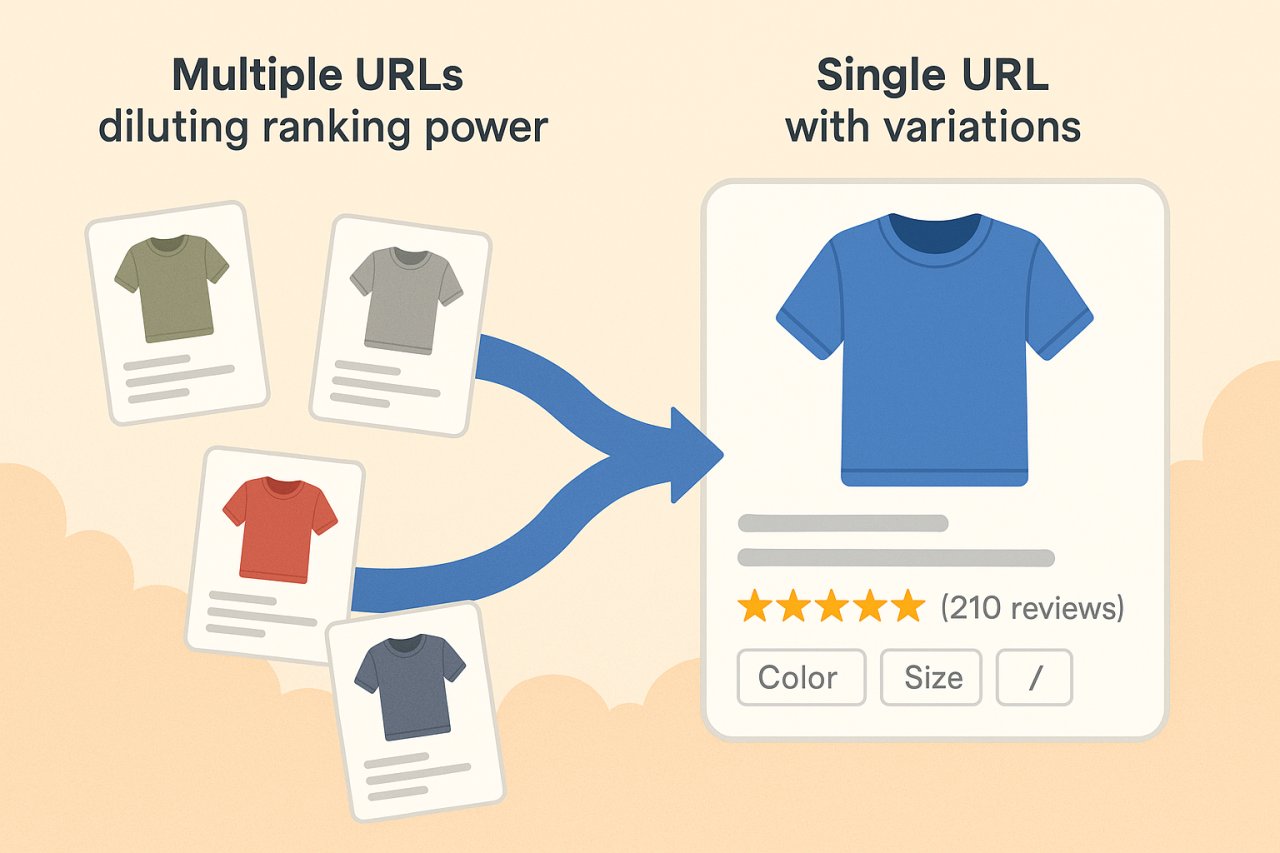
If you sell a product in multiple colors or sizes, don’t create separate URLs for each variation. Use a single canonical URL with dropdown selectors.
Why? Because splitting variations across multiple URLs dilutes your ranking signals. Google sees five mediocre pages instead of one strong one.
Then add Product schema markup. Not optional. Rich snippets with star ratings and price information get 30% higher click-through rates than plain blue links.
WooCommerce does some of this automatically, but verify your implementation with Google’s Rich Results Test. Most themes mess up the schema markup in subtle ways.
Category Pages Are Your Secret Ranking Weapon
Here’s what Amazon figured out a decade ago: category pages can rank for high-volume commercial keywords better than individual product pages.
Search for “wireless headphones” and you’ll see category pages dominating the first page, not specific product listings.
Why? Because category pages satisfy informational and transactional intent simultaneously. They help browsers compare options while letting buyers jump straight to purchase.
Your WooCommerce category pages should do the same.
Category Description Content That Ranks
Most stores either skip category descriptions entirely or write a thin paragraph of keyword-stuffed nonsense.
You need at least 500 words of genuinely useful content above the product grid. Answer the questions someone has when they land on that category:
– What makes products in this category different from related categories?
– What should buyers consider before choosing a product?
– Which products work best for specific use cases?
For a “wireless headphones” category, you might cover: over-ear vs. in-ear styles, battery life considerations, active noise cancellation technology, best options for travel vs. gym use.
Then naturally link to specific products as examples within that content.
Faceted Navigation Done Right
Filter by price, by brand, by color — faceted navigation is essential for user experience.
It’s also an SEO nightmare if implemented wrong.
Every filter combination can create a unique URL. Filter “running shoes” by “size 10” and “blue” and “under $100” and suddenly you have a URL that Google might try to index.
Multiply that across all your products and filter options, and you’ve got thousands of thin, duplicate pages competing with your real category pages.
The fix: use AJAX for filters so they don’t create new URLs, or implement rel=canonical tags pointing back to the main category page. Add parameter handling in Google Search Console to tell Google which URL parameters to ignore.
Internal Links From Categories to Products
This seems obvious, but most themes handle it poorly.
Yes, your category page displays product thumbnails that link to product pages. But those are just images with basic anchor text — usually just the product name.
Add contextual text links within your category description. When you mention “best option for marathon training,” link that phrase to your most relevant product.
These text links carry more SEO weight than image links, and they provide contextual signals about what the product page is about.
Building an Internal Linking System That Scales
Manual internal linking doesn’t scale when you have hundreds or thousands of products.
You need a systematic approach.
Hub and Spoke Architecture for E-commerce
Organize your site into content hubs:
– Hub page: Main category page (e.g., “Running Shoes”)
– Spoke pages: Individual product pages and supporting blog content
Every spoke should link back to the hub. The hub should link to the most important spokes. Spokes can cross-link to each other when contextually relevant.
This creates a clear hierarchy that concentrates link equity where you need it — on your money pages.
Blog-to-Product Linking Strategy
Your blog shouldn’t exist in isolation. Every article should serve your commercial pages.
Write “best running shoes for flat feet” and link to:
– Your running shoes category
– 3-5 specific products that fit the criteria
– Related articles about pronation, injury prevention, etc.
The goal is to create multiple pathways from informational content to transactional pages. Someone reading about flat feet today might not buy immediately, but they’ll remember your store when they’re ready.
Automated Internal Linking for E-commerce
Once you pass 100 products, manual internal linking becomes impossible to maintain.
You add a new product, publish a blog post, update category descriptions — and suddenly your linking strategy is outdated.
This is where automation becomes essential. Tools like AI Internal Links can analyze your content and automatically create contextually relevant links between your blog posts, category pages, and product pages.
The key is contextual relevance. A good automated system doesn’t just link random pages together — it understands semantic relationships and creates links that make sense for both users and search engines.
For a WooCommerce store, that means automatically linking:
– Blog posts to relevant category pages
– Category descriptions to top-selling products
– Product pages to related products and categories
– All content to your main topical hubs
Link Distribution and Equity Flow
Not all pages deserve equal internal links.
Your top-selling products and highest-margin items should receive the most internal links. Period.
Yet most stores distribute links evenly, or worse — give the most links to their least valuable pages just because those pages happen to be older and more interconnected.
Audit your internal link structure quarterly. Check which pages have the most inbound internal links. If it’s your “Shipping Policy” page instead of your best product, you’ve got work to do.
Technical SEO Elements That E-commerce Sites Can’t Ignore
Site Speed and Core Web Vitals
WooCommerce sites tend to be slow. Lots of images, product variations, dynamic pricing — it all adds up.
But page speed directly impacts both rankings and conversions. A one-second delay in load time costs you 7% in conversions.
Priorities:
– Image optimization (WebP format, lazy loading)
– Database optimization (clean up transients and revisions)
– Caching (page cache, object cache, CDN)
– Minimizing plugins (every active plugin adds overhead)
Test your Core Web Vitals in Google Search Console. If your Largest Contentful Paint is over 2.5 seconds, you’re bleeding traffic.
XML Sitemaps for Product Catalogs
Your XML sitemap should prioritize your most important pages.
Don’t just include every URL. Exclude:
– Cart and checkout pages
– Customer account pages
– Filter and sort URLs
– Out-of-stock product pages (or mark them as lower priority)
Use separate sitemaps for products, categories, and blog posts. This helps Google understand your site structure and crawl more efficiently.
Handling Out-of-Stock Products
Deleting out-of-stock product pages is a mistake. You lose all the ranking signals and backlinks those pages accumulated.
Better approach:
– Keep the page live
– Update it to show “Currently Unavailable”
– Link to similar in-stock products
– Add an email notification signup for when it’s back
If it’s permanently discontinued, implement a 301 redirect to the most similar current product, not to the category page.
Conversion Optimization Meets SEO
Product Schema and Rich Snippets
Already mentioned schema, but it bears repeating: rich snippets are mandatory, not optional.
Implement:
– Product schema with price, availability, and reviews
– Aggregate rating schema
– Breadcrumb schema for navigation
– Organization schema for brand information
Google won’t always display rich snippets, but when they do, they dramatically increase click-through rates.
FAQ Schema for Product Questions
Add an FAQ section to your high-value product pages. Answer the questions people actually ask:
– “Is this waterproof?”
– “What’s the return policy?”
– “How does sizing run?”
Mark it up with FAQ schema. These answers can appear as rich results in search, giving you multiple listings on the same search results page.
Measuring What Actually Matters
Vanity metrics are useless. Total traffic means nothing if it doesn’t convert.
E-commerce SEO KPIs Worth Tracking
Organic revenue per product category: Which categories drive the most value from organic search?
Assisted conversions from blog content: How many sales started with a blog visit before converting on a product page?
Internal link click-through rate: What percentage of visitors follow your internal links from content to products?
Category page rankings for commercial keywords: Are your category pages ranking for high-intent terms?
Track these monthly. When you see a category driving strong organic revenue, double down — create more supporting content, add more internal links, expand the product selection.
Tools for E-commerce SEO Monitoring
Google Search Console is your foundation. Check:
– Which product pages are ranking
– Click-through rates for commercial queries
– Index coverage issues
– Mobile usability problems
Google Analytics 4 with enhanced e-commerce tracking shows the customer journey from first touch to purchase. Set up custom segments for organic-only traffic to isolate SEO performance.
For more advanced internal link analysis, crawl your site monthly with Screaming Frog. Export the internal link data and identify opportunities: which high-value pages have too few internal links?
The Competitive Advantage of Systematic Linking
Most WooCommerce stores treat SEO as a checklist. Install a plugin, fill out some meta tags, maybe write a few blog posts.
The stores that win? They treat SEO as a system.
Every new product becomes an opportunity to strengthen site architecture. Every blog post serves multiple commercial pages. Category pages act as content hubs that accumulate authority over time.
Your competitors aren’t doing this. They’re either ignoring internal linking entirely or doing it haphazardly, adding a few manual links here and there without any strategy.
That’s your opening.
Start with your top-selling products. Audit how many internal links point to those pages from your blog and category pages. Probably not enough.
Add contextual links from existing content. Write new supporting content specifically to funnel traffic to those products. Build topic clusters around your most valuable product categories.
Do this consistently for 90 days and your organic traffic to product pages will increase measurably. Not because you’re gaming the algorithm — because you’re building the site structure Google wants to reward.
The stores selling the same products you are? They’ll keep wondering why they’re stuck on page three.