

Table of Contents
- Why Bounce Rate and Time on Page Still Matter
- How Internal Links Directly Reduce Bounce Rate
- Pages Per Session: The Underrated SEO Metric
- The Technical Side: Internal Links and Crawl Efficiency
- Avoiding Internal Linking Mistakes That Hurt Performance
- Measuring the Impact of Internal Linking on Engagement
- Future-Proofing Your WordPress SEO Through Internal Links
Your site can load in under a second, but if visitors hit the back button after ten seconds because they can’t find what they need next, you’ve got a performance problem that PageSpeed Insights won’t catch.
Internal links are the bridge between technical performance and user engagement. When done right, they keep visitors moving through your site, turn single-page visits into multi-page sessions, and send clear signals to Google that your content delivers value.
Here’s how internal linking transforms both user experience and SEO outcomes — and why most WordPress sites leave this leverage on the table.
Why Bounce Rate and Time on Page Still Matter
Google’s algorithm doesn’t care about your bounce rate in isolation. But it absolutely cares about what bounce rate represents: whether people found what they were looking for.
When a visitor lands on your post about WordPress security plugins, reads for 15 seconds, then bounces back to search results, that’s a signal. When that pattern repeats across dozens of visitors, Google learns your page didn’t satisfy the query.
Now flip the scenario. Same visitor lands on that security post, scrolls through your recommendations, clicks an internal link to read your comparison of firewall plugins, then checks out your guide to hardening wp-config.php. Three pages, six minutes on site.
That’s not just better engagement metrics. That’s proof your content cluster works.
The Direct Impact on Rankings
Google confirmed in their Search Quality Rater Guidelines that they evaluate whether a page provides a satisfying experience. Time on page and subsequent navigation are proxies for satisfaction.
But here’s where it gets interesting: internal links don’t just keep people on your site longer. They also concentrate PageRank flow to your most valuable pages, making them more likely to rank for competitive terms.
When your cornerstone content about WordPress speed optimization links to supporting posts on image compression, caching plugins, and database optimization, you’re building a fortress of topical authority. Google sees a cluster of interconnected expertise, not isolated articles.
The PageRank Distribution Problem
Most WordPress sites leak PageRank like a sieve. New posts get published, generate a few social shares, maybe earn a backlink or two. Then they sit there, isolated, with no internal links pointing to or from them.
Meanwhile, your homepage and a handful of popular posts hoard all the link equity while dozens of valuable articles remain invisible to both visitors and crawlers.
Strategic internal linking redistributes that authority. It’s like building roads through your content — the more connections, the easier it is for Google to discover, crawl, and rank everything you’ve published.
How Internal Links Directly Reduce Bounce Rate
The mechanics are simpler than most SEO guides make them sound. People bounce when they hit a dead end. Give them a clear next step, and they’ll take it.
Contextual Links Beat Related Post Widgets
That sidebar widget showing your five most recent posts? It’s not doing much. Visitors have already trained themselves to ignore sidebars.
What works: inline contextual links woven into your content. When you’re explaining how to optimize WordPress images and you mention that choosing the right hosting setup matters just as much, link directly to your hosting performance post right there.
The reader is already thinking about performance. You’re not interrupting — you’re answering the question forming in their head.
Strategic Placement Within Content
Internal links work best when placed at natural decision points:
- After explaining a concept that has its own dedicated guide
- When introducing a tool or technique covered in depth elsewhere
- At the end of a section, before moving to the next topic
- In conclusion sections as next steps
Don’t cluster five links in one paragraph. Space them throughout the post so each one feels like a logical continuation, not a desperate attempt to boost page views.
Anchor Text That Promises Value
Generic anchor text like click here or read more tells the reader nothing about what they’ll find. Descriptive anchors set clear expectations.
Weak: Check out this article for more details.
Strong: Learn how to implement lazy loading without breaking your layout.
The second version tells readers exactly what they’ll get. If that’s what they need, they’ll click. If not, they won’t waste time, and you won’t inflate your bounce rate with mismatched traffic.
Pages Per Session: The Underrated SEO Metric
Bounce rate gets all the attention, but pages per session is often more revealing. A visitor who reads one 3,000-word guide and leaves satisfied isn’t a problem. A visitor who reads ten shallow posts searching for a real answer is.
But when someone reads your beginner’s guide to WordPress SEO, clicks through to your technical audit checklist, then explores your schema markup tutorial, you’ve created a self-guided learning path.
That journey doesn’t happen by accident.
Building Content Clusters That Flow
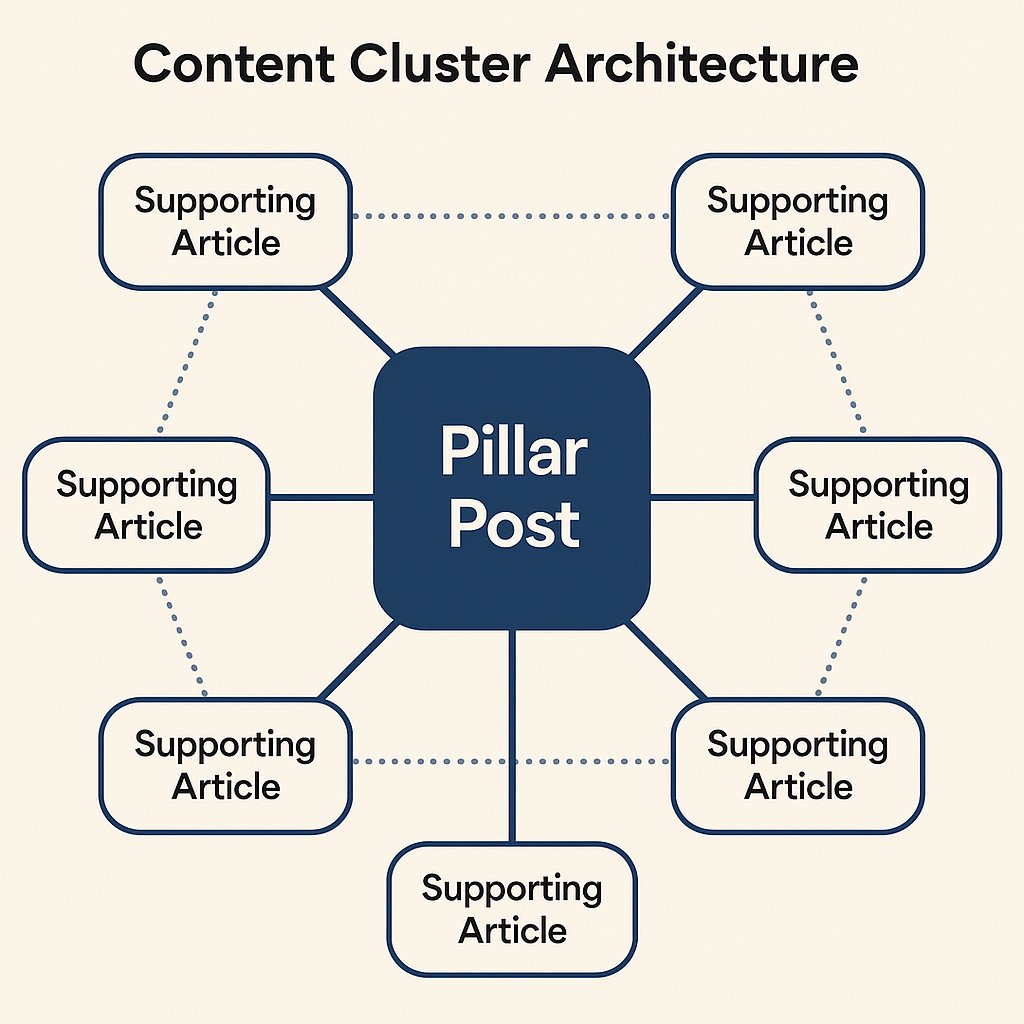
Pillar content should link to supporting articles. Supporting articles should link back to the pillar and horizontally to related pieces. This creates a web of interconnected expertise.
Example: Your pillar post on WordPress speed optimization should link out to individual deep dives on caching, CDNs, image optimization, and database cleanup. Each of those posts should link back to the pillar and to each other where relevant.
Visitors can enter anywhere in the cluster and navigate to whatever depth they need. Google sees a comprehensive resource hub, not a collection of competing standalone posts.
[placeholder_image]
The Practical Impact on Session Duration
Longer sessions send a compounding signal. Every additional page a visitor views is more evidence that your content works. Google uses engagement data (through Chrome, Analytics opt-ins, and other signals) to gauge content quality.
But there’s a caveat: forcing people to click through artificially fragmented content to inflate page views backfires. Listicles split across ten pages destroy user experience and train visitors to avoid your site.
Internal links should offer optional value, not mandatory hoops.
The Technical Side: Internal Links and Crawl Efficiency
Engagement metrics matter, but internal links also serve a purely technical SEO function: they help crawlers discover and index your content efficiently.
Shallow Site Architecture Beats Deep Hierarchies
Ideally, every important page on your site should be reachable within three clicks from the homepage. Internal links from high-authority pages (your homepage, popular posts, pillar content) pass more value than links buried deep in your category archives.
If a post only gets linked from a tag page that itself is rarely crawled, it’s functionally invisible even if it’s technically in your sitemap.
Orphan Pages Are Ranking Black Holes
An orphan page is one with no internal links pointing to it. Google might discover it through your XML sitemap, but without internal link equity, it won’t rank for anything competitive.
Every time you publish new content, you should immediately add internal links from at least two or three relevant existing posts. This passes authority and ensures Google prioritizes crawling the new page.
How Automation Helps at Scale
Manually maintaining internal links across hundreds of posts becomes impractical fast. You forget which posts link where. New content gets published with zero internal links. Old posts remain isolated.
Tools like AI Internal Links solve this by automatically analyzing semantic relationships between your posts and adding contextual links as your site grows. Instead of spreadsheets and manual audits, the plugin handles link placement, anchor text variation, and orphan page detection in the background.
For sites publishing multiple posts per week, automation stops internal linking from becoming a maintenance nightmare.
Avoiding Internal Linking Mistakes That Hurt Performance
More internal links aren’t always better. Badly implemented internal linking can actually hurt both user experience and SEO.
Too Many Links Create Decision Paralysis
If every paragraph has three links, readers don’t know where to go next. They scan, get overwhelmed, and leave.
Keep internal links purposeful. One or two highly relevant links per section is more effective than a dozen scattered everywhere.
Irrelevant Links Destroy Trust
Forcing internal links just to hit a quota backfires. If you’re writing about WordPress security and you shoehorn a link to your guide on choosing blog colors, readers notice. Relevance matters more than volume.
Only link when the connection genuinely adds value for the reader. If you can’t justify why someone would click, don’t add the link.
Over-Optimization Triggers Manual Penalties
Repeating the same exact-match anchor text across dozens of internal links looks manipulative. Vary your anchors naturally:
- Branded: our guide to WordPress caching
- Exact match: WordPress caching plugins
- Partial match: how to configure caching
- Generic: learn more about improving site speed
Mix them based on context, not a formula.
Measuring the Impact of Internal Linking on Engagement
You can’t improve what you don’t measure. Track how internal linking changes impact your engagement metrics over time.
Google Analytics Reports to Watch
Behavior Flow shows how visitors navigate between pages. Look for drop-off points where people should be clicking internal links but aren’t. That’s where you need better link placement or more compelling anchors.
Pages per Session broken down by landing page reveals which content successfully pulls people deeper into your site. Double down on what works.
Avg. Session Duration is noisy on its own but useful in combination with pages per session. If duration increases but pages viewed stays flat, you’ve improved content quality. If both rise, your internal linking is working.
Testing Link Placement and Anchor Text
Small changes compound over thousands of visits. Test:
- Link placement (early in the post vs. mid-content vs. conclusion)
- Anchor text styles (questions vs. benefits vs. direct descriptions)
- Number of links per post (minimal vs. moderate vs. heavy)
Run tests for at least two weeks before drawing conclusions. Engagement metrics fluctuate day to day.
Future-Proofing Your WordPress SEO Through Internal Links
Algorithm updates come and go. Strong internal linking is one of the few SEO tactics that has never stopped working.
Google’s goal is to surface the best answer to every query. When your internal link structure demonstrates deep expertise on a topic through interconnected content clusters, you’re aligned with that goal.
Sites that rely solely on backlinks and keyword optimization get hit by updates. Sites that build semantic authority through internal linking and genuinely helpful content tend to recover faster — or avoid penalties entirely.
Start with your highest-traffic pages. Audit what they link to. Add contextual links to your best supporting content. Then work backward through older posts, updating them to link to newer, more comprehensive guides.
Internal linking isn’t a one-time task. It’s an ongoing architecture that grows with your site, surfaces your best work, and keeps visitors engaged long enough to trust your expertise.
That’s how you turn performance into rankings.