
Table of Contents
- City Hub vs Neighborhood Silo: Pick Your Pattern
- How to Wire Service Pages Into Location Pages
- Service-Area Clusters: When You Serve Without a Storefront
- Internal Linking Patterns That Signal Local Relevance
- Maintaining Structure as You Scale New Locations
- Your Structure Is Your Competitive Advantage
If you run an HVAC company in Phoenix, you can’t just slap up “Phoenix HVAC Services” and call it done. You need a system that scales across neighborhoods, ties services to locations, and makes Google confident you actually serve Scottsdale differently than you serve Tempe.
The businesses winning local search built their WordPress sites around repeatable patterns. Not random pages. Not keyword-stuffed clones. Structured hubs and spokes that internal links hold together.
City Hub vs Neighborhood Silo: Pick Your Pattern
You have two proven ways to organize location-based content on WordPress, and the right one depends on how you actually deliver service.
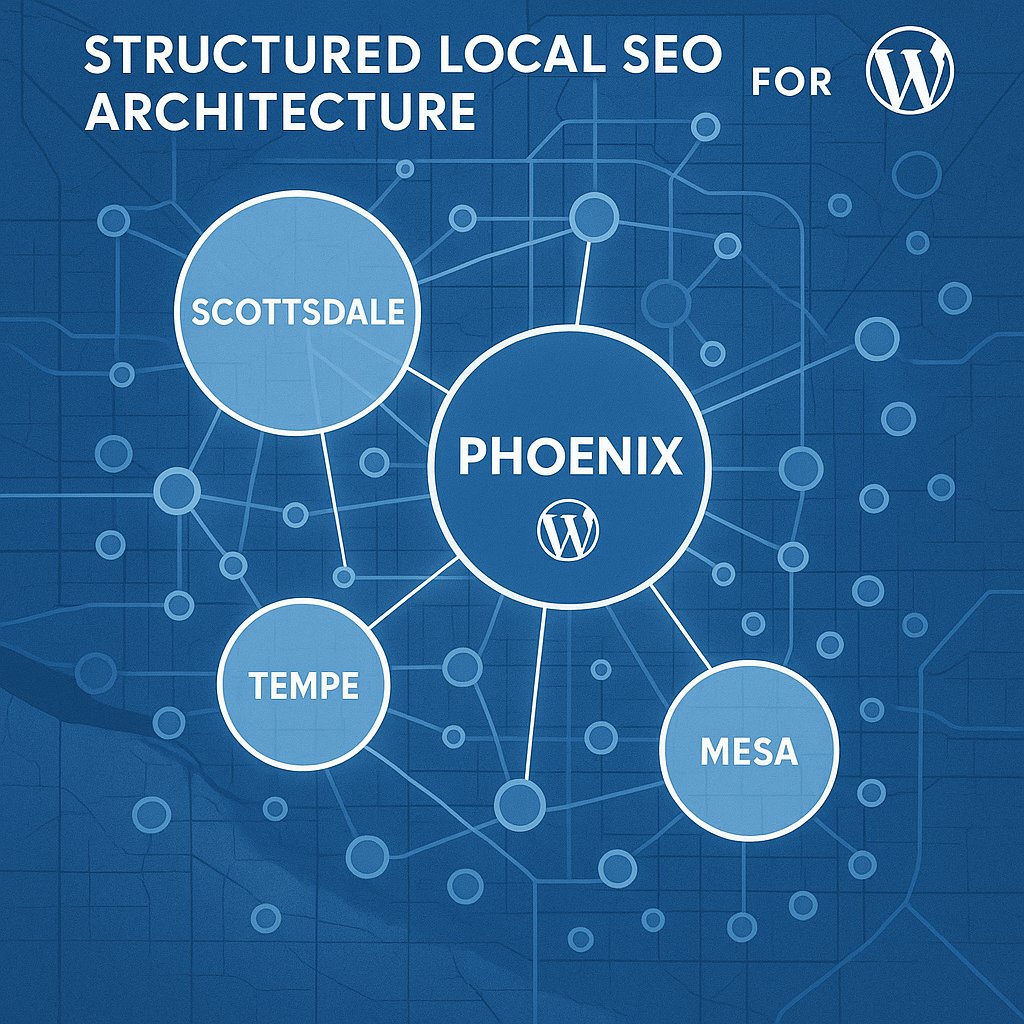
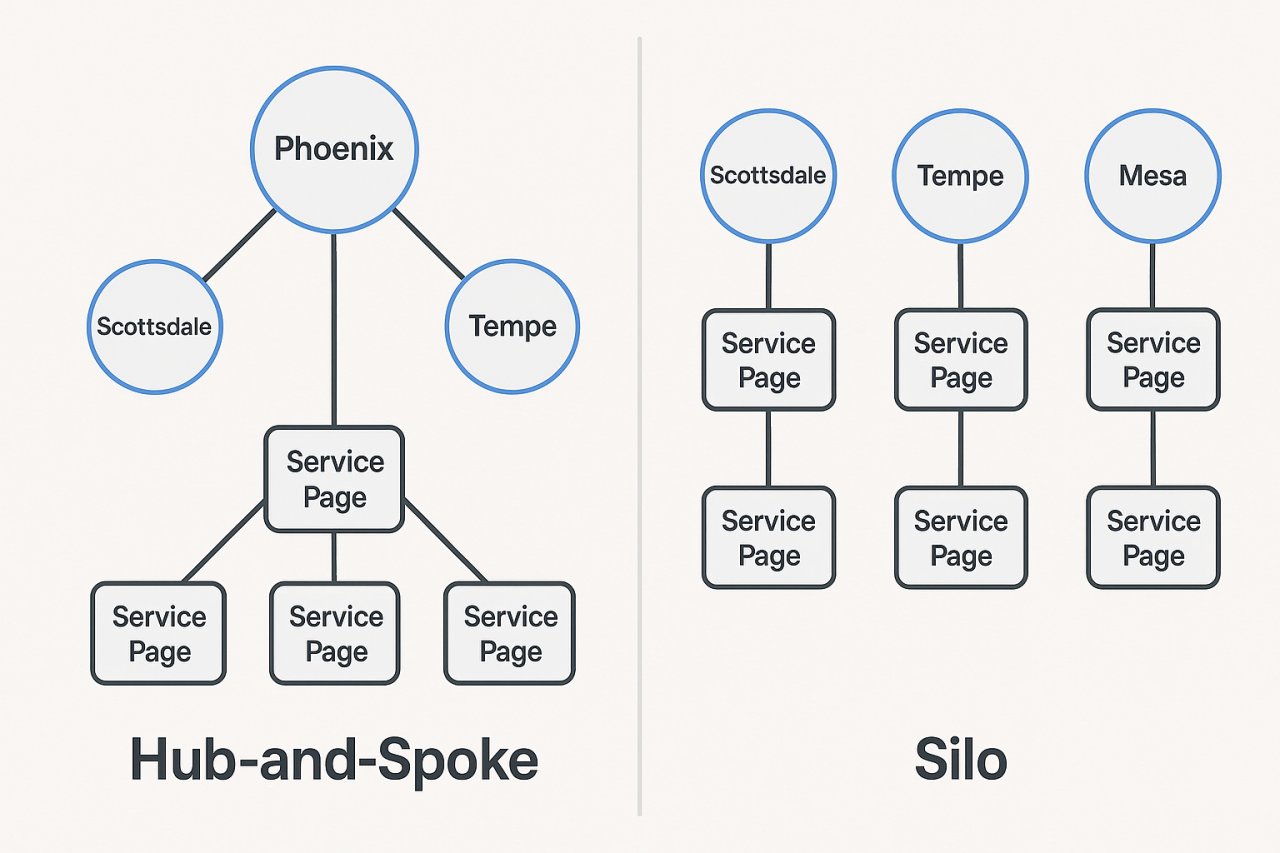
The city hub pattern works when you operate from one location but serve a metro area. Create a main city page as your anchor, then branch out neighborhood pages beneath it. Your URL structure might look like /phoenix-plumbing/ as the hub, with /phoenix-plumbing/scottsdale/ and /phoenix-plumbing/tempe/ as spokes.
Each neighborhood page targets hyper-local keywords and mentions specific landmarks, zip codes, and service quirks. The hub page links to all of them. They all link back to the hub. This creates a closed loop that tells Google you’ve mapped the entire service area.
The neighborhood silo pattern fits multi-location businesses with actual storefronts or service centers in different areas. Here, each neighborhood gets full independence. /scottsdale-plumbing/ exists as its own hub, with its own service pages nested underneath. You replicate the entire structure for each city.
This takes more work but wins when you need separate Google Business Profile listings for each location. The silos stay mostly separate, with only strategic cross-links for services that genuinely overlap.
Don’t mix the two. I’ve seen WordPress sites try to hedge by creating both city hubs and independent neighborhood pages, and Google treats the whole thing as duplicate content. Commit to one architecture.
How to Wire Service Pages Into Location Pages
Here’s where most local WordPress sites fall apart: they build service pages and location pages, but never connect them strategically.
Your service pages should be location-agnostic at the top level. /ac-repair/ explains what AC repair involves, why it matters, how you approach it. Then, about halfway down, you introduce location-specific sections.
“We provide AC repair across Phoenix, including Scottsdale, Tempe, and Mesa.” That sentence becomes an internal linking opportunity. Link each city name to its dedicated location page. Not just once at the bottom in a footer list—contextually, where the reader is already thinking about service areas.
Now flip it. Your location pages need to link back to relevant service pages. If /scottsdale-plumbing/ exists, it should link to /drain-cleaning/, /water-heater-repair/, and /emergency-plumbing/ within the body content. Not in a sidebar widget. In the actual narrative where you describe what you do in Scottsdale.
The pattern is bidirectional. Service pages point to locations. Location pages point to services. This cross-linking signals to Google that you don’t just have a page about Phoenix, you actually perform specific work there.
For WordPress sites managing dozens of service and location combinations, this becomes tedious fast. You’re not going to manually update 40 pages every time you add a new neighborhood. This is exactly where automation becomes necessary, not a luxury.
Service-Area Clusters: When You Serve Without a Storefront
Service-area businesses—contractors, mobile services, consultants—face a specific challenge. You don’t have a physical location customers visit, so Google Business Profile hides your address. Your WordPress content structure has to work harder to prove local relevance.
The service-area cluster approach groups pages by the combination of service and geography. Instead of separate silos, you create targeted landing pages for each service-location pair that matters.
/ac-repair-scottsdale/ becomes a dedicated page, not just an anchor link on a general Scottsdale page. Same with /ac-repair-tempe/ and /ac-repair-mesa/. You’re building depth, not just breadth.
Each of these pages needs unique content. Talk about local climate factors (Scottsdale heat patterns vs Tempe humidity). Mention neighborhood-specific housing stock (older AC units in historic Mesa vs newer builds in North Scottsdale). Reference nearby landmarks to prove you know the area.
Internal links tie these clusters together. Your main /ac-repair/ page links to all the city variants. Each city variant links to related services in the same city. /ac-repair-scottsdale/ should link to /hvac-maintenance-scottsdale/, for example.
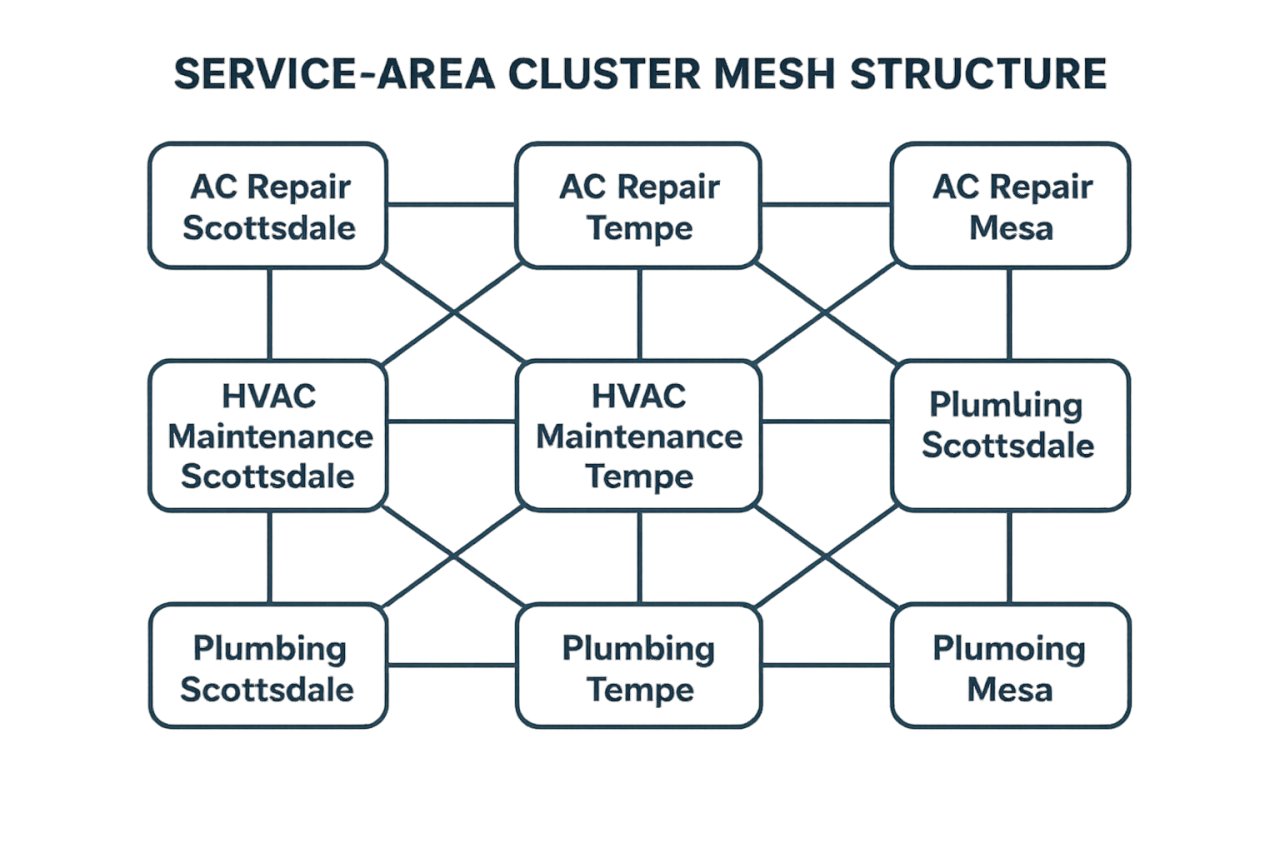
This creates what I call a “mesh structure” rather than a strict hierarchy. Google crawls through your site and sees repeated signals that you operate in specific cities and provide specific services there. The more connections, the stronger the signal.
Tools like AI Internal Links can automate these mesh structures by identifying new service-location pages as you publish them and wiring in the contextually relevant links across your existing content.
Internal Linking Patterns That Signal Local Relevance
Not all internal links carry the same weight for local SEO. The placement, anchor text, and surrounding context all matter.
Anchor text should include both the service and the city when possible. “Learn more about our AC repair in Scottsdale” beats “click here” by a mile. Google reads that anchor, follows the link, and confirms the target page is indeed about AC repair in Scottsdale.
Context around the link matters too. If you link to /scottsdale-plumbing/ from a sentence that also mentions zip codes, neighborhoods, or local landmarks, that link carries more local relevance. It’s not just a navigational link. It’s editorial confirmation that the page belongs in the local ecosystem.
Avoid footer-only linking for local pages. Yes, you can have a “Service Areas” footer menu, but that shouldn’t be the only place you link to city pages. Google discounts footer links because they’re often template-based and not editorial.
Internal linking velocity also plays a role. When you publish a new blog post about summer AC maintenance and immediately link it to your Scottsdale, Tempe, and Mesa service pages, you’re signaling fresh relevance. Those city pages get a crawl-priority boost.
For WordPress sites, this means your new content needs to integrate into the existing local structure from day one. If you publish and don’t add those links until weeks later, you’ve lost the velocity benefit.
Maintaining Structure as You Scale New Locations
The real test of your WordPress local SEO content structure comes when you expand. You launch service in a new neighborhood or add a new service offering. Does your existing architecture accommodate it cleanly, or does everything break?
If you’ve built city hubs properly, adding a new neighborhood means creating one new spoke page and linking it from the hub. Then updating your service pages to include the new area in their location lists. If this takes you more than 30 minutes, your structure is too manual.
Same with new services. Launch water heater repair? You need to add that service to every location page where you offer it, and create location-specific variants if you’re using the service-area cluster model.
This is where most local WordPress sites stagnate. The initial structure works, but maintaining it as content grows becomes impossible without dedicated staff or automation. Pages go stale. Internal links stay static. New content publishes in isolation.
The solution is treating your internal linking structure as dynamic, not static. Every new page published should trigger an analysis: what existing pages should link to this? What pages should this link to? The mesh needs to update itself.
Most businesses won’t do this manually. The ones that win local search either hire someone to manage it full-time or they automate the pattern recognition and link insertion.
Your Structure Is Your Competitive Advantage
Local competitors aren’t thinking about WordPress site architecture. They’re thinking about getting a page published for each city and moving on. That’s your opportunity.
Build a deliberate structure: choose city hubs or neighborhood silos based on how you operate, wire service and location pages bidirectionally, create service-area clusters for depth, and maintain the mesh with every new page.
Google rewards sites that demonstrate comprehensive local coverage through structure, not just keywords. When your internal links consistently connect services to locations with contextual anchors, you’re building that signal into the foundation of your site.
Start with your most important city and three core services. Map out the connections. Get those pages published and linked properly. Then replicate the pattern for the next city. Scale methodically, not chaotically.