
Table of Contents
- Why E-commerce SEO Breaks All the Normal Rules
- Product Page Optimization That Actually Converts and Ranks
- Category Page Architecture That Builds Authority
- Schema Markup: The E-commerce Ranking Multiplier
- Internal Linking Architecture for Product Discovery
- Technical SEO Essentials for WooCommerce
- Start With What Drives Revenue
Your WooCommerce store isn’t competing with other blogs. You’re up against Amazon, niche retailers with million-dollar SEO budgets, and thousands of dropshippers flooding Google with identical product descriptions. Generic SEO advice won’t cut it.
Here’s what will.
Why E-commerce SEO Breaks All the Normal Rules
E-commerce SEO operates in a different universe than content marketing. You’re not trying to rank for informational queries — you’re targeting commercial intent. People searching for ‘organic cotton t-shirts size large’ aren’t browsing. They’re buying.
This changes everything about how you optimize.
Traditional SEO priorities: comprehensive content, backlinks, topical authority.
E-commerce SEO priorities: precise keyword targeting, schema markup, conversion-optimized pages that still satisfy Google’s relevance algorithms.
The challenge? Google wants helpful content. Your customers want product specs and a buy button. You need both in the same 500 pixels.
Product Page Optimization That Actually Converts and Ranks
Product descriptions are where most stores fail catastrophically. They either copy manufacturer specs (duplicate content death) or write flowery marketing copy that Google ignores.
The solution isn’t choosing between SEO and conversion. It’s architecting the page so both work.
Unique Descriptions Are Non-Negotiable
If you’re using manufacturer descriptions, you’re competing with every other retailer selling that product. Amazon included. You will lose that fight.
Write unique product descriptions for every item. Yes, even if you have 5,000 SKUs. Start with your top 100 revenue-generating products, then work down. Tools like WooCommerce’s bulk editing can speed this up, but there’s no shortcut around original content.
Structure each description this way:
- Opening line: One sentence addressing the primary pain point or desire
- Feature breakdown: 3-5 bullet points covering specs, materials, dimensions
- Use case scenario: Two sentences painting a picture of the product in action
- Trust signal: Warranty, return policy, or social proof woven naturally into the text
Keep descriptions between 150-300 words. Longer doesn’t mean better for products. Google knows this isn’t a blog post.
Title Tags That Capture Commercial Intent
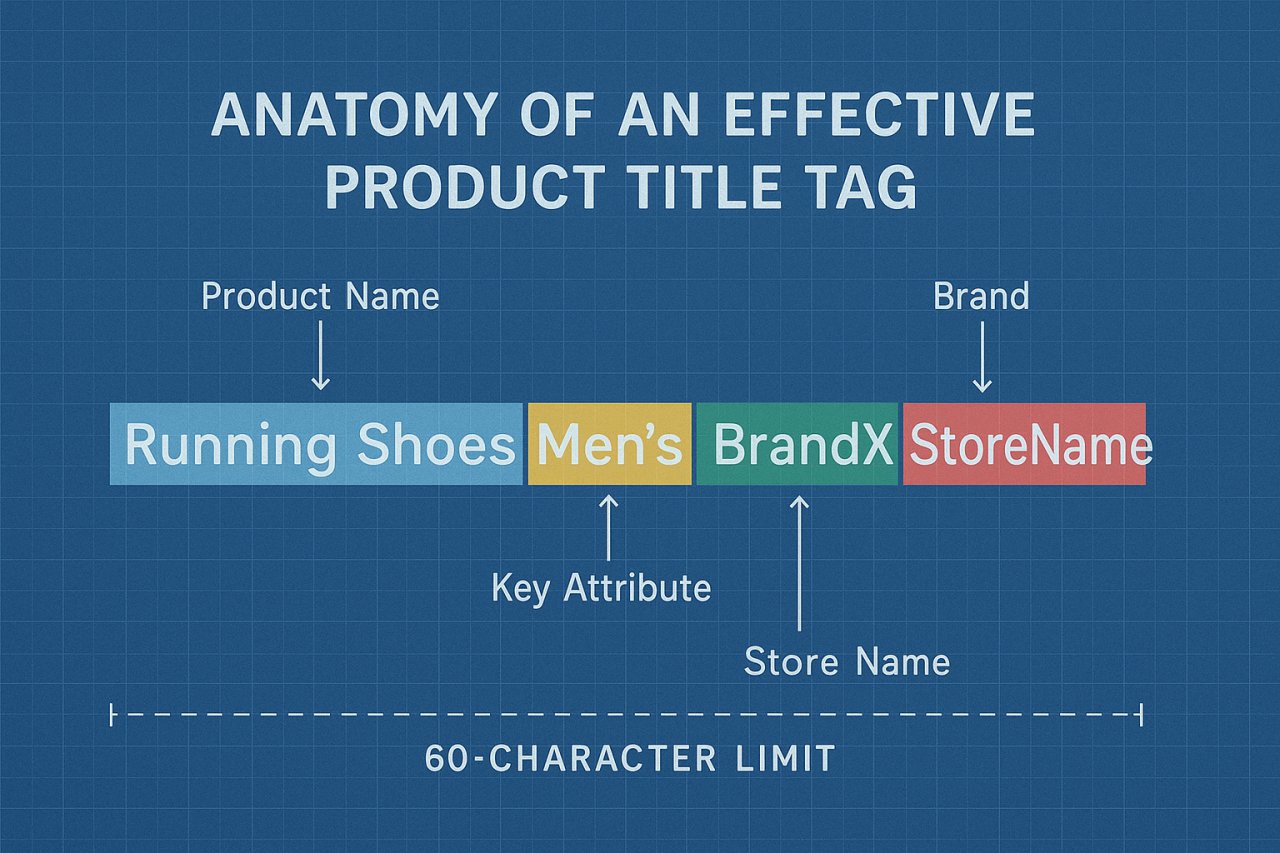
Your product title tag formula should be ruthlessly consistent:
[Product Name] - [Key Attribute] - [Brand] | [Store Name]
Example: Organic Cotton Crew Neck T-Shirt – Navy Blue – Patagonia | EcoThreads
This structure accomplishes three things: it matches how people search for products, it differentiates your listing from competitors, and it keeps everything under 60 characters.
Don’t waste characters on fluff like ‘Buy Now’ or ‘Free Shipping.’ Save those for meta descriptions where they actually drive clicks.
Product Images and Alt Text
Google can’t see your product images. Alt text is how you tell the algorithm what’s in the photo — and it’s a ranking signal for both web and image search.
Write alt text that describes the product specifically: Navy blue organic cotton t-shirt on wooden hanger, not product image.
Every product should have at least four images: main product shot, detail close-up, lifestyle context photo, and size/scale reference. Name image files descriptively before uploading: organic-cotton-tshirt-navy-front.jpg instead of IMG_3847.jpg.
Category Page Architecture That Builds Authority
Category pages are your secret weapon. They rank for broader commercial keywords that individual product pages can’t touch.
Most stores treat category pages like automated product grids. That’s a mistake. Google sees thin content and ranks you accordingly.
Add Unique Category Descriptions
Every category page needs at least 300 words of original content above or below the product grid. This isn’t filler — it’s your chance to rank for head terms like ‘men’s organic t-shirts’ while the product pages fight for ‘organic cotton crew neck navy medium.’
Cover these angles in category descriptions:
- What makes this product category unique or valuable
- Buying considerations customers should know
- How products in this category differ from each other
- A brief statement on quality, sourcing, or brand philosophy
Write it like you’re advising a friend who’s shopping this category for the first time.
Breadcrumb Navigation as an SEO Asset
Breadcrumbs aren’t just for user experience. When implemented correctly, they create a clear hierarchy that Google uses to understand your site structure.
Enable breadcrumb schema markup in your theme or via a plugin like Yoast. This gives you rich snippets in search results — that visual hierarchy path under your listing that screams ‘professional e-commerce site.’
Your breadcrumb structure should mirror your URL structure: Home > Men's Clothing > T-Shirts > Organic Cotton
Schema Markup: The E-commerce Ranking Multiplier
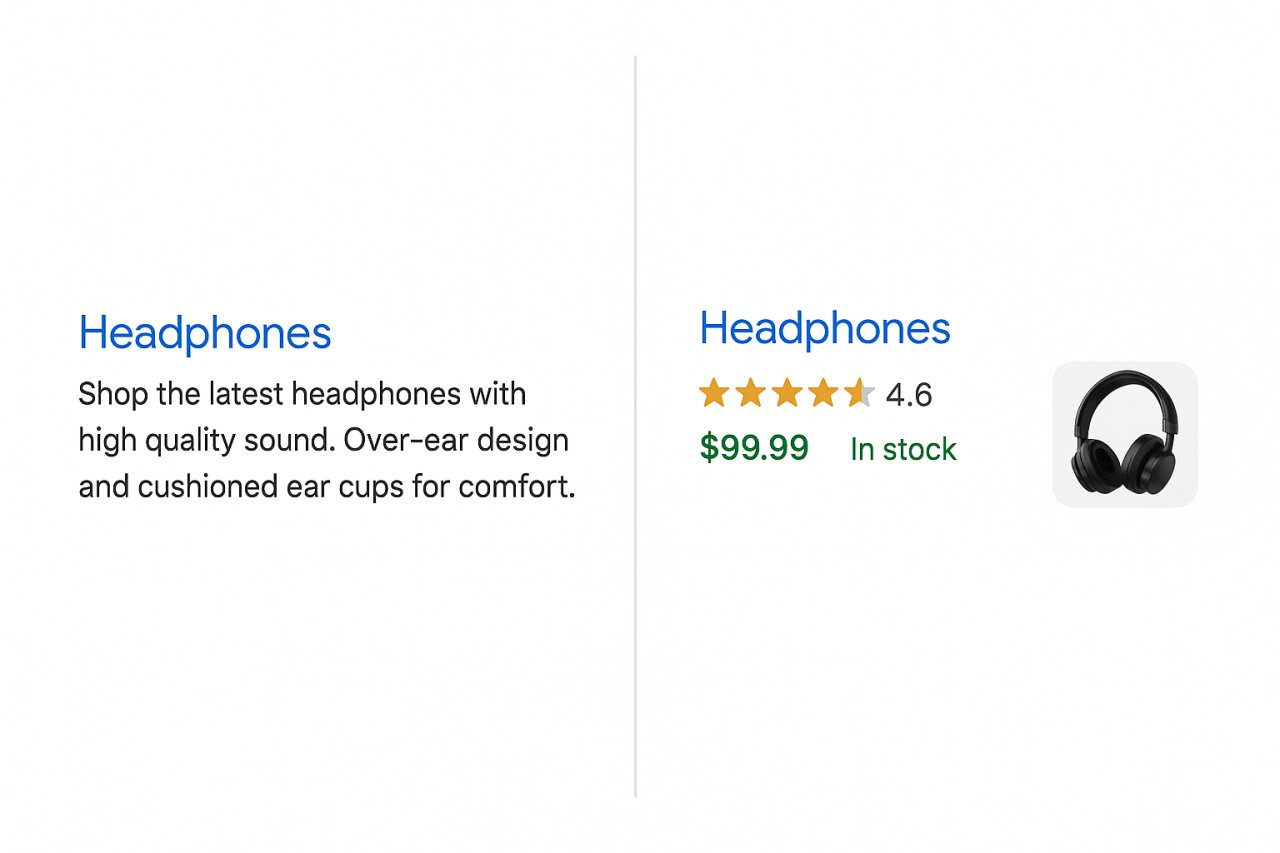
Schema markup is structured data that tells Google exactly what’s on your page. For e-commerce, it’s the difference between a plain listing and one with star ratings, price, and availability showing directly in search results.
Those rich snippets? They increase click-through rates by 20-30%. And higher CTR improves rankings. It’s a compounding advantage.
Essential Schema Types for WooCommerce
Product schema is mandatory. It should include:
- Product name
- Price and currency
- Availability status
- SKU or product ID
- Product images
- Brand
Most WooCommerce SEO plugins (Rank Math, Yoast) add product schema automatically. Verify it’s working by checking your pages in Google’s Rich Results Test.
Review schema displays star ratings in search results. Even if you only have a few reviews, they build trust and improve CTR. Use a plugin like WooCommerce Product Reviews Pro to collect and display reviews, then ensure schema includes the aggregate rating.
Breadcrumb schema we covered above, but it deserves repeating — it’s one of the easiest wins in e-commerce SEO.
Organization and Local Business Schema
Add Organization schema to your homepage. This tells Google your business name, logo, social profiles, and contact information. If you have a physical location, layer in Local Business schema.
These aren’t direct ranking factors, but they build entity recognition. Google understands your brand as a legitimate business, not just a collection of product pages.
Internal Linking Architecture for Product Discovery
Here’s where most e-commerce sites collapse: they let WooCommerce auto-generate related products and call it a day. That’s not internal linking strategy. That’s product roulette.
Strategic internal linking connects products to relevant categories, blog content to product pages, and high-authority pages to new product launches. It distributes PageRank, guides crawlers, and creates conversion pathways.
The problem? Doing this manually across hundreds or thousands of products is impossible. You’d need to update links every time you add inventory, discontinue items, or publish new content.
This is exactly why AI Internal Links exists. It automatically builds contextual links between related products, connects blog posts to relevant product pages, and updates the link graph as your catalog changes. For WooCommerce stores, this means new products get link equity immediately, and seasonal items stay connected to evergreen content.
Manual internal linking works fine for blogs. E-commerce needs automation.
Link From Blog Content to Product Pages
If you’re running a blog alongside your store (you should be), every post should link to at least 2-3 relevant products. Not in a spammy way — as natural recommendations within the content.
Example: A blog post about ‘How to Build a Capsule Wardrobe’ should link to your essential basics category and specific hero products. This converts informational traffic into revenue and signals to Google which products are important.
Cross-Link Related Products
Beyond WooCommerce’s related products widget, manually cross-link complementary items within product descriptions. If someone’s viewing a camera, link to compatible lenses, memory cards, and camera bags in the description text.
Use descriptive anchor text: <a href='/product/camera-bag'>weather-resistant camera bag</a>, not ‘click here.’
Technical SEO Essentials for WooCommerce
E-commerce sites have technical challenges blogs don’t face: duplicate content from faceted navigation, slow page loads from product images, and massive site structures that exhaust crawl budgets.
Canonicalization and Parameter Handling
Filters are fantastic for users. They’re murder for SEO if misconfigured.
When someone filters by size, color, or price, WooCommerce often generates a new URL. Without canonical tags, you’ve just created duplicate content.
Solution: Use canonical tags to point all filtered versions back to the main category page. Most SEO plugins handle this automatically, but verify in your page source.
For paginated category pages, use rel='next' and rel='prev' tags, or implement a ‘View All’ page and canonicalize to that.
Page Speed Matters More for E-commerce
Slow product pages kill conversions and rankings. Google’s Core Web Vitals are table stakes now.
Priority fixes:
- Image optimization: Use WebP format, lazy loading, and a CDN
- Caching: Install WP Rocket or W3 Total Cache
- Reduce HTTP requests: Minimize plugins, combine CSS/JS files
- Database cleanup: WooCommerce accumulates transients and revisions fast
Aim for a Largest Contentful Paint (LCP) under 2.5 seconds. Your product images should load first, above the fold.
XML Sitemap Optimization
Don’t include every single product variation in your sitemap. If you sell t-shirts in 10 colors and 6 sizes, you don’t need 60 sitemap entries for one product.
Include:
- Main product pages
- Category pages
- Important blog posts
Exclude:
- Cart, checkout, account pages
- Product variations and filters
- Tag archives
Submit your sitemap to Google Search Console and monitor for indexing errors.
Start With What Drives Revenue
You can’t optimize everything at once. Most stores should follow this priority sequence:
Week 1: Fix product schema and verify it’s showing in search results.
Week 2: Write unique descriptions for your top 20 revenue-generating products.
Week 3: Add 300-word descriptions to your top 5 category pages.
Week 4: Audit and optimize internal linking structure.
Then expand systematically. E-commerce SEO isn’t a one-time project — it’s an ongoing process that scales with your catalog.
The stores that win aren’t the ones with the biggest budgets. They’re the ones that treat every product page like it matters, because in e-commerce SEO, it does.