

Table of Contents
- Why Most WordPress Sites Target the Wrong Keywords
- The Right Foundation: Understanding Search Intent First
- Best Keyword Research Tools for WordPress Users
- Building Topic Clusters That Actually Work
- Long-Tail Keywords: Your Actual Ranking Opportunity
- Connecting Keywords Through Internal Linking Strategy
- From Research to Results: Implementation Strategy
You’ve probably done this: opened a keyword tool, typed in your main topic, sorted by search volume, and picked the biggest numbers. That’s not keyword research. That’s gambling.
Real keyword research for WordPress means understanding what your audience actually searches for, how Google groups those searches, and which terms you can realistically rank for given your domain authority. It means building a network of interconnected content that signals topical authority to search engines.
This guide walks you through the exact process successful WordPress sites use to dominate their niches — from choosing the right tools to structuring content clusters that compound your SEO momentum over time.
Why Most WordPress Sites Target the Wrong Keywords
Walk into any WordPress dashboard and check the published posts. You’ll see article titles targeting broad, high-competition keywords that the site has zero chance of ranking for. Local bakery targeting “best cakes”? E-commerce startup going after “running shoes”? It’s SEO suicide.
The mistake isn’t ambition. It’s ignoring the reality of domain authority.
Google ranks pages based on relevance and trust. A new WordPress site — or even an established one without strong backlinks — can’t outrank REI for “running shoes” no matter how good the content is. But that same site can rank for “best trail running shoes for wide feet under $100.”
The difference? Specificity and competition level.
Search Volume Isn’t Everything
Here’s what beginners miss: a keyword with 50 searches per month that you rank #1 for brings more traffic than a keyword with 5,000 searches where you’re buried on page four. The math is simple but the psychology is hard — high numbers feel better even when they deliver nothing.
Focus on keywords you can actually win. Check the current top 10 results. Look at their domain authority. If they’re all massive brands or sites with thousands of backlinks, move on. Find the gaps.
Intent Mismatch Kills Conversions
Volume and competition matter, but search intent determines whether that traffic converts. Someone searching “WordPress hosting” is researching. Someone searching “buy Bluehost WordPress plan” is ready to purchase.
Your content must match where the searcher is in their journey. Informational content for informational queries. Transactional content for buying keywords. Mixing them up wastes everyone’s time.
The Right Foundation: Understanding Search Intent First
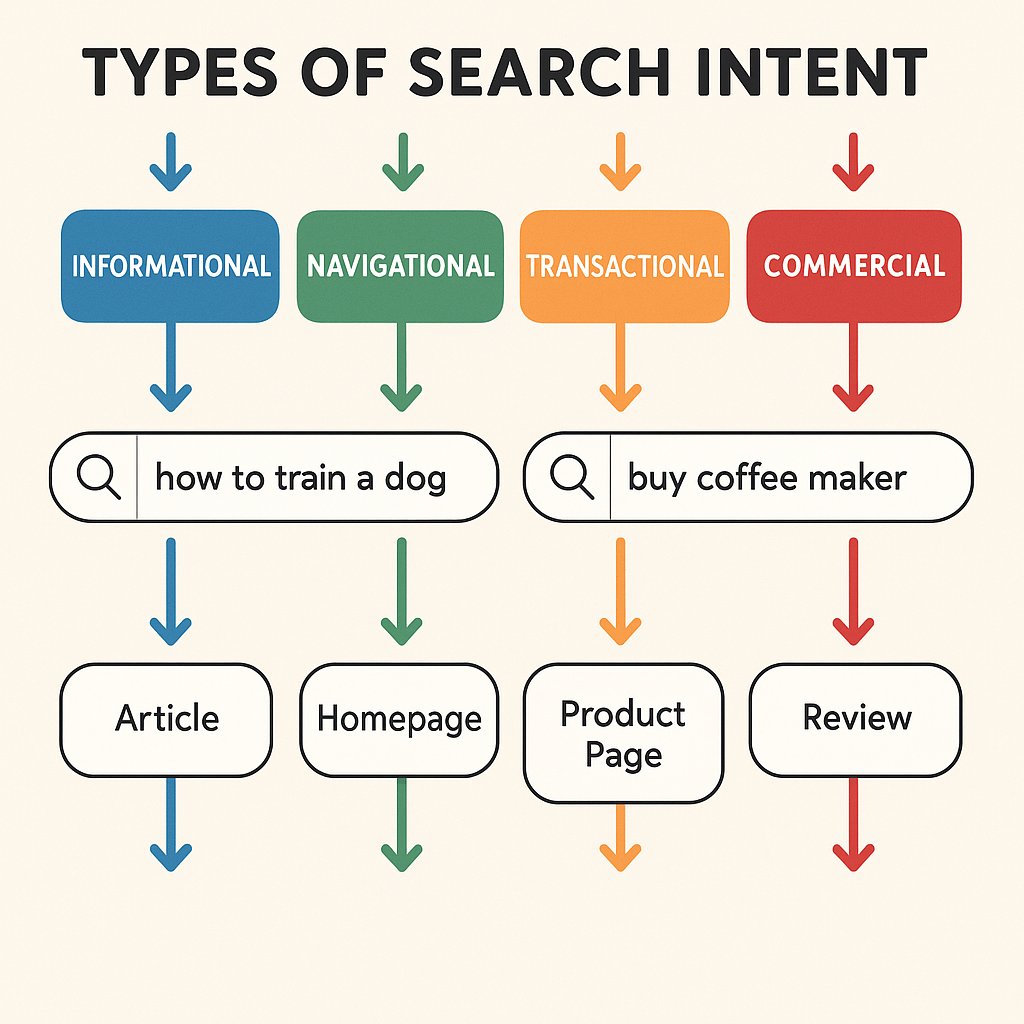
Before you touch a keyword tool, you need to understand the four types of search intent — because everything else flows from this.
Informational: The searcher wants to learn something. “How to optimize WordPress images” or “what is keyword difficulty.” These queries drive top-of-funnel traffic. Your goal here is to educate and build trust.
Navigational: They’re looking for a specific site or page. “WordPress login” or “Yoast dashboard.” Unless you’re that brand, don’t waste time on these.
Transactional: They’re ready to buy or take action. “Best WordPress hosting deals” or “hire WordPress developer.” These convert. Target them strategically.
Commercial investigation: They’re comparing options before buying. “WP Rocket vs W3 Total Cache” or “Elementor review.” These searchers are close to converting but need the final push.
Look at any keyword and ask: what does the searcher want? Then look at the current top results. What format are they? Blog posts? Product pages? Videos? Google’s already telling you what it thinks satisfies that intent.
Best Keyword Research Tools for WordPress Users
You don’t need a massive tool budget to do effective keyword research. You need one good paid tool and the discipline to use Google’s free resources properly.
The Core Paid Tool: Ahrefs or Semrush
Pick one. Both work. Ahrefs has better backlink data and a cleaner interface. Semrush has more features but feels cluttered. For WordPress site owners focused on content SEO, Ahrefs wins.
What you’re paying for: accurate search volume, keyword difficulty scores, SERP analysis, and the ability to see what keywords your competitors rank for. That last one is gold — you can reverse-engineer successful content strategies in your niche.
Start with the Keyword Explorer. Type your seed keyword. Ignore the volume at first. Go straight to the “Questions” and “Also rank for” reports. These show you the long-tail variations and related concepts that form natural content clusters.
Free Tools That Actually Matter
Google Search Console is sitting in your WordPress dashboard right now, showing you which keywords you already rank for. Most people never look at it. Check the Performance tab monthly. Sort by impressions. You’ll find keywords where you rank positions 8-15 — prime targets for optimization.
Google Autocomplete reveals what people actually type. Start typing a keyword and watch the suggestions. These are real searches, updated constantly. Write them down.
People Also Ask boxes in search results show you the questions Google considers relevant to a topic. Each one is a potential H2 or H3 in your content. Expand them all. Screenshot them. This is Google telling you what comprehensive content looks like.
Keyworddit used to be good for Reddit keyword mining, but the API changes killed it. Now you’re better off manually browsing subreddits in your niche and noting the language people use. The questions they ask become your long-tail keywords.
The Underrated Tool: Answer The Public
It’s noisy and the free version is limited, but Answer The Public excels at one thing: showing you question-based keywords. These map perfectly to featured snippet opportunities and voice search queries.
Search your topic. Export the questions. You now have a list of H2 headings that directly match user intent.
Building Topic Clusters That Actually Work
Here’s where most WordPress sites waste their keyword research. They find 50 good keywords and write 50 disconnected articles. No structure. No strategy. Just a pile of content.
Topic clusters are how you build authority in Google’s eyes. You create one comprehensive pillar page targeting a broad topic, then multiple cluster pages targeting specific subtopics, all interlinked.
Let’s say your niche is WordPress security. Your pillar page targets “WordPress security” — a complete guide covering all aspects. Your cluster pages target:
- “WordPress malware removal”
- “Two-factor authentication WordPress”
- “WordPress firewall plugins”
- “Database security WordPress”
- “WordPress brute force attack prevention”
Each cluster page links back to the pillar. The pillar links to each cluster page. Google sees this interconnected structure and understands you’re an authority on WordPress security — not just someone who wrote one article about it.
How to Map Keywords to Clusters
Dump all your researched keywords into a spreadsheet. Create columns for search volume, difficulty, and intent. Now add a column called “Parent Topic.”
Group keywords by their natural parent. “Change WordPress password,” “WordPress password manager,” and “WordPress password security plugin” all belong to a parent topic about WordPress password security.
Your pillars are the parents. Your clusters are the children. Simple.
The mistake? Making too many pillars. Start with 3-5 pillar topics maximum. Build out their clusters completely before adding more pillars. Depth beats breadth in topic authority.
Long-Tail Keywords: Your Actual Ranking Opportunity
Long-tail keywords — phrases of 4+ words — make up roughly 70% of all searches. They’re also way easier to rank for. But most WordPress site owners ignore them because the individual volume looks pathetic.
Here’s the thing: you’re not targeting one long-tail keyword. You’re targeting hundreds.
A single well-optimized page can rank for dozens of long-tail variations. Your article about “WordPress backup plugins” might also rank for “best automatic WordPress backup plugin,” “WordPress backup plugin for large sites,” “WordPress backup to Dropbox plugin,” and fifty other variations.
This is how small WordPress sites compete with giants. While the big players fight over “WordPress hosting,” you own “WordPress hosting for high-traffic membership sites” and twenty related long-tails.
Finding Long-Tail Gold
Go back to Ahrefs or Semrush. Use the Keyword Explorer, but this time filter for keywords with 4+ words. Set the difficulty to “easy” or “medium” based on your domain authority. Set minimum volume to something realistic — maybe 20 or 50 searches per month.
You’ll see hundreds of opportunities that bigger sites ignore because they’re chasing volume. These are yours.
Another method: look at forum discussions in your niche. The specific questions people ask? Those are long-tail keywords. “Why does my WordPress site load slow after updating Elementor?” That’s a real search someone will type.
Connecting Keywords Through Internal Linking Strategy
You’ve done the research. You’ve mapped clusters. You’ve published content. Now comes the part that actually builds authority: strategic internal linking.
Internal links tell Google which pages on your site matter most and how they relate to each other. When you link from ten cluster pages to your pillar page using relevant anchor text, you’re signaling that the pillar is your authoritative resource on that topic.
But here’s where it gets tedious. As your WordPress site grows to 50, 100, 200 posts, manually maintaining optimal internal linking becomes impossible. You miss opportunities. You create orphan pages. Your site architecture gets messy.
This is why tools like AI Internal Links exist — to automatically identify relevant linking opportunities based on your content’s semantic relationships. The plugin analyzes your posts and creates contextual internal links that strengthen your topic clusters without manual work.
Anchor Text Matters More Than You Think
Don’t use “click here” or “this post” as anchor text. Ever. Use descriptive, keyword-rich phrases that tell both users and Google what the linked page is about.
If you’re linking to your WordPress security pillar page, use anchors like “comprehensive WordPress security guide” or “complete WordPress security checklist” — not “check this out.”
Variation matters too. Don’t use the exact same anchor text every time you link to a page. Mix it up naturally while staying relevant.
From Research to Results: Implementation Strategy
Keyword research means nothing without execution. Here’s the workflow successful WordPress sites follow.
Phase 1: Initial research and clustering (Week 1)
Identify your 3-5 pillar topics. Map 5-10 cluster topics per pillar. Create a content calendar scheduling pillar pages first, then clusters.
Phase 2: Content creation (Ongoing)
Write pillar pages as comprehensive resources — 3,000+ words covering everything about the topic. Make them linkable hubs. Then create cluster pages — 1,500-2,000 words each, diving deep into specific subtopics.
Phase 3: Strategic interlinking (As you publish)
As each cluster page goes live, link it to the relevant pillar. Update the pillar to link back. Add contextual links between related cluster pages.
Phase 4: Monitor and optimize (Monthly)
Check Google Search Console for ranking movement. Double down on keywords climbing toward page one. Update content that’s stagnating. Add more depth where needed.
The biggest mistake? Publishing everything at once, then moving to a completely different topic. Finish one cluster before starting another. Google rewards consistent depth in a topic area.
When to Revisit and Refresh Keywords
Search trends change. Your domain authority grows. What was impossible to rank for last year might be within reach now.
Revisit your keyword research quarterly. Look for:
- Keywords you rank 5-10 for that could reach top 3 with content updates
- New long-tail variations around your pillar topics
- Competitor keywords you now have the authority to target
- Gaps in your cluster coverage
Keyword research isn’t a one-time project. It’s an ongoing process that evolves with your WordPress site’s growth and your niche’s search landscape. The sites that win are the ones that keep researching, keep refining, and keep building topic authority through interconnected content.
Start small. Pick one pillar. Research the cluster keywords. Build it out completely. Then do it again. That’s how WordPress sites go from zero to search visibility — not through sporadic viral content, but through systematic topic authority.