
Table of Contents
- Why Traditional Keyword Research Falls Short for WordPress Sites
- Semantic Keyword Clustering: The Foundation of Modern SEO
- Essential Tools for WordPress Keyword Research
- Turning Keyword Research Into WordPress Content Architecture
- Common WordPress Keyword Research Mistakes to Avoid
- Measuring Keyword Research Success on WordPress
The gap between amateur and strategic keyword research isn’t about better tools. It’s about understanding how modern search engines connect concepts, not just match strings. Google’s algorithms have moved from keyword matching to topic understanding, and your research methodology needs to match that shift.
Here’s what actually works for WordPress sites competing in saturated niches: semantic clustering, intent mapping, and building content architectures that signal topical authority from the first page you publish.
Why Traditional Keyword Research Falls Short for WordPress Sites
The old playbook looked simple. Pop a seed keyword into a tool, export a CSV of variations, write posts targeting each one. Check the box, move on.
The problem? Search engines stopped rewarding isolated keyword targeting years ago. Google’s algorithms now evaluate whether your entire site demonstrates expertise on a subject, not whether individual posts hit exact-match phrases.
WordPress makes this worse by design. The platform encourages atomic content creation — one post at a time, published in reverse chronological order. No built-in structure for topic relationships. No automatic clustering. Just a growing pile of individual URLs that may or may not connect logically.
Your competitors who rank above you aren’t necessarily writing better content. They’re building better content architectures informed by smarter keyword research. The difference starts at the research phase, not the writing phase.
Semantic Keyword Clustering: The Foundation of Modern SEO
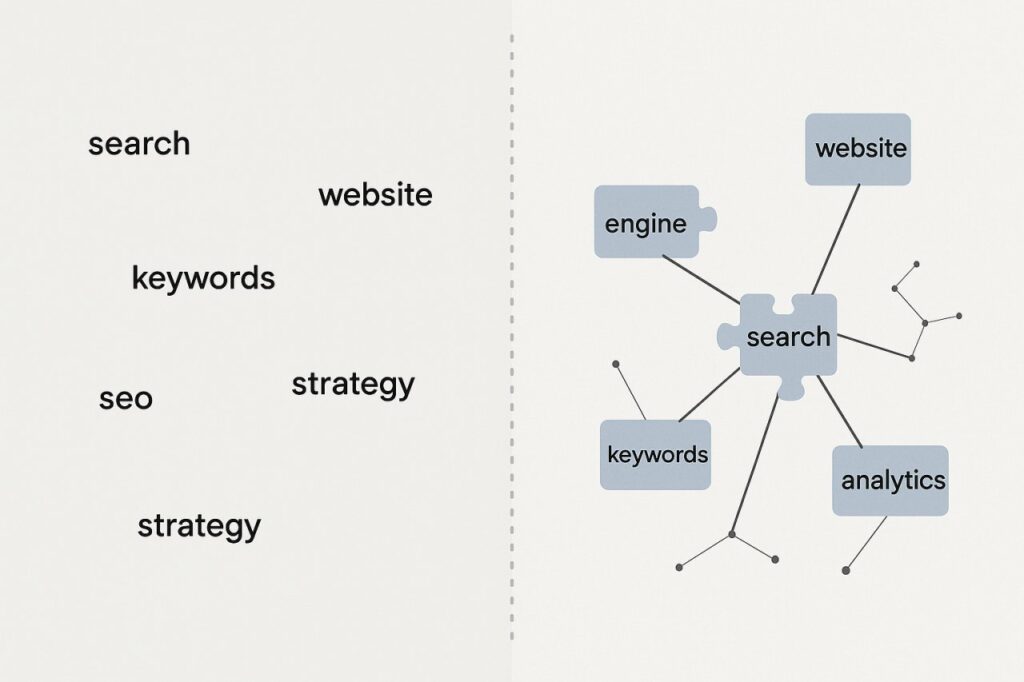
Semantic clustering means grouping related keywords by topic intent, not by string similarity. Instead of treating “WordPress hosting,” “best WordPress hosting,” and “WordPress hosting comparison” as three separate targets, you recognize them as variations of one searcher need.
This shift changes your entire content strategy. You’re no longer creating 47 blog posts targeting 47 keyword variations. You’re creating pillar content that addresses a topic comprehensively, with supporting content that explores subtopics in depth.
How to Identify Semantic Clusters in Your Niche
Start with a core topic relevant to your WordPress site. Let’s say “email marketing automation” for a marketing blog.
Dump that phrase into Ahrefs or Semrush. Don’t look at the keyword difficulty column first. Look at the questions tab and the related terms section. You’re mining for semantic relationships, not volume metrics.
You’ll notice patterns emerge. Questions about integration with CRMs. Questions about triggers and workflows. Questions comparing platforms. Each cluster represents a subtopic your pillar content needs to address.
Export 200-300 related keywords. Now comes the manual part that tools can’t do for you: group them by searcher intent, not by word similarity. “Best email automation tools” and “email automation software comparison” go in the same cluster even though they use different words — same intent, same content destination.
The Cluster Architecture That Google Rewards
Once you have your semantic groups, map them to a content structure:
- One pillar page — comprehensive overview of the main topic, 3000+ words
- 5-8 cluster posts — deep dives into specific subtopics, linking back to the pillar
- Supporting posts — tactical how-tos and case studies that reference both pillar and cluster content
This isn’t theory. Sites that implement cluster architectures see measurable improvements in rankings across all pages in the cluster, not just the pillar. Google interprets the interconnected structure as a signal of topical authority.
The catch? Building and maintaining this structure manually is painful on WordPress. You need to remember which posts belong to which clusters, update internal links when you publish new content, and ensure the anchor text diversity looks natural.
Long-Tail Keywords: Still Relevant or Outdated?
You’ll hear conflicting advice about long-tail keywords. Some SEOs say they’re dead. Others swear by them. Both are partially right.
Long-tail phrases as standalone targets are less valuable than they were five years ago. Ranking for “how to set up drip campaigns in Mailchimp for e-commerce stores” won’t move the needle if that’s your only ranking.
But long-tail variations matter enormously as signals within comprehensive content. When your pillar page naturally incorporates dozens of long-tail variations — because it thoroughly covers the topic — Google understands the breadth of your expertise.
Don’t create separate posts for every long-tail variation. Instead, use long-tail research to ensure your pillar and cluster content addresses the full spectrum of related searches.

Essential Tools for WordPress Keyword Research
You don’t need a dozen tools. You need the right combination for discovery, analysis, and implementation.
Ahrefs: The Discovery Workhorse
Ahrefs remains the gold standard for keyword discovery and competitive analysis. The “Content Gap” feature alone justifies the subscription — it shows you keywords your competitors rank for that you don’t.
For WordPress users, the real value is in batch analysis. Export keyword data for your entire niche, not just your site. Look for patterns in what content types rank: listicles, guides, tools, comparisons. That tells you what format your semantic clusters should take.
The “Also rank for” report is particularly useful. It reveals the secondary keywords that top-ranking pages capture, giving you a roadmap for comprehensive coverage.
Answer The Public: Mining Question-Based Queries
Question keywords signal high engagement potential. Someone searching “why does WordPress cache cause problems” is further along the learning curve than someone searching “WordPress cache.”
Answer The Public visualizes question patterns quickly. Export the data, but don’t create a separate post for every question. Use questions as H2 and H3 subheadings within your cluster content. This gives you natural long-tail coverage while maintaining content depth.
Google Search Console: The Reality Check
Before you chase new keywords, mine what’s already working. GSC shows you queries where you rank on page 2-3 — the low-hanging fruit.
Filter for queries with impressions but low clicks. These represent existing visibility with poor conversion. Often, the fix isn’t new content — it’s optimizing titles and improving internal linking to pages that already rank.
For WordPress sites with 50+ posts, this typically reveals 20-30 opportunities to boost existing content rather than creating new pages.
Turning Keyword Research Into WordPress Content Architecture
Research without implementation is just data hoarding. The crucial step most WordPress users skip: translating keyword clusters into a concrete content plan with internal linking strategy built in.
Map your clusters to a spreadsheet. Each row represents a post or page. Columns should include: target cluster, primary keyword, related semantics, and most importantly — which existing pages it should link to and receive links from.
This pre-planning prevents the WordPress default: publishing content in isolation, then trying to retrofit connections later.
The Internal Linking Layer That Completes Keyword Strategy
Here’s where most keyword research falls apart on WordPress. You’ve identified perfect semantic clusters. You’ve created comprehensive content. But without strategic internal links, Google can’t understand the topical relationships you’ve built.
Every pillar page should link to its cluster posts. Every cluster post should link back to the pillar and to related cluster content. Supporting posts should reference the cluster they belong to.
Manually maintaining this as your site grows becomes impossible. You publish a new guide on email segmentation — now you need to update 12 other posts to link to it with appropriate anchor text. Most people do this for the first few posts, then give up.
This is exactly where tools like AI Internal Links become essential. They automatically identify semantic relationships between posts and create contextual internal links that reinforce your topic clusters. The anchor text varies naturally, and new posts get integrated into existing clusters without manual intervention.
The difference is measurable. Sites with automated internal linking systems see cluster pages ranking for 40-60% more keywords than identical content with sparse internal linking.
Content Calendar Integration
Don’t just research keywords and create one-off posts. Plan your publishing calendar around completing clusters.
If you identify a valuable cluster on “WordPress security,” commit to publishing the pillar page and at least 4 cluster posts within 6-8 weeks. This concentrated publishing signals topical focus to search engines more effectively than spreading those posts across six months.
Use a simple tracking system: traffic light colors for cluster completion status. Red = not started. Yellow = pillar published, clusters in progress. Green = fully interlinked cluster live.
Common WordPress Keyword Research Mistakes to Avoid
You’ll waste months if you fall into these traps.
Chasing Volume Over Intent Alignment
A keyword with 10,000 monthly searches means nothing if those searchers want something your WordPress site doesn’t offer. Volume is vanity. Conversion is sanity.
If you run a WordPress development agency, ranking for “free WordPress themes” brings massive traffic with zero business value. Better to rank for “custom WordPress development for SaaS” with 200 monthly searches.
Filter keyword lists by commercial intent before worrying about volume.
Ignoring SERP Reality
Before you commit to targeting a keyword, actually Google it and look at what ranks. If page one is dominated by Fortune 500 brands or 5,000-word comprehensive guides, your 800-word blog post isn’t breaking through regardless of optimization.
Match your content format and depth to what Google is already rewarding. If listicles rank, write a listicle. If detailed tutorials rank, tutorials it is.
Building Content Silos You Can’t Fill
Don’t map out 15 topic clusters if you can only realistically publish one cluster per quarter. Better to dominate 3 clusters than publish incomplete coverage across 15.
Google rewards depth and completeness. An incomplete cluster with a pillar page and 2 thin cluster posts performs worse than a tight, fully developed cluster of 5 interconnected pieces.
Measuring Keyword Research Success on WordPress
How do you know if your research methodology is working?
Track cluster performance, not individual keyword rankings. Set up custom segments in Analytics for each topic cluster. Monitor collective traffic, not just pillar page visits.
Watch for these positive signals:
- Increasing impressions for semantic variations you didn’t directly target
- Featured snippet captures on question keywords within your clusters
- Rising average position for the cluster as a whole, even if individual rankings fluctuate
The timeline for results? Expect 8-12 weeks for a fully published cluster to show meaningful ranking improvements. Patience is mandatory. Google needs time to crawl, assess relationships, and test your pages in search results.
Keyword research for WordPress isn’t a one-time project. It’s an ongoing strategic process that informs your content calendar, internal linking, and site architecture. The sites that treat it seriously — with semantic clustering, intent mapping, and structured implementation — consistently outrank competitors with better domain authority and more content.
Your advantage as a WordPress user is agility. You can implement cluster strategies faster than enterprise sites stuck in bureaucratic publishing workflows. Make it count.