
Table of Contents
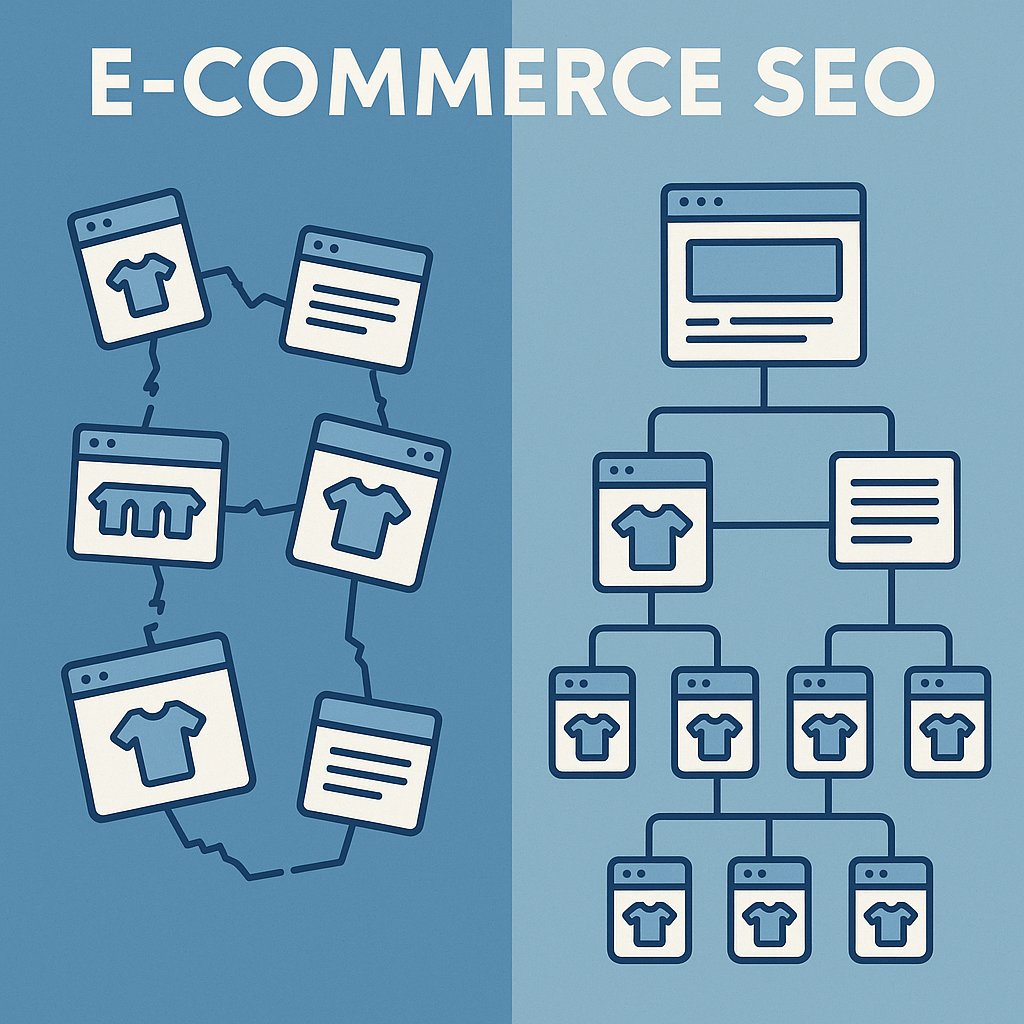
The difference isn’t in the basics. It’s in how you connect your catalog, how you structure authority across categories, and whether Google understands what you’re actually selling. E-commerce SEO isn’t just on-page optimization. It’s architecture.
If you’re running a WordPress store with WooCommerce, you’ve got an advantage most platforms don’t offer: total control over your site structure. But with that control comes the responsibility to build it right. Here’s how to turn your product pages into traffic magnets that actually convert.
Why Most E-commerce Sites Fail at SEO Before They Start
Your competitor launches a store with 50 products. You launch with 500. Logic says you should win — more inventory means more keywords, more landing pages, more chances to rank.
Except that’s not how Google sees it.
A store with 500 orphaned product pages — pages with no meaningful internal links pointing to them — looks like 500 isolated islands. Google crawls a few, gets confused about what matters, and moves on. Your competitor with 50 tightly interconnected products? That’s a coherent catalog. Google understands the relationships. It knows which products are important. It ranks them.
Scale without structure is just noise.
The Crawl Budget Problem Nobody Talks About
Google doesn’t have infinite time to crawl your site. For small stores, that’s rarely an issue. But once you cross 200-300 product pages, crawl budget becomes real. If Google wastes time on low-value pages — out-of-stock products, thin category archives, paginated URLs — it might not discover your best sellers.
Internal linking tells Google where to focus. Every link is a vote. A product linked from your homepage, a category page, and three related products gets crawled more often than one buried four clicks deep.
Your Category Pages Are Wasted Authority
Most WooCommerce stores treat category pages like product indexes. Thumbnail, price, “Add to Cart” button. Maybe 50 words of auto-generated text at the bottom.
That’s a missed opportunity.
Category pages should be landing pages for commercial keywords. “Best running shoes for flat feet.” “Organic dog food grain-free.” These are high-intent searches with decent volume, and they convert better than product-specific queries because the searcher is still exploring options.
Write 300-500 words of original content on every major category page. Explain what makes these products different. Answer the questions a first-time buyer would ask. Then link strategically to your top products within that category — not all of them, just the ones you want to rank.
Product Page Optimization That Actually Moves the Needle
You’ve heard it before: optimize title tags, write unique descriptions, add alt text. Everyone does that. The stores that win do more.
Stop Writing for Search Engines
Here’s the uncomfortable truth: keyword-stuffed product descriptions convert worse than natural ones, even if they rank slightly higher. Google’s algorithm is sophisticated enough to understand synonyms and context. You don’t need to jam “leather laptop bag men” into every sentence.
Write descriptions that answer the question: “Why should I buy this instead of the one I saw on Amazon?” Focus on unique selling points. Materials. Dimensions. Use cases. The customer who lands on your page from Google is comparing you to three other tabs. Make it easy for them to choose you.
Title Tag Formula That Works
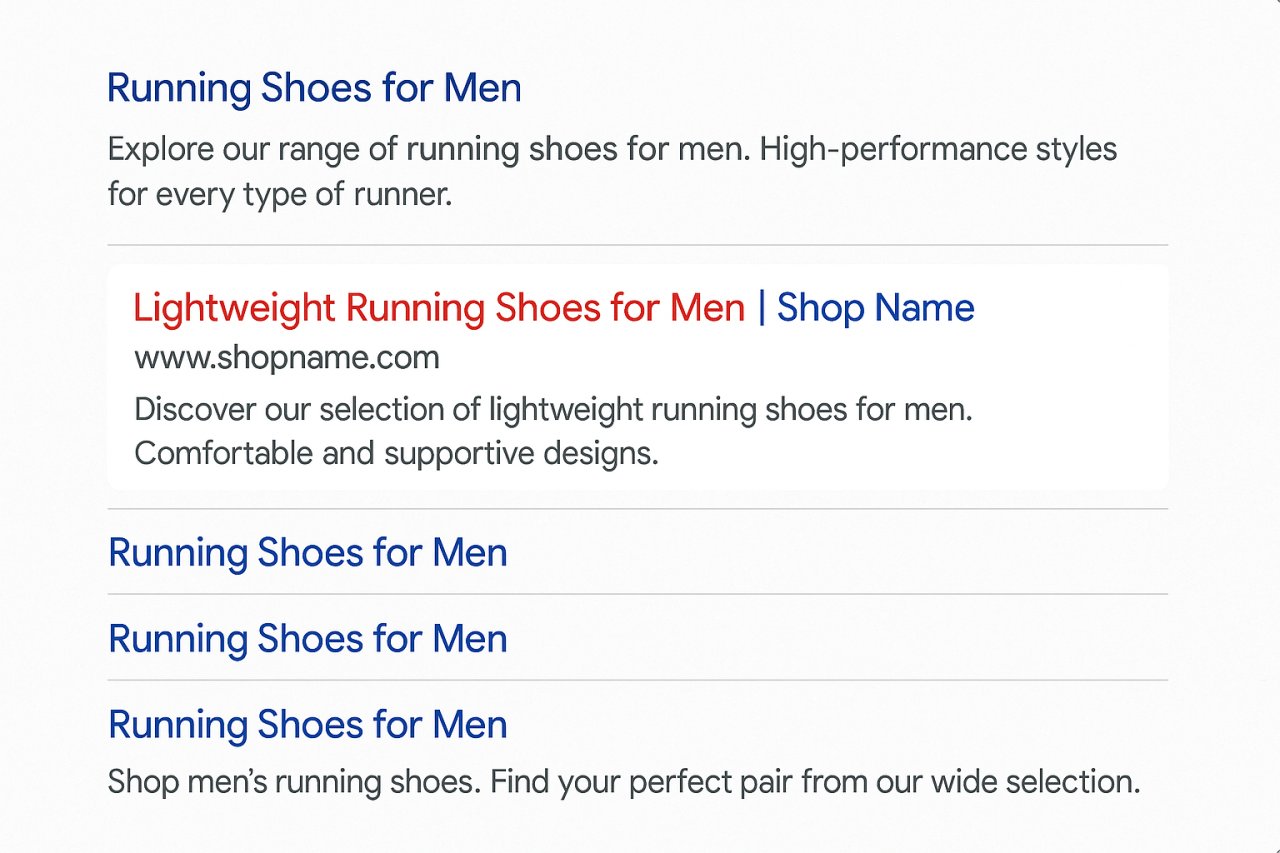
Forget the SEO template of “Product Name | Category | Brand.” That’s optimized for robots, not humans.
Try this instead: [Product Name] – [Key Benefit] | [Your Store Name]
“Osprey Atmos 65L Backpack – Ultralight Hiking with AG Anti-Gravity | Trail Outfitters”
You’ve got the product name for exact-match searches, a benefit for click-through appeal, and your brand for recognition. The title works in search results and as a headline on the page itself.
Product Descriptions Need Structure
Don’t write walls of text. Break descriptions into scannable sections:
- Opening paragraph: What it is, who it’s for, why it matters
- Features list: Bullet points for specs (size, material, compatibility)
- Use cases: Real scenarios where this product shines
- Comparison hook: “Compared to [competitor product], this one offers…”
This structure keeps readers engaged and gives Google clear signals about what the page covers.
The Schema Markup You Can’t Skip
Product schema is non-negotiable. It displays rich snippets in search results — price, availability, ratings — and those snippets increase click-through rates by 20-30%.
WooCommerce handles basic schema automatically, but you’ll want to verify it with Google’s Rich Results Test. Check that price, availability, and review markup are firing correctly. If you’re using a custom theme, schema often breaks. Fix it immediately.
Internal Linking Strategy for E-commerce Sites
This is where most stores leave money on the table.
You’ve got hundreds of products. Some are bestsellers. Some are high-margin. Some target competitive keywords you’re trying to rank for. If you’re not strategically linking between them, you’re diffusing authority randomly instead of concentrating it where it matters.
The Hub-and-Spoke Model
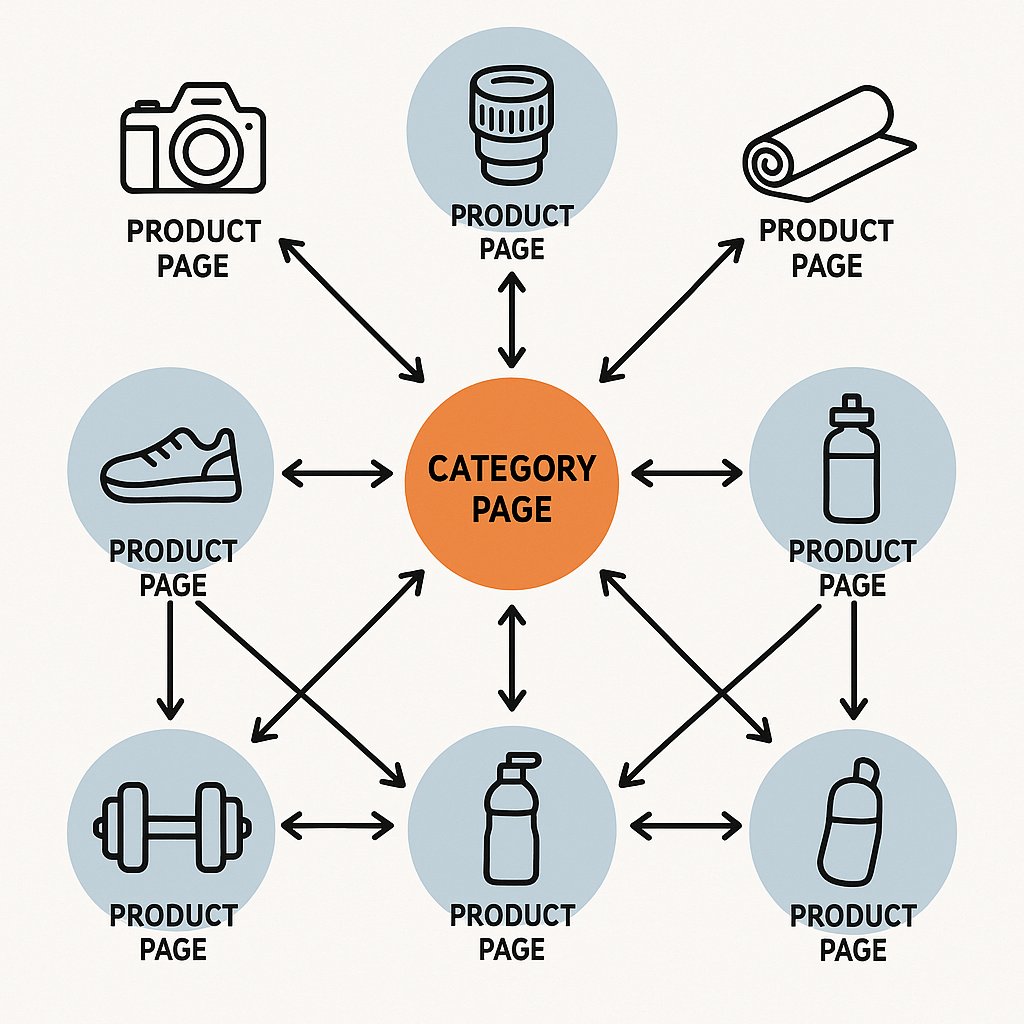
Think of your site structure like a wheel. Category pages are hubs. Product pages are spokes. But here’s what most people miss: spokes should connect to each other, not just back to the hub.
If someone’s looking at a camera body, link to compatible lenses. If they’re browsing a yoga mat, suggest blocks and straps. These aren’t just upsells — they’re contextual links that build topical clusters Google rewards.
But doing this manually across a large catalog? Impossible at scale.
Related Products vs. Strategic Internal Links
WooCommerce’s “Related Products” widget is algorithmic — it shows items from the same category or tag. That’s fine for user experience, but it’s not an SEO strategy.
Strategic internal linking is intentional. You’re linking from high-traffic pages to pages you want to rank. From established products to new ones. From broad keywords to long-tail variations.
Tools like AI Internal Links can automate this by analyzing your content and suggesting contextually relevant links across your catalog, saving hours of manual work while building the architecture Google actually cares about.
Don’t Forget Your Blog
If you’re running content marketing — buying guides, how-to articles, comparison posts — those pages are authority engines. They rank for informational keywords, build backlinks, and drive traffic.
But they’re useless for sales unless you link from them to product pages. A “Best Hiking Boots” guide should link to the specific boots you sell, not just generic category pages. Make it easy for the reader to go from research to purchase in one click.
Category Architecture That Distributes Authority
Your category structure is either amplifying your SEO or sabotaging it. There’s no neutral.
Flat Is Better Than Deep
Keep products no more than three clicks from your homepage. A deep hierarchy — Home > Shop > Category > Subcategory > Sub-subcategory > Product — dilutes link equity and makes crawling inefficient.
If you’ve got a massive catalog, use faceted navigation (filters) instead of endless subcategories. Let users drill down by size, color, price range without creating a thousand near-duplicate category URLs.
Breadcrumbs Are SEO Gold
Breadcrumb navigation does two things: it improves user experience (people can jump back to parent categories) and it creates automatic internal links Google follows.
Enable breadcrumb schema markup so Google shows them in search results. It makes your listing more prominent and gives users a preview of your site structure before they click.
Pagination and Infinite Scroll
Paginated category pages confuse search engines. Should Google index page 1? Page 2? All of them?
Use rel='next' and rel='prev' tags to tell Google these pages are part of a sequence. Or better yet, use a “Load More” button instead of pagination — it keeps users on one URL and simplifies indexation.
Technical SEO Fixes Every WooCommerce Store Needs
On-page optimization won’t matter if your site’s technical foundation is broken. These are the must-fix issues.
Fix Your URL Structure
WooCommerce defaults to URLs like /product/blue-widget/. That’s fine. But some stores add category slugs: /category/subcategory/product/blue-widget/. Now if you move the product to a different category, the URL changes. Broken links everywhere.
Keep product URLs flat. Remove category bases from permalinks unless you absolutely need them for disambiguation.
Canonicalization for Filtered Pages
When users filter products by color or size, WooCommerce often generates new URLs with query parameters. Google sees these as separate pages. Suddenly you’ve got 50 versions of the same category page competing against each other.
Use canonical tags to point all filtered variations back to the main category URL. Tell Google: “This is the version that matters.”
Speed Matters More for E-commerce
A one-second delay in page load kills conversions by 7%. For e-commerce, speed is literally revenue.
Prioritize image optimization — compress product photos without losing quality. Use lazy loading so images below the fold don’t slow initial render. Cache aggressively. WooCommerce is dynamic by nature, but most product pages can be cached for hours without issues.
Measuring What Actually Matters
You can’t optimize what you don’t measure. But most stores track the wrong metrics.
Focus on Product-Level Traffic
Google Analytics shows sitewide traffic. Cool. But which products are getting organic visits? Which categories drive the most engaged sessions?
Set up custom segments in GA4 to isolate organic traffic to product pages. Compare it month-over-month. If a product ranks on page one but gets low traffic, your title tag or meta description isn’t compelling. Fix it.
Track Keyword Cannibalization
When multiple products target the same keyword, they compete against each other. Google picks one to rank (usually not the one you want) and ignores the others.
Run a monthly audit: search your target keywords manually and check which page ranks. If it’s not your priority page, adjust internal links and on-page content to shift authority toward the right URL.
Conversion Rate by Traffic Source
Organic traffic should convert higher than paid traffic because intent is stronger. If it doesn’t, you’re ranking for the wrong keywords or your landing pages aren’t aligned with search intent.
Look at conversion rate for each major keyword. If “best running shoes” sends traffic but no sales, those visitors are still researching. Maybe they need a comparison guide, not a product page.
E-commerce SEO isn’t about tricking Google. It’s about building a site that makes sense — to search engines, yes, but more importantly to humans who land there looking to buy. Structure your catalog intelligently, optimize with intent, and connect your pages in ways that guide both crawlers and customers toward conversion.
Do that, and rankings become a side effect of doing e-commerce right.