
Table of Contents
The choice between fixing broken links and setting up redirects isn’t binary. Each approach preserves different amounts of SEO value depending on what happened to the original page and where those links came from. A blanket redirect strategy often does more harm than leaving some 404s alone.
What Actually Happens When Links Break
A 404 error tells search engines the page doesn’t exist. Clean signal, clear outcome: the linking page loses that specific connection, crawl budget gets spent on a dead end, and any equity that would have flowed through that link stops.
But not all broken links return proper 404s. A soft 404 happens when a server returns a 200 status code for a page that doesn’t really exist anymore, usually showing generic “page not found” content or redirecting to an unhelpful homepage. Google treats these worse than hard 404s because the mixed signal wastes crawl budget and creates confusion about whether the page exists.
The third scenario: the page still exists but moved to a new URL. This is where most people reach for redirects without thinking through the consequences.
When 301 Redirects Preserve SEO Value
A 301 redirect works when the destination page serves the same user intent as the original. If you renamed a guide about WordPress security plugins from /security-plugins-guide/ to /wordpress-security-plugins/, a redirect makes perfect sense. The content is identical or better, and anyone looking for that original page will find exactly what they expected.
Google has confirmed that 301 redirects pass the same ranking signals as the original URL. But that only matters when relevance stays intact.
Here’s where it gets practical: say you deleted a specific product page and that product line no longer exists. You have three options:
1. Redirect to the category page
2. Redirect to a similar but different product
3. Let it 404
Most WordPress site owners pick option one or two by default. Wrong move in many cases.

When Redirects Waste More Value Than 404s
Redirecting to an irrelevant page creates what I call “equity dilution.” The original page might have ranked for “blue ceramic coffee mugs,” but redirecting to a general coffee accessories category means that specific signal now gets spread across dozens of unrelated products. The category page doesn’t get a meaningful boost, and you’ve told Google that blue ceramic mugs and stainless steel travel cups are interchangeable. They’re not.
A redirect chain amplifies this problem. If page A redirects to page B, which redirects to page C, each hop loses a small amount of signal. More importantly, it slows down crawlers and creates maintenance nightmares when you need to update links later.
Then there’s the homepage redirect trap. Sending every deleted page to your homepage teaches Google nothing about what your site actually offers. It’s a soft 404 in disguise, except worse because you’re actively telling search engines that your homepage is about everything and therefore nothing.
The counterintuitive truth: a clean 404 often preserves more SEO value than a bad redirect. It lets Google remove the old page from the index cleanly, doesn’t confuse signals, and doesn’t waste equity on irrelevant pages.
Decision Framework for Broken Links vs Redirects
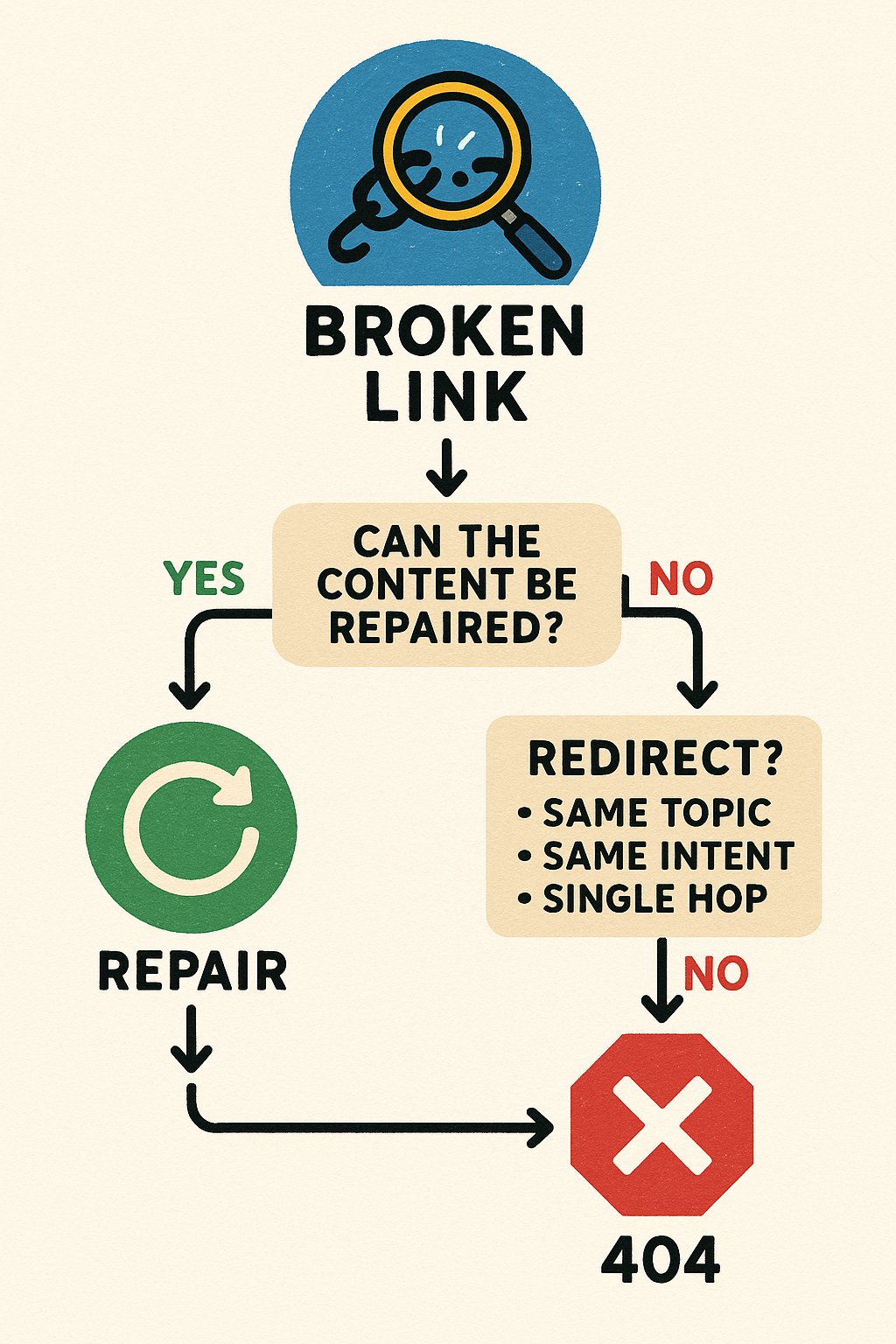
Use this hierarchy when you find WordPress broken links:
First, check if you can repair the destination. If the page was deleted by mistake or moved without your knowledge, restoring it at the original URL is always the best fix. No redirect needed, no lost equity, no confusion.
If the content truly moved, redirect only when these three conditions are met:
1. The new page covers the same topic in equal or greater depth
2. The search intent is identical (informational stays informational, commercial stays commercial)
3. The redirect is one hop, not part of a chain
Fail any of those tests? Let it 404.
For internal links pointing to 404s, update the links directly. This is where WordPress site owners waste the most time on unnecessary redirects. If 20 of your own blog posts link to a deleted page, don’t set up a redirect so those links keep working. Fix the links themselves, either by pointing them to a truly relevant alternative or removing them entirely. Internal links are under your control, so control them.
External links follow different rules. If another site links to your deleted page, you can’t update their link. Here, a redirect makes sense only if you have a legitimately relevant replacement. Otherwise, the 404 is honest: that page doesn’t exist anymore, and sending visitors somewhere random helps no one.
Small Site Example: Repair First, Then Optimize
Let’s say you run a WordPress site about sustainable home products. You had a detailed post about bamboo toothbrushes that you deleted during a content audit, not realizing it ranked #8 for “biodegradable toothbrush alternatives” and had 30 internal links pointing to it.
Option A: Redirect to your general “bathroom products” category. Result: you lose the specific ranking, the category page doesn’t gain anything meaningful, and those 30 internal links now point somewhere generic.
Option B: Let it 404 and hope for the best. Result: you lose the ranking, 30 internal links now point nowhere, and you get 404 errors in Search Console.
Option C: Restore the page (or recreate better content on that topic), then audit those 30 internal links. Maybe five of them were low-quality mentions that should be removed. Maybe ten could be updated to point to a newer, more comprehensive guide about sustainable dental care. The remaining fifteen stay as they are.
Option C takes more work, but it’s the only one that preserves and potentially increases SEO value.
The second part of this: discovering new internal link opportunities. When you fix broken links, you’re already looking at your content structure. That’s the moment to ask whether other pages should also link to your restored or replacement content. Tools like AI Internal Links can automate this process, suggesting contextually relevant places to add connections you might have missed manually.
A real scenario: you fix a broken link to a guide about composting, then discover three other posts about kitchen waste and gardening that never linked to it. Adding those connections doesn’t just fix a problem, it strengthens the topical cluster and helps Google understand the relationship between your content.
The Redirect Audit Most Sites Skip
Set a calendar reminder to review all redirects every six months. Many WordPress sites accumulate hundreds of 301s over years, including chains that formed accidentally when pages moved multiple times.
Check for:
Redirects pointing to other redirects (chains)
Redirects to pages that are now 404s themselves
Redirects to pages that changed topics and are no longer relevant
In each case, either update the redirect to point directly to the final destination, or remove it and let the original URL 404. Yes, removing a redirect means accepting a 404, but if the redirect was misleading users and confusing Google, the 404 is more honest.
Stop Treating Every Broken Link the Same
The WordPress broken links vs redirects question has no universal answer because not all broken links represent the same problem. A link to a moved page needs different treatment than a link to deleted content, which needs different treatment than a link that was never correct in the first place.
Repair what can be repaired. Redirect only when relevance is preserved. Update internal links directly instead of masking them with redirects. Let irrelevant pages 404 cleanly rather than diluting equity across unrelated destinations.
Your next step: run an internal link checker, identify your actual 404s, and classify them. Moved content that’s still relevant gets a redirect. Deleted content with no good replacement gets a 404. Internal links to either category get updated at the source. That’s how you preserve SEO value instead of just shuffling it around.