
Table of Contents
- Why WordPress Site Structure Decides Your SEO Ceiling
- The Fundamental WordPress Structure Layers That Control SEO
- Building Content Clusters That Actually Work
- The Homepage Authority Distribution Strategy
- Common WordPress Structure Mistakes That Kill Rankings
- Maintaining Structure as Your Site Scales
- Measuring Whether Your Structure Actually Works
- Final Thoughts: Structure Is Strategy
Your WordPress site structure isn’t just about keeping things organized for visitors. It’s the blueprint Google uses to understand your content relationships, determine which pages matter most, and decide what deserves to rank. A solid structure channels authority through your site like water flowing downhill — naturally, efficiently, and with purpose.
Here’s the truth most SEO guides won’t tell you: you can have brilliant content and perfect technical SEO, but if your site structure is broken, you’re fighting with one hand tied behind your back. Let’s fix that.
Why WordPress Site Structure Decides Your SEO Ceiling
Think of your site structure as the nervous system of your SEO. When it works well, signals flow effortlessly. When it’s tangled, everything suffers — indexation, crawl efficiency, ranking potential.
Google Can’t Read Your Mind
You might know that your cornerstone guide on email marketing is your best content. But does Google? If that page sits three clicks deep from your homepage, surrounded by unrelated posts, buried in a generic “Blog” category — Google sees noise, not authority.
Proximity to the homepage signals importance. Every click away from your root domain dilutes that signal. Your most valuable content should be no more than two clicks from your homepage. Period.
Link Equity Doesn’t Distribute Itself
When you earn a backlink to any page on your site, that authority wants to flow somewhere. With poor structure, it gets stuck. It trickles into dead ends. It leaks through weak internal links to pages that don’t matter.
A well-planned structure acts like irrigation channels, directing that authority exactly where you need it: to your money pages, your pillar content, your pages targeting competitive keywords.
Crawl Budget Is a Real Constraint
Google doesn’t have infinite patience. On larger sites — anything over a few hundred pages — how you structure content determines what gets crawled frequently and what gets ignored for weeks.
If your structure forces Googlebot to wade through pagination, tag archives, and redundant category pages to find your best content, you’re wasting crawl budget on the wrong things.
The Fundamental WordPress Structure Layers That Control SEO
WordPress gives you several organizational systems out of the box. Most people use them wrong. Let’s break down each layer and how it should serve your SEO.
Categories: Your Primary Content Clusters
Categories aren’t just filing cabinets. They’re your main topic declarations to Google. Each category should represent a distinct subject area you want to rank for.
Here’s the mistake: sites with 47 categories, each containing three posts. That’s not structure — that’s chaos. Google sees shallow topic coverage everywhere and deep expertise nowhere.
Better approach: 5-10 strong categories, each packed with content. If a category can’t sustain at least 15-20 quality posts, it shouldn’t exist. Merge it with a parent category instead.
Tags: Connective Tissue, Not Organization
Tags should create lateral relationships between posts. They answer the question: “What else should someone interested in THIS also read?”
The problem? Most sites generate tag archive pages that are thin, duplicate, and cannibalize category authority. Unless you’re actively building out tag pages with unique content, you should noindex tag archives. Let tags work behind the scenes to inform your internal linking, not create more pages for Google to crawl.
URL Structure: Simplicity Beats Complexity
WordPress defaults to ugly URLs with date stamps and parameters. You’ve probably already changed that. But what did you change it to?
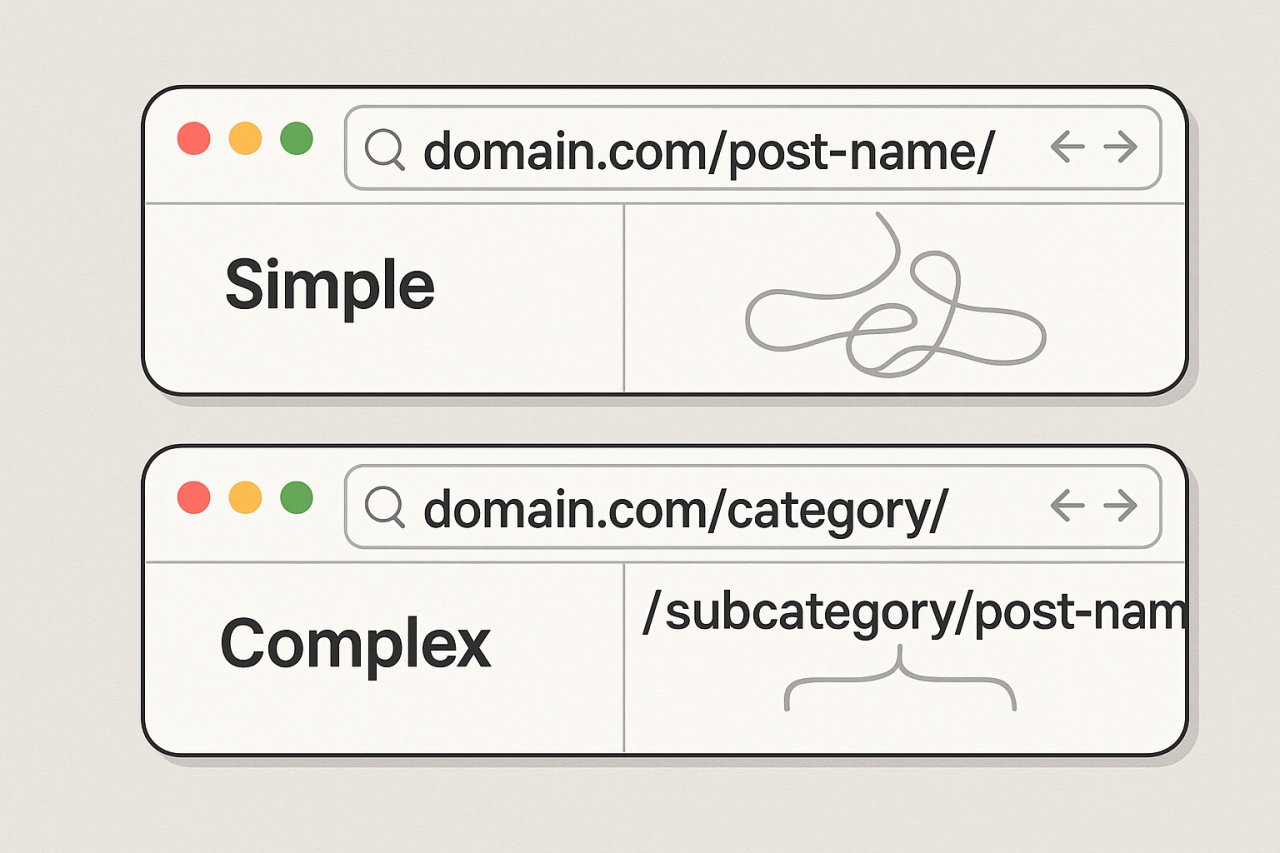
Here’s what works: domain.com/post-name/
That’s it. Flat and simple.
Skip the category in the URL (domain.com/category/post-name/). Yes, it looks neat. But it creates problems when you need to recategorize content. The URL changes, you need redirects, you lose established authority. Not worth it.
Parent-Child Page Relationships
For static pages (your About, Services, Product pages), WordPress lets you create hierarchies. Use this deliberately.
Your main service page should be /services/. Sub-services nest under it: /services/seo-audit/, /services/technical-seo/, etc.
This creates a clear topical silo. Google understands the relationship. Internal links flow naturally. Users navigate intuitively.
Building Content Clusters That Actually Work
The pillar-cluster model isn’t new. But most implementations are broken. Here’s why — and how to do it right.
Your Pillar Pages Must Earn the Title
A pillar page isn’t just a long guide. It’s a comprehensive resource that could legitimately rank for a head term. If your “pillar” is 1,200 words of surface-level overview, it’s not a pillar. It’s just another blog post.
Real pillar pages are 3,000+ words, cover the topic exhaustively, and provide enough value that people would bookmark it as a reference. Everything else in the cluster should enhance specific aspects of what the pillar introduces.
Cluster Content Should Be Specific and Complementary
Each cluster post tackles one narrow aspect of the pillar topic. Not a rehash. Not a summary. A deep dive into something the pillar only touched.
If your pillar is “Complete Guide to WordPress SEO,” a cluster post might be “How to Optimize WordPress Category Pages for Maximum Crawl Efficiency.” Notice the specificity.
Internal Links Must Create Clear Hub-and-Spoke Relationships
Here’s where most cluster strategies fall apart: weak internal linking.
Your pillar should link to every piece of cluster content contextually — not in a “Related Posts” widget, but within the body content where it naturally supports the narrative.
Every cluster post should link back to the pillar AND to related cluster posts. This creates a dense network of topical relevance that Google can’t miss.
Maintaining these relationships manually as your site grows becomes impossible. Tools like AI Internal Links can automatically suggest and maintain these contextual connections across your content clusters, ensuring no orphaned pages and preserving the architecture you’ve designed as you publish new content.
The Homepage Authority Distribution Strategy
Your homepage is your most powerful page. It typically has the most backlinks, the highest domain authority, and the most prominent position in your site.
How you distribute that authority matters enormously.
Feature Your Best Content Prominently
That single direct link from your homepage carries significant weight. Don’t waste it on your “About” page.
Link to your pillar content, your money pages, and your highest-priority landing pages. Everything else can sit one level deeper.
Use Descriptive, Keyword-Rich Anchor Text
Your homepage navigation is prime real estate for keyword-rich anchors. Instead of “Services,” try “WordPress SEO Services.” Instead of “Resources,” try “SEO Guides & Tutorials.”
Google pays attention to anchor text, especially from authoritative pages. Use that.
Avoid Homepage Bloat
More links don’t mean better distribution. They mean dilution.
If your homepage links to 50 different pages, each link carries a fraction of the authority. Keep it focused: 10-20 strategic links maximum.
Common WordPress Structure Mistakes That Kill Rankings
Let’s address the architectural sins that cripple otherwise solid sites.
The Endless Blog Archive Problem
By default, WordPress creates paginated archives: /page/2/, /page/3/, continuing forever. This creates two problems:
1. Crawl budget waste — Googlebot follows pagination links instead of finding valuable content
2. Thin pages — Archive pages offer little unique value and often create duplicate title tag issues
Fix it: Use a “Load More” button with JavaScript instead of pagination. Or better yet, don’t rely on blog archives at all — build curated category hubs that actually help users.
Orphaned Pages That Google Never Finds
Publish a post, forget to add it to any category, skip internal links from existing content. Congratulations: you’ve created an orphan.
Orphaned pages have no internal links pointing to them. Google might eventually find them through sitemaps, but they carry almost no authority. They rank poorly. They contribute nothing to your site’s topical authority.
Every page needs multiple internal links from relevant, related content.
Taxonomy Explosion
Someone decided that creating a new category for every minor topic variation was “good organization.” Now you have 60 categories, each with 2-5 posts.
This fragments your topical authority. Instead of being seen as an expert in “Content Marketing” with 80 posts, you’re seen as someone who wrote a few things about “Content Marketing Strategy,” “Content Marketing Tools,” “Content Marketing for B2B,” etc.
Consolidate ruthlessly. Broader categories with deeper content beat narrow categories with thin coverage.
Maintaining Structure as Your Site Scales
Here’s what happens to most WordPress sites: they start with good structure. Then they publish 200 more posts. The structure devolves into chaos.
New Content Must Fit the Architecture
Before publishing anything, ask: “Where does this belong in my structure?” If the answer is unclear, you might not need to publish it — or you need to refine your architecture to accommodate new content directions.
Every post should strengthen an existing cluster or initiate a new one with sufficient runway to build out.
Regular Audits Catch Structural Decay
Set a quarterly reminder: audit your structure.
Look for orphaned pages. Check that pillar-cluster relationships remain intact. Verify that your most important pages still appear in prominent positions.
Structure isn’t set-it-and-forget-it. It requires maintenance.
Internal Linking Requires Ongoing Attention
You publish a new post that perfectly complements content from six months ago. Did you add a link from that older post to the new one?
Probably not. And that’s how structure breaks down.
Bi-directional linking strengthens architecture. New posts should link to relevant existing content. But you must also update older content to link to new additions.
Measuring Whether Your Structure Actually Works
Structure isn’t about aesthetics. It’s about performance. Here’s how to measure if yours is working.
Track Click Depth Distribution
Use Screaming Frog or another crawler to measure how many clicks each page sits from your homepage. Your most important pages should cluster at 1-2 clicks. If valuable content sits at 5+ clicks, your structure has problems.
Monitor Organic Traffic by Content Cluster
In Google Analytics, create segments for each content cluster. Track whether traffic is growing. If a cluster isn’t gaining traction after 20-30 posts and six months, either your topic selection is off or your internal linking isn’t creating enough authority flow.
Watch for Indexation Patterns
In Google Search Console, check which pages get crawled most frequently. Your pillar content should be crawled often. Cluster content should be crawled regularly. Archives and tag pages should be crawled infrequently (if at all).
If the crawl data doesn’t match your intended hierarchy, Google isn’t seeing the structure you think you built.
Final Thoughts: Structure Is Strategy
WordPress makes it easy to publish content. It doesn’t make it easy to build coherent SEO architecture.
That’s on you.
Great structure multiplies the impact of good content. It helps Google understand your expertise. It distributes authority efficiently. It creates clear pathways for both users and crawlers.
Poor structure does the opposite — it hides your best work, fragments your authority, and forces Google to guess at relationships you should be making obvious.
Treat your site structure like the strategic asset it is. Build it intentionally. Maintain it deliberately. Measure whether it’s working.
Your rankings will reflect the effort.