
Table of Contents
- Why Most WordPress Sites Choose Speed Over SEO (And Regret It)
- Internal Links Aren’t Just for Google — They’re User Signals
- The Performance Traps That Kill Your Link Graph
- How to Optimize Without Sacrificing Internal Linking
- Automating Internal Links Without the Performance Hit
- The Real Trade-Off You Should Be Making
The performance-SEO trade-off is mostly fiction. It exists because most site owners treat speed optimization like a sledgehammer: strip plugins, gut features, cache everything into static HTML, then wonder why Google stopped crawling their new content.
Here’s what actually happens: You install WP Rocket, enable aggressive caching, lazy-load everything, and your PageSpeed score jumps to 95. Six months later, you notice traffic plateaued. New posts aren’t ranking. Your category pages lost authority.
You didn’t get faster. You just made your site invisible.
Why Most WordPress Sites Choose Speed Over SEO (And Regret It)
The Core Web Vitals obsession pushed site owners into dangerous territory. Google said speed is a ranking factor, so everyone assumed faster always wins.
It doesn’t.
A site with a 2-second load time and zero internal linking loses to a 3.5-second site with a tight topic cluster structure. Every time. Google cares about speed, but it cares more about whether your content is findable, connected, and signals topical authority.
The hidden cost of aggressive caching
Full-page caching turns your dynamic WordPress site into static HTML. Great for TTFB. Terrible for maintaining fresh internal links.
When you publish a new post, cached pages don’t update. That new article sits orphaned until cache expires — could be hours, could be days. Your carefully planned topic cluster? Broken at the cache layer.
Most caching plugins don’t rebuild every related page when you publish. They rebuild the homepage, maybe the blog archive. Your pillar pages still link to last month’s content.
What happens when you strip out ‘unnecessary’ links
Some performance guides tell you to remove related posts widgets and footer links to cut DOM size. Technically correct — fewer links means fewer render-blocking elements.
Strategically disastrous.
Those contextual links are how Google discovers your content depth. They’re how users find your second-best article after reading the first. Remove them for a 0.2-second speed gain, and you’ve just kneecapped your crawl budget and engagement metrics simultaneously.
Internal Links Aren’t Just for Google — They’re User Signals
This is where the performance-only crowd misses the plot entirely. They see internal links as SEO infrastructure — something for bots, not humans.
Wrong lens.
Internal links drive user behavior. And Google measures that behavior obsessively.
Time on site and bounce rate tell the real story
When someone lands on your article about WordPress caching, what happens next matters more than how fast the page loaded. Do they bounce in 12 seconds? Or do they click through to your guide on CDN configuration, then your Redis tutorial, then spend eight minutes on your site?
That session depth is a ranking signal. Not officially — Google won’t admit it — but sites with higher pages-per-session consistently outrank faster sites with weak engagement.
Your internal links create that flow. Remove them for speed, and you’ve optimized for a metric that doesn’t drive rankings.
Depth of visit matters more than you think
Sites that keep users clicking through three, four, five pages build topical authority signals Google can’t ignore. You’re demonstrating comprehensive coverage. You’re proving users trust your content enough to keep exploring.
A single 400-word post with a 1.2-second LCP and 92% bounce rate isn’t beating a 2,500-word guide with contextual internal links that sends readers on a 15-minute journey through your topic cluster.
Speed gets you in the door. Internal linking keeps you in the room.

The Performance Traps That Kill Your Link Graph
Let’s get tactical. These are the optimization mistakes that silently destroy your internal linking architecture.
Lazy loading and infinite scroll
Lazy loading images? Smart. Lazy loading internal links below the fold? Catastrophic.
Some themes and performance plugins defer rendering any content outside the viewport. Great for Initial Contentful Paint. Terrible when your related posts section doesn’t exist until the user scrolls — and Googlebot doesn’t scroll.
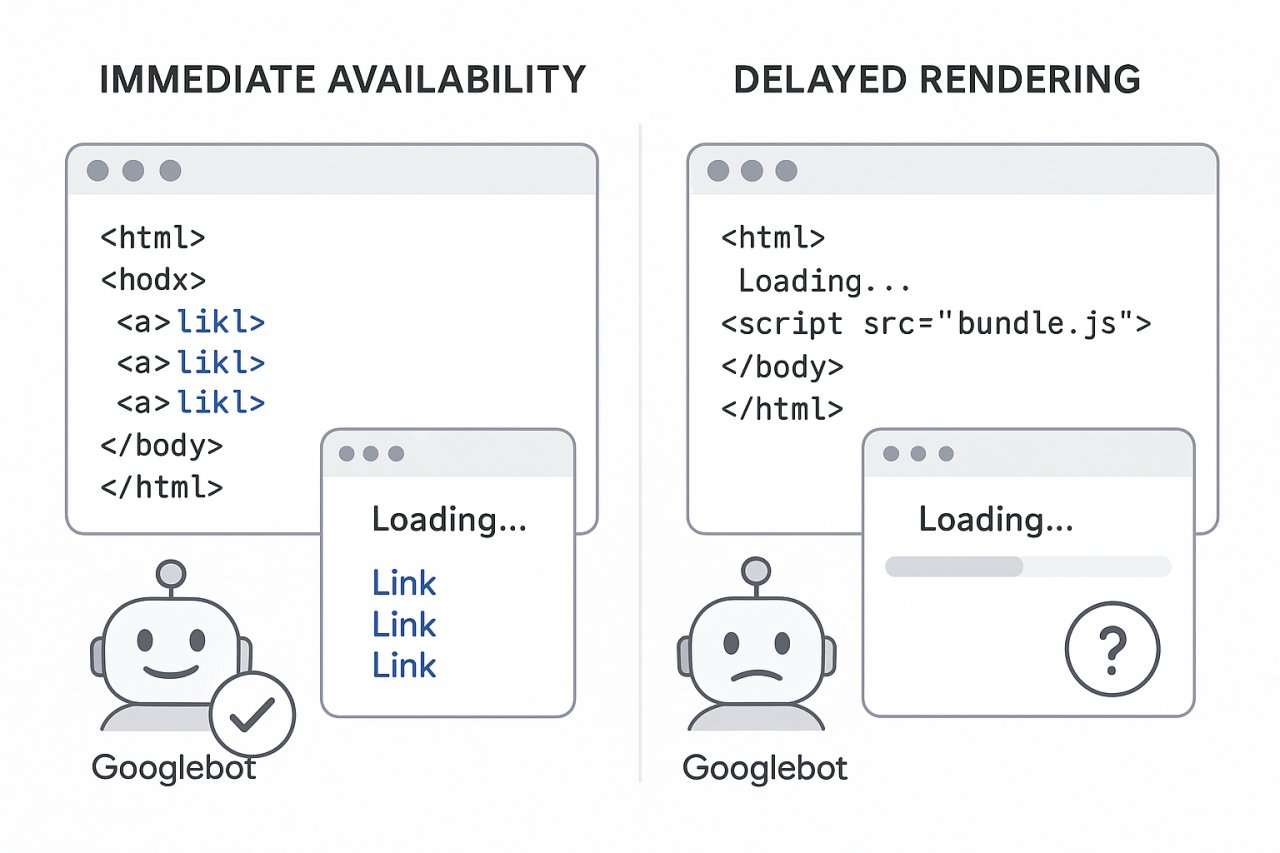
If your links don’t render in the initial HTML, they don’t count. You just made half your site architecture invisible to crawlers.
Infinite scroll is worse. It replaces pagination links — actual crawlable URLs — with JavaScript that loads more content dynamically. Google might crawl those URLs if they’re in your sitemap. Or it might not. You just gambled your entire archive structure on maybe.
JavaScript-heavy themes that delay rendering
Modern WordPress themes love JavaScript navigation menus, dynamic sidebars, Ajax-loaded content blocks. Looks slick. Renders slow. And if your internal links are buried in a JS bundle that executes 2.4 seconds after page load, they might as well not exist for SEO.
Googlebot can execute JavaScript now. But it’s expensive and slow. It doesn’t wait around for your deferred scripts to rebuild your navigation. It crawls the initial HTML and moves on.
If your critical internal links require JavaScript to render, you’re relying on Google’s second-wave indexing system — the slow, unreliable one.
CDN caching that freezes your site architecture
Cloudflare and similar CDNs cache your pages at edge locations worldwide. Blazing fast delivery. But when you publish new content, those edge caches don’t automatically update your internal link structure across every cached page.
You might set a 24-hour cache TTL. That means your new post is orphaned for a full day on cached versions of your pillar pages. Google might find it via XML sitemap. Or it might wait until the cache expires.
You optimized for speed. You broke discovery.
How to Optimize Without Sacrificing Internal Linking
Enough problems. Here’s how to actually get fast without gutting your SEO.
Pick the right caching plugin
Not all caching plugins treat internal links equally. WP Rocket and WP Super Cache both offer cache preloading — they rebuild cached pages when you publish new content. Enable it.
That means when you hit publish, the plugin crawls your sitemap and regenerates cached HTML for key pages. Your new post gets linked from related content immediately, not whenever cache expires.
Configure preload to prioritize:
- Homepage and main navigation pages
- Pillar pages and category archives
- High-traffic posts that link to new content
Skip preloading your entire site — that defeats the purpose of caching. Focus on pages that form your linking backbone.
Defer JavaScript, don’t eliminate it
Defer non-critical JavaScript so it loads after your HTML renders. Don’t remove it entirely just to shave 200ms off your load time.
Your internal links should be static HTML, rendered server-side. No JavaScript required. That means related posts, contextual links, and navigation elements need to exist in the initial page source.
Themes that build everything client-side? Replace them. You can’t optimize your way around fundamentally broken architecture.
Static HTML links beat dynamic any day
If you’re dynamically generating internal links with JavaScript or Ajax, stop. Render them server-side in PHP. Yes, it’s slower to generate. Cache the output.
The best internal link is one that exists in the HTML source before any JavaScript executes.
That means Googlebot sees it instantly. Users see it instantly. Your LCP isn’t affected because links are lightweight. And you’re not gambling on whether Google’s JavaScript renderer feels like executing your bundle today.
Automating Internal Links Without the Performance Hit
Manual internal linking doesn’t scale. You publish 50 posts a month, each one should link to 5-8 relevant existing articles. That’s 250+ linking decisions monthly.
You’ll skip it. Everyone does.
Why manual linking doesn’t scale
Even disciplined content teams can’t maintain consistent internal linking as a site grows past 500 posts. You forget which articles exist. You don’t know which pages need more authority. You link to the same five pillar pages repeatedly and ignore the rest.
Automation solves this — if you pick the right tool. Most related posts plugins are performance nightmares. They query your entire database on every page load, calculate similarity scores in real-time, and murder your TTFB.
What to look for in a lightweight linking solution
A smart internal linking system does the heavy lifting once — when you publish — then caches the results. No real-time calculations. No database queries on every page view.
Tools like AI Internal Links use semantic analysis to find relevant connections, but they compute those relationships in the background and inject static HTML links into your content. From a performance perspective, it’s identical to manual linking. Zero query overhead. Zero JavaScript. Just HTML anchors.
That’s the only approach that works at scale. Anything else trades SEO value for speed, or speed for SEO value. You need both.
The trick is separating link discovery (expensive, done once) from link rendering (cheap, done every page load). Good tools do the expensive work asynchronously. Bad tools do it every time someone visits your site.
The Real Trade-Off You Should Be Making
Here’s what no one tells you: the performance-SEO conflict only exists if you’re optimizing surface metrics.
Core Web Vitals are table stakes. Get above 75th percentile and stop obsessing. A site that scores 85 on mobile with killer internal linking will crush a site that scores 95 with orphaned content.
The real trade-off? Time. You can manually build perfect internal links and perfect performance optimization. Or you can automate the parts that scale (linking, cache management, image optimization) and spend your time on strategy — keyword research, content planning, topical authority building.
Speed matters. Links matter more. Build systems that deliver both, or you’re optimizing toward mediocrity.
Your Core Web Vitals report will never tell you that you’re losing rankings because your new posts are orphaned for 18 hours while cache expires. But your traffic graph will.