

Table of Contents
- Why Most WordPress Keyword Research Fails
- The Three-Layer Keyword Framework
- Tools That Actually Matter for WordPress Research
- The Clustering Strategy That Changes Everything
- Implementation: From Keywords to WordPress
- Competitive Research Without Copying
- Tracking What Actually Matters
- The Biggest Mistakes to Avoid
Why Most WordPress Keyword Research Fails
Here’s what typically happens: you install a plugin, check monthly search volume, pick terms with low competition scores, and start writing. Three months later, you’re nowhere on Google.
The problem isn’t your tools. It’s your approach.
Keyword research for WordPress sites requires thinking like a site architect, not a content factory. You’re not just finding topics — you’re building a topical map that tells Google what you’re an authority on. Every keyword should connect to others. Every post should strengthen your site’s overall relevance signal.
This isn’t about gaming algorithms. It’s about understanding what your audience actually needs and organizing your content to deliver it better than anyone else.
The Three-Layer Keyword Framework
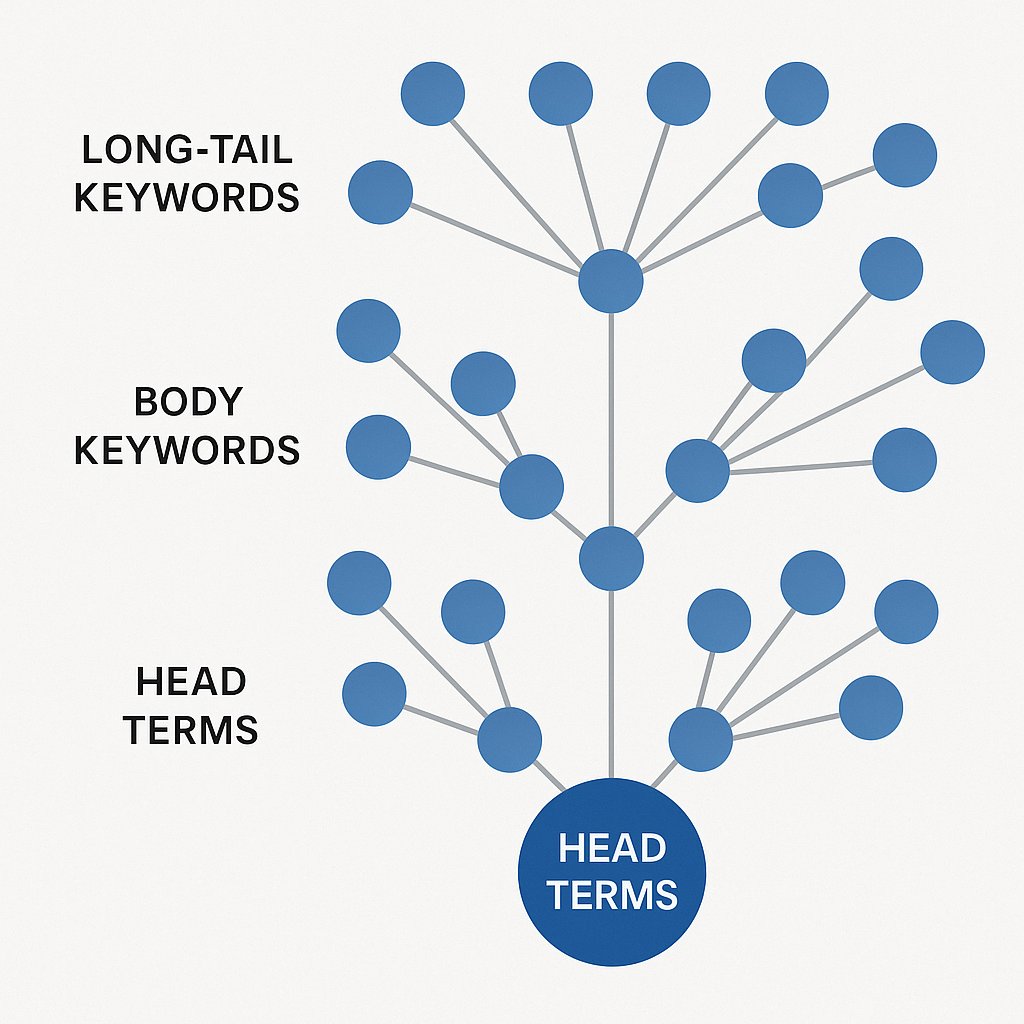
Head Terms: Your Site’s Foundation
Head terms are the 1-2 word phrases that define your core topics. For a fitness blog, that’s terms like weight loss, strength training, or nutrition. For a SaaS company, maybe project management or team collaboration.
You won’t rank for these tomorrow. That’s not the point.
Head terms anchor your content strategy. They tell you what categories to build, what pillar content to create, and how to structure your site’s information architecture. Think of them as the chapters in your book — not individual articles, but organizing principles.
Body Keywords: Where Rankings Actually Happen
Body keywords typically contain 2-4 words and represent specific subtopics within your head terms. These are phrases like beginner strength training, weight loss plateau, or high protein meal prep.
This is where you’ll win most of your organic traffic. Body keywords have enough volume to matter but narrow enough intent that you can genuinely serve it better than massive sites.
The key: cluster them. Don’t create random posts targeting random body keywords. Group related terms together and plan content clusters where multiple posts support each other topically.
Long-Tail Terms: Your Quick Wins
Long-tail keywords are 4+ word phrases with ultra-specific intent. Something like how to break through a weight loss plateau after 40 or best beginner strength training program for women over 50.
These terms have low individual volume — maybe 50-200 searches per month. But they convert like crazy because the searcher knows exactly what they want. And collectively, they add up fast.
Here’s the strategy most sites miss: long-tail terms aren’t separate content pieces. They’re H2 and H3 sections within your body keyword articles. One comprehensive post on weight loss plateau can rank for dozens of related long-tail variations.
Tools That Actually Matter for WordPress Research
Google Keyword Planner: Still Underrated
Yes, it’s basic. Yes, everyone uses it. That doesn’t make it less effective.
Google Keyword Planner gives you data directly from Google’s search database — not third-party estimates. The volume ranges are broad, but the keyword suggestions reveal what Google considers semantically related.
Best use: start with a seed keyword and export everything. Don’t filter yet. Grab the whole list (usually 200-800 variations) and dump it into a spreadsheet. You’re looking for patterns, not individual gems.
Look for unexpected modifiers. If you search WordPress SEO and see lots of results for WordPress SEO checklist, WordPress SEO tips for beginners, and WordPress SEO mistakes — that tells you something. Searchers want actionable, checklist-style content. Give them that.
Ahrefs: When You Need Competitive Intelligence
Ahrefs excels at one thing: showing you what’s actually ranking and why. The keyword explorer is fine, but the real power is in the Content Gap and Site Explorer features.
Run a Content Gap analysis between your site and three competitors. It reveals keywords they rank for that you don’t. But don’t mindlessly chase every gap. Look for patterns.
If all three competitors rank for variations of internal linking strategy and you have zero presence there, that’s a legitimate gap worth filling. If they rank for random one-off terms with no common thread, ignore it.
SEMrush: For Search Intent Analysis
SEMrush’s keyword magic tool segments results by question, comparison, and preposition modifiers. That matters more than most people realize.
When you see 30 question-based variations of your seed keyword, that’s Google telling you people want explanatory content. Lots of comparison terms? Your audience is shopping around. Preposition modifiers? They’re looking for specific use cases.
This shapes your content format before you write a word. A question-heavy cluster needs FAQ-style structure. Comparison intent needs tables, pros/cons lists, clear recommendations.
The Clustering Strategy That Changes Everything
Stop Creating Random Posts
Most WordPress sites are keyword junkyards. Someone finds 50 decent keywords and creates 50 unrelated posts. Zero topical authority. Zero internal linking logic. Zero chance of competing with sites that actually plan their content.
Keyword clustering fixes this.
Group related keywords by search intent and topical similarity, not just by shared words. Tools like Keyword Insights or MarketMuse can automate clustering, but you can do it manually in a spreadsheet.
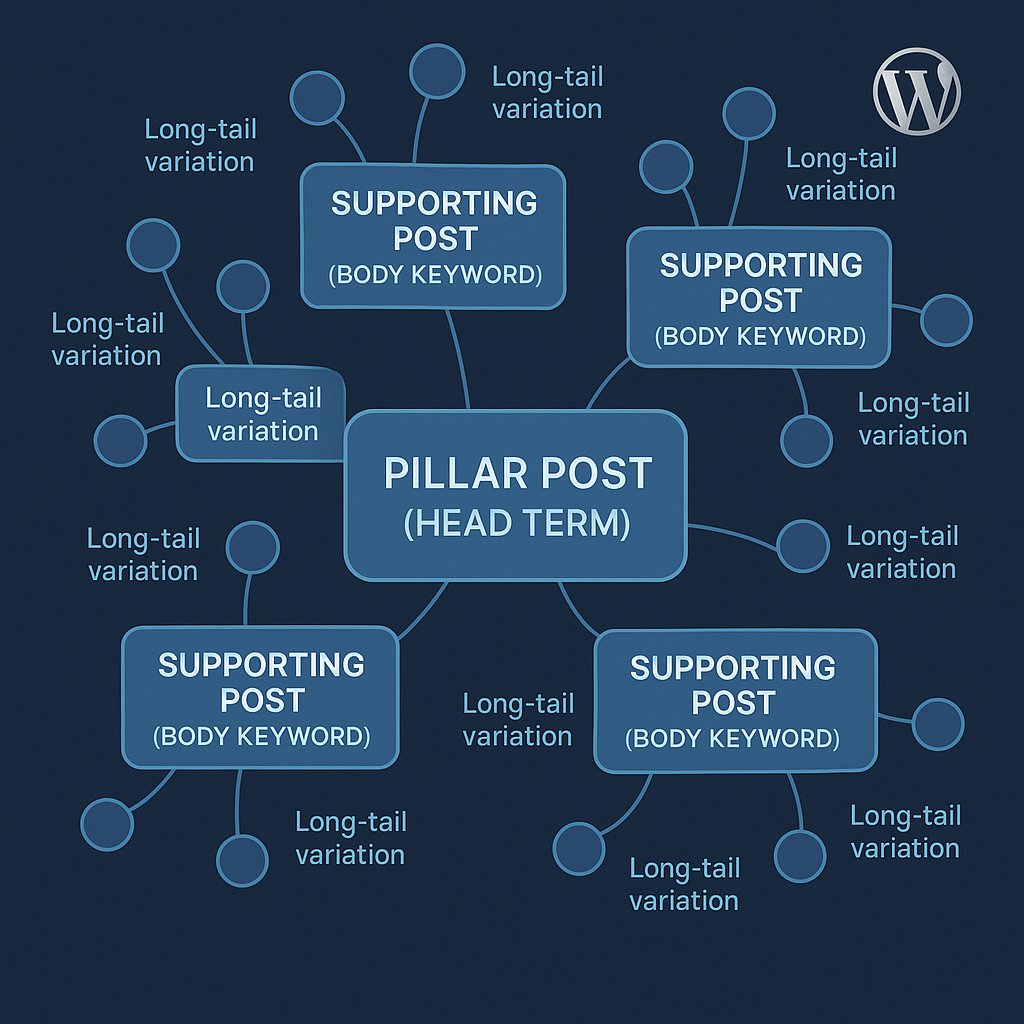
Start with your body keywords. For each one, identify 5-10 long-tail variations that could be H2 sections within the same article. Then identify 3-5 related body keywords that deserve their own posts but support the same head term.
That’s your cluster. Now you have a pillar post (the head term), 3-5 supporting posts (body keywords), and each supporting post targets 5-10 long-tail variations through its structure.
Internal Linking Becomes Obvious
Here’s where most WordPress sites leave rankings on the table. They do keyword research and content creation but ignore the connective tissue.
When you build content in clusters, internal linking stops being a guessing game. Every supporting post should link to the pillar. Related supporting posts should link to each other. Your pillar post should link out to all supporting content.
This creates a topical hub that Google can’t ignore. You’re not just targeting keywords — you’re demonstrating comprehensive coverage of a subject.
Implementation: From Keywords to WordPress
Map Keywords to WordPress Categories
Your WordPress category structure should mirror your head terms. Not literally — don’t create a category called weight loss if that’s too broad. But your categories should represent distinct topical areas, each supported by multiple keyword clusters.
This isn’t just for user navigation. Google uses category structure as a relevance signal. Well-organized sites with clear topical boundaries rank better than sites with one giant Blog category containing everything.
Use tags sparingly. They’re useful for cross-cluster connections but too many create duplicate content issues and dilute link equity.
Create a Keyword-to-URL Mapping Sheet
Before writing anything, map every target keyword to a specific URL. This prevents keyword cannibalization — the silent ranking killer where multiple pages compete for the same term.
Spreadsheet columns: target keyword, URL, content status, word count, parent cluster, last updated. Update it as you publish.
When you find a new keyword opportunity, check the sheet first. Maybe you already have a post that could rank for it with a content refresh. Maybe it fits as an H2 in an existing article. You don’t need new content for every keyword.
Automate the Connections
Here’s where execution usually breaks down. You have great keyword research. You’ve built content clusters. You know which posts should link to each other. But actually implementing dozens of contextual internal links across 50+ posts? That’s where good strategy dies.
This is where tools like AI Internal Links become practical necessities. Instead of manually auditing every post to add relevant links every time you publish something new, automation handles the grunt work. Your keyword clusters inform the linking strategy, but you’re not spending hours implementing it.
The best keyword research means nothing if your content sits in isolation. Strategic internal linking amplifies every keyword decision you make.
Competitive Research Without Copying
Analyze Top-Ranking Pages, Not Just Keywords
When you find a target keyword, don’t just note the search volume and move on. Open the top 5 results and actually read them.
What structure do they use? How comprehensive are they? What angle did they take? Most importantly: what did they miss?
The best opportunities are keywords where ranking content is mediocre. If the top result is a thin 400-word post that barely answers the query, you can dominate that term with comprehensive coverage.
Look for Content Gaps in Format
Sometimes the keyword is well-covered, but all existing content uses the same format. If every ranking page is a listicle, maybe a deep how-to guide wins. If everything is text-heavy theory, maybe a practical, example-driven approach stands out.
Google doesn’t reward you for making the same content that already ranks. It rewards you for making content searchers engage with more.
Check engagement metrics if you can access them. High rankings with low average session duration? That keyword’s begging for better content.
Tracking What Actually Matters
Stop Obsessing Over Individual Rankings
Most people track rankings for specific target keywords and get discouraged when they fluctuate. That’s not how modern SEO works.
Track topical visibility instead. If your weight loss cluster includes 5 posts targeting 30 total keywords, you don’t care if one term drops from position 4 to position 7. You care about overall traffic from that cluster and whether it’s growing.
Use Google Search Console to view impressions and clicks by page or category. That’s your real signal.
Monitor Cluster Performance
Set up custom segments in Google Analytics (or GA4 properties) for each content cluster. Track how traffic to those clusters converts compared to random blog traffic.
You’ll usually find that cluster traffic converts better because visitors go deeper. Someone who reads your pillar post and clicks through to two supporting articles is way more engaged than someone who lands on one random post and bounces.
That engagement signals to Google that your site deserves higher rankings. The flywheel effect starts spinning.
The Biggest Mistakes to Avoid
Chasing Volume Over Intent
A keyword with 10,000 monthly searches means nothing if the intent doesn’t match your content. Someone searching WordPress isn’t looking for your how-to guide on WordPress SEO plugins. They’re probably looking for wordpress.org.
Prioritize keywords where you can genuinely serve the intent better than anyone else. That’s rarely the highest-volume option.
Ignoring Update Cycles
Keyword research isn’t a one-time project. Search trends shift. Competitors publish new content. Your own site authority grows, opening new keyword opportunities.
Revisit your keyword mapping quarterly. Look for new clustering opportunities. Identify old posts that could be refreshed to target better terms. SEO is maintenance, not a launch campaign.
Forgetting Local Modifiers
If you serve specific geographic areas, local keyword variations are often your easiest wins. They have lower competition and higher intent.
A generic term like personal trainer is nearly impossible to rank for. But personal trainer Seattle Capitol Hill? That’s achievable. And everyone searching that term is a potential customer in your service area.
Keyword research for WordPress isn’t complicated. It’s just rarely done strategically. Most sites collect keywords like baseball cards — lots of individual pieces with no cohesive plan. Build clusters. Map to site structure. Connect with internal links. That’s the entire playbook.