

Table of Contents
Featured snippets aren’t lottery wins. They’re engineered outcomes.
Google doesn’t randomly pick content for position zero. It scans for specific patterns: direct answers to questions, structured formatting, and topical authority signals that confirm you’re the real deal on a subject. WordPress gives you the architecture to nail all three, but most site owners fumble the execution.
Here’s what actually works.
What Featured Snippets Really Reward
Forget the mythology about snippet optimization being some dark art. Google wants one thing: the fastest path to a complete answer. If your content delivers that better than the nine other results on page one, you’re in the game.
The snippet types you see — paragraphs, lists, tables, videos — aren’t random formats Google invented. They’re answer frameworks matched to query intent. Someone searching “how to change WordPress permalinks” expects steps. Someone asking “what is a permalink” expects a definition. Match the format to the question type, and you’re halfway there.
Most WordPress sites fail because they bury answers in fluffy intros or split them across multiple sections. Google won’t piece together your answer from scattered paragraphs. It wants one clean block it can extract and display.
Paragraph Snippets: The 40-60 Word Sweet Spot
Paragraph snippets dominate “what is” and “why does” queries. Your target: 40-60 words that answer the question completely, positioned right after an H2 or H3 that mirrors the search query.
Example: If you’re targeting “what is schema markup,” don’t write three paragraphs building up to the definition. Lead with it.
Schema markup is code that helps search engines understand your content’s meaning — like tagging a recipe so Google knows it’s a recipe, not just a blog post about food.
That’s it. One sentence. Complete answer. Google can extract it cleanly.
List Snippets: Numbered Steps and Bullet Points
List snippets appear for “how to” queries and comparison searches. Use numbered lists for processes (how to install a plugin) and bullet lists for features or options (types of WordPress hosting).
The trick: introduce the list with an H2 or H3 that’s nearly identical to the target query. If the search is “how to add schema to WordPress,” your heading should be “How to Add Schema to WordPress” — not “Schema Implementation Guide.”
Google’s algorithm looks for that semantic match between query and heading, then scans the list below it.
Table Snippets: Comparison and Data Queries
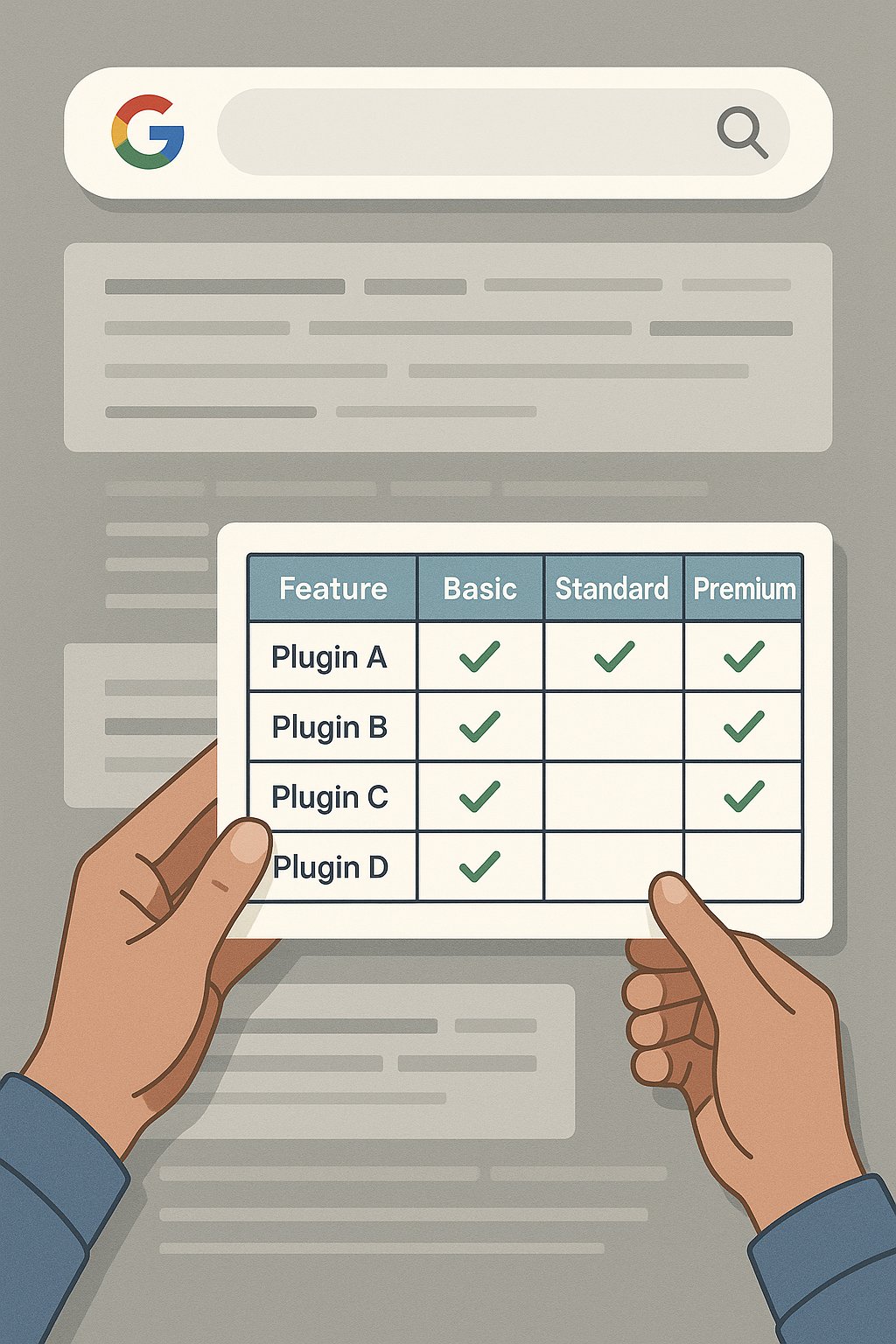
Table snippets appear when users compare options or need quick data lookups. WordPress plugin comparisons, pricing tiers, and spec sheets all trigger table snippets.
Format matters more than content here. Use clean HTML tables with clear headers. The first column should contain the thing being compared (plugin names, hosting types). Subsequent columns should contain comparable attributes (price, features, ratings).
The Architecture Behind Snippet Success
You can’t optimize for snippets in isolation. Google awards position zero to pages that already demonstrate topical authority — and that authority flows through your site’s internal link structure.
Think of it like this: if you’re ranking #4 for “WordPress security best practices,” Google sees you as somewhat relevant. But if that page links to and from a cluster of related security content (plugin hardening, firewall setup, user role management), you’re signaling deeper expertise. That’s the difference between staying at #4 and jumping to position zero.
Most WordPress sites have orphaned content — great articles that sit disconnected from the rest of their topic cluster. Google can’t assess your full authority on a subject if your content doesn’t reference itself strategically.
Why Internal Linking Determines Snippet Eligibility
Internal links do two things for snippet optimization. First, they transfer authority from your strongest pages to newer content, accelerating how quickly Google considers that new content for snippets. Second, they create topical clusters that prove you’re not just ranking for one keyword by accident.
If your snippet-targeted page on “WordPress caching” links to pages about CDNs, database optimization, and lazy loading — and those pages link back — you’ve built a knowledge hub. Google’s algorithm interprets that as authority depth.
The manual approach: mapping these links across dozens of posts, updating old content to point to new, keeping anchor text relevant. It works, but it’s tedious.
Automation changes the game. Tools like AI Internal Links analyze your content library and build these topic clusters automatically, keeping your link structure optimized as you publish. It’s the difference between hoping Google sees your authority versus engineering it into your site architecture.
Content Freshness and Snippet Retention
Earning a snippet isn’t permanent. Google re-evaluates snippet choices constantly. If a competitor updates their content with fresher information or better formatting, they can steal your position zero.
WordPress makes content updates easy — use it. Add a “last updated” date to snippet-targeted posts. Refresh examples annually. If you’re targeting “best WordPress themes,” that list better reflect current options, not plugins from three years ago.
Set a calendar reminder to review your snippet-winning posts every six months. Even small updates signal freshness to Google.
WordPress-Specific Optimization Tactics
WordPress gives you structural advantages other platforms don’t. Gutenberg blocks, for instance, let you format content in ways that align perfectly with snippet formats. The table block, the list block, the quote block — these aren’t just layout tools. They’re semantic markup Google reads.
Your theme matters too. Snippet optimization requires clean HTML output. Bloated themes that wrap every element in unnecessary divs confuse Google’s content extraction. Use a lightweight theme like GeneratePress or Kadence that outputs semantic HTML5.
The Heading Hierarchy Mistake Everyone Makes
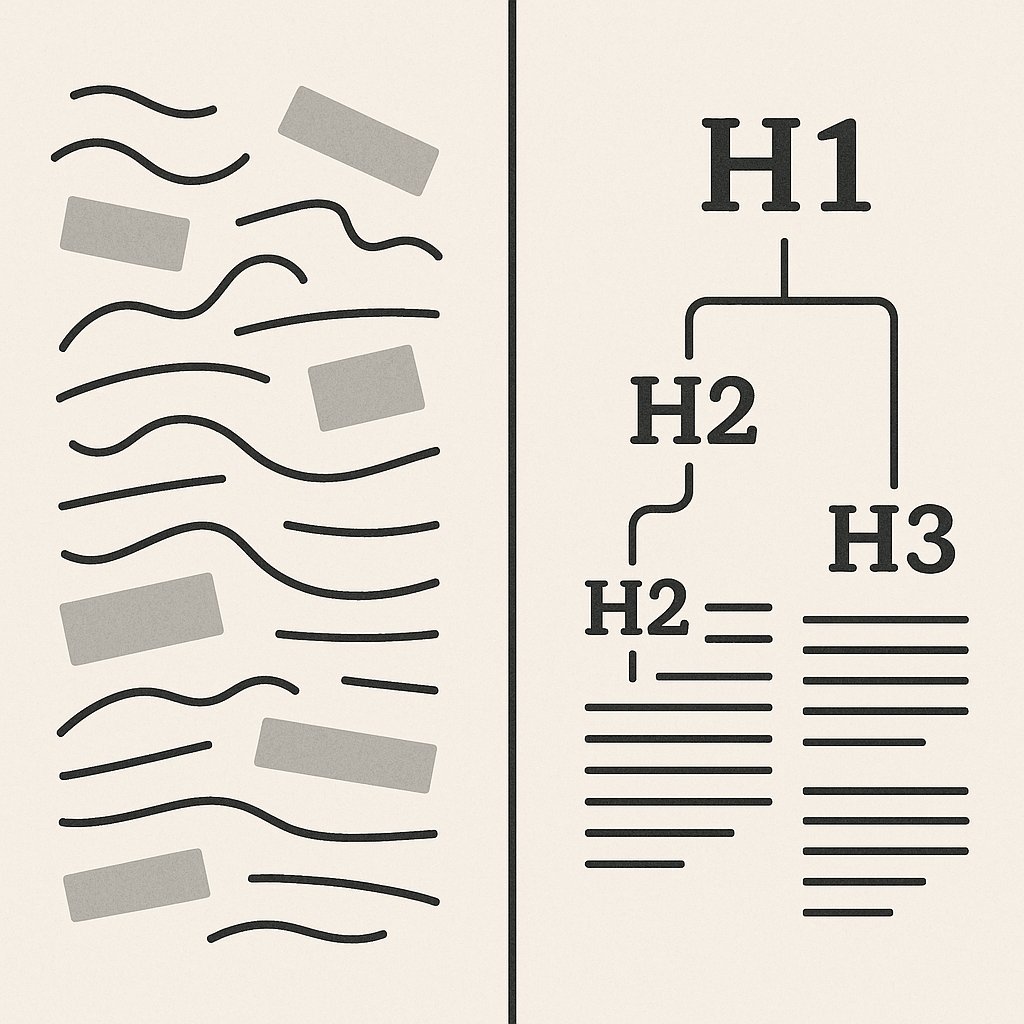
Google extracts snippets based partly on heading structure. If your H2s and H3s don’t directly mirror common search queries, you’re making Google work harder to match your content to user intent.
Bad heading: “Our Thoughts on Caching”
Good heading: “How WordPress Caching Improves Site Speed”
The second version matches how people search. It’s also clearer for snippet extraction.
Use one H1 per page (your title), then deploy H2s for major sections and H3s for subsections. Never skip levels (H2 to H4). Google uses this hierarchy to understand content structure.
Structured Data and Schema Implementation
Schema markup isn’t required for featured snippets, but it helps. Structured data gives Google explicit context about your content type — article, recipe, product, FAQ, how-to.
For WordPress, schema plugins handle the heavy lifting. Rank Math and Yoast SEO both auto-generate schema for posts and pages. The key is choosing the right schema type for your content.
How-to queries? Use HowTo schema. It tells Google exactly where your steps are. FAQ pages? FAQ schema markup makes each question eligible for its own snippet. Product reviews? Product schema with ratings can trigger review snippets.
FAQ Schema: The Low-Hanging Snippet Fruit
FAQ schema is criminally underused. Add an FAQ section to any informational post, mark it up properly, and each question becomes a snippet candidate.
WordPress block editors make this trivial. Use an accordion block or a dedicated FAQ block (many SEO plugins include one). Structure each question as an H3, answer it in 2-3 sentences directly below, and enable FAQ schema.
Google often pulls these into “People Also Ask” boxes or dedicated FAQ snippets. It’s position zero through the side door.
Common Schema Mistakes That Kill Snippet Chances
Don’t add schema for content types you don’t have. If your post isn’t actually a recipe, don’t use Recipe schema just because it might trigger a rich result. Google penalizes schema spam.
Validate your schema with Google’s Rich Results Test before publishing. Broken schema is worse than no schema — it signals sloppiness to Google’s quality algorithms.
Content Formatting That Google Rewards
Formatting isn’t cosmetic. It’s semantic signaling. When you bold a key phrase, use a blockquote for a critical insight, or structure content with clear subheadings, you’re telling Google what matters most on the page.
For snippet optimization, bold your direct answers. If someone asks “how long does WordPress caching last,” and your answer is “browser cache lasts 7-30 days depending on settings,” bold that timeframe. It signals to Google (and readers) that this is the crucial data point.
The pages that win snippets aren’t always the longest or most comprehensive — they’re the ones that make answers impossible to miss.
Use white space deliberately. If your answer paragraph is buried between two dense blocks of text, separate it visually. Add a line break before and after. Google’s algorithms factor in how easily humans can extract information, and white space improves both readability and snippet-ability.
The ‘Above the Fold’ Snippet Strategy
Google often favors answers that appear early on the page. If your direct answer to a query is buried in paragraph 12, a competitor who answers it in paragraph 2 has the advantage.
Don’t bury the lead. If you’re targeting “what is WordPress multisite,” define it in the first section, right after your intro. You can elaborate later, but give Google a clean extraction point high on the page.
Avoiding Snippet Bait That Backfires
Some SEOs stuff their content with every snippet format hoping one sticks. The result: cluttered pages that confuse both Google and readers. Pick one primary snippet format per page based on the main query, then optimize relentlessly for that format.
If you’re targeting a list snippet for “WordPress security tips,” don’t also try to win a table snippet for “security plugin comparison” on the same page. One page, one snippet focus. Build separate pages for separate snippet opportunities.
Measuring and Iterating on Snippet Performance
Google Search Console shows which queries trigger your snippets under the Performance report. Filter by pages ranking in positions 1-3 — these are your snippet candidates. If you’re ranking #2 but not holding the snippet, that’s your optimization opportunity.
Click-through rate is the real metric. A snippet that earns position zero but has a lower CTR than your #3 ranking isn’t winning — it means your snippet format isn’t compelling enough. Test different answer formulations, adjust formatting, and re-check CTR in 2-4 weeks.
When to Stop Chasing a Snippet
Not every query rewards snippets with traffic. Some featured snippets are “no-click” results — they answer the question so completely that users don’t need to visit your site. If your snippet is earning position zero but CTR dropped, you’ve won a hollow victory.
Focus on queries where snippets generate clicks: how-to guides, multi-step processes, comparisons that require detail. Avoid optimizing for snippets on simple definitional queries unless you’re building brand authority, not traffic.
Featured snippets are earned through precision, not volume. One well-optimized page beats ten mediocre attempts.