
Table of Contents
The stakes are higher for online stores. A blog post that ranks on page two still gets some traffic. A product page on page two? Invisible. Zero sales.
This isn’t about gaming the system. It’s about helping search engines understand your catalog structure, matching customer search intent, and connecting related products in ways that actually make sense. Let’s break down what works.
Why E-commerce SEO Hits Different
Blog SEO and store SEO play by different rules. A blog thrives on fresh content and topical authority. An online store needs to do something harder: convince Google that a specific product page deserves to rank when thousands of competitors sell the exact same thing.
You’re competing with Amazon, eBay, and every other retailer who carries that product. The battlefield is crowded.
WooCommerce gives you control that hosted platforms like Shopify limit. You own the code. You can optimize URL structures, control internal linking architecture, and implement advanced schema markup. But that flexibility means nothing if you don’t use it strategically.
Most store owners optimize their homepage and call it done. That’s backwards. Your product and category pages are where the money lives.
Product Page Optimization That Actually Converts
Write Unique Product Descriptions
Manufacturer descriptions are poison. If you copy-paste the text that came with the product, you’re publishing duplicate content that exists on hundreds of other sites. Google has zero reason to rank yours.
Write your own descriptions. Every single one.
Focus on benefits, not features. “Stainless steel construction” is a feature. “Won’t rust even in coastal humidity” is a benefit. The second one matches what real customers search for.
Keep it scannable: short paragraphs, bullet points for specs, natural keyword usage. If you sell organic cotton t-shirts, work that phrase into the first paragraph naturally — don’t stuff it five times.
Optimize Product Titles for Search Intent
Your product title is prime real estate. It feeds into your H1 tag, your page title, and often your URL slug.
Bad: “Blue Shirt – Style #4429”
Good: “Men’s Organic Cotton T-Shirt – Navy Blue”
The second version includes searchable terms customers actually use. Nobody searches for style numbers. They search for “men’s organic cotton t-shirt” or “navy blue t-shirt organic.”
Match your title to commercial search queries. Think like a buyer, not a warehouse manager.
Image SEO Can’t Be Ignored
Product images often account for 30-40% of e-commerce traffic through Google Image Search. Yet most stores upload files named “IMG_4429.jpg” and call it done.
Rename every image before uploading: mens-organic-cotton-tshirt-navy-front.jpg. Add descriptive alt text that includes your target keyword naturally. “Navy blue organic cotton t-shirt front view” beats “blue shirt” every time.
Compress images aggressively. A 2MB product photo kills your page speed score, which directly impacts rankings. Tools like ShortPixel or Imagify handle this automatically in WordPress.
Implement Product Schema Markup
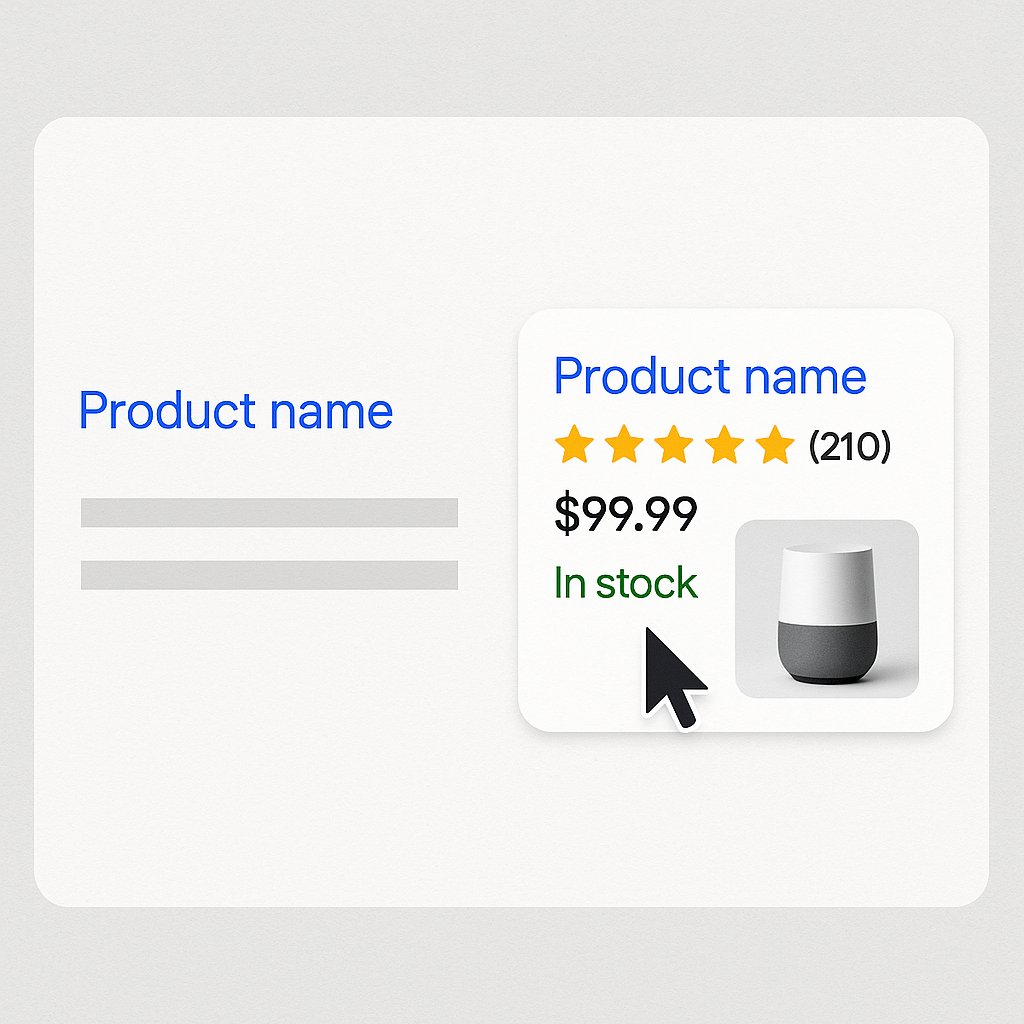
Schema tells Google exactly what it’s looking at: price, availability, reviews, brand. This powers rich snippets — those product cards with star ratings and prices that dominate mobile search results.
WooCommerce handles basic schema out of the box, but plugins like Schema Pro or Rank Math extend it. Make sure you’re marking up:
- Product name and description
- Price and currency
- Availability status (in stock, out of stock, preorder)
- Aggregate review ratings
- Brand and SKU
Rich snippets don’t directly boost rankings, but they demolish your competitors’ click-through rates. A product showing 4.5 stars gets clicked even if it ranks below a plain blue link.
Category Page Architecture That Ranks
Treat Categories Like Landing Pages
Category pages aren’t just product lists. They’re primary ranking opportunities for broader commercial keywords like “men’s organic t-shirts” or “sustainable activewear.”
Write unique intro content for every category — at least 150-200 words above the product grid. Explain what makes this category valuable, include target keywords naturally, and give Google context.
Don’t bury this content at the bottom of the page where nobody reads it. Put it at the top, or use a “read more” expandable section.
Optimize Category URLs and Titles
WooCommerce defaults to messy category URLs if you’re not careful. Lock down your permalink structure early.
Bad: yourstore.com/product-category/clothing/mens/tshirts/
Good: yourstore.com/mens-organic-tshirts/
Flatter is better. Each subfolder dilutes link equity and adds crawl depth. Keep categories as close to your root domain as possible.
Your category page title should target the main commercial keyword: “Men’s Organic Cotton T-Shirts | Sustainable & Comfortable” works better than “T-Shirts for Men – Category.”
Faceted Navigation Without the SEO Nightmare
Filter options (size, color, price range) create thousands of duplicate URL variations. Google sees yourstore.com/tshirts/?color=blue and yourstore.com/tshirts/?size=large as separate pages.
This wastes crawl budget and creates thin content issues.
Solution: use AJAX-based filtering that doesn’t change the URL, or implement canonical tags pointing back to the main category page. WooCommerce doesn’t handle this perfectly by default — you’ll need a plugin like SEO Framework or careful manual configuration.
Never let filter combinations generate indexable pages unless you’re writing unique content for each one.
Internal Linking Strategy for E-commerce
This is where most WooCommerce stores completely fail. They launch products, maybe link a few related items, and stop there.
Internal links are how you distribute authority across your catalog. They tell Google which products matter most and help customers discover items they didn’t know they needed.
Connect Products to Relevant Blog Content
If you sell running shoes, write content like “How to Choose Running Shoes for Flat Feet” and link to specific product pages. That blog post can rank for informational queries, then funnel qualified traffic to transactional pages.
Most stores do this backwards: they link from products to blog posts. That’s fine, but the real SEO value flows from high-authority content pages to products.
Create a hub-and-spoke model: comprehensive guides (hubs) linking to relevant products (spokes). Update old blog posts regularly to link to new products.
Master Product-to-Product Linking
Related products, upsells, and cross-sells aren’t just conversion tactics. They’re internal linking opportunities.
But don’t rely only on WooCommerce’s automated “You may also like” widget. Those tend to be shallow and algorithmic. Manually curate links between complementary products:
- Running shoes → running socks, insoles, GPS watches
- Camera body → compatible lenses, memory cards, camera bags
- Coffee maker → coffee beans, filters, grinders
Write brief contextual sentences introducing these links. “Pair these shoes with our moisture-wicking socks” gives Google and users more context than a plain widget.
Automate Internal Linking at Scale
Manual linking works for 50 products. For 500 or 5,000? You need automation.
This is where tools like AI Internal Links become essential. They analyze your content, identify semantic relationships, and automatically create contextual links between products, categories, and blog posts. You’re not just linking randomly — the system understands which products naturally relate to which content.
The time savings are massive, but the real win is consistency. Manual linking gets abandoned after the first month. Automated systems keep your internal link structure healthy as your catalog grows.
Don’t Forget Breadcrumbs
Breadcrumb navigation helps users and creates structured internal links that Google values. Make sure yours are implemented with proper schema markup.
Home > Men’s Clothing > Organic T-Shirts > Navy Cotton Tee
Each step is a clickable link that reinforces your site hierarchy. Enable breadcrumbs in your theme or use a plugin like Yoast or Rank Math.
Technical Essentials for WooCommerce SEO
Speed Matters More for E-commerce
Page load time directly impacts conversion rates. Amazon found that every 100ms of latency cost them 1% in sales. For WooCommerce stores, slow load times are a double penalty: lower rankings and higher bounce rates.
Priorities:
- Quality hosting: Shared hosting can’t handle WooCommerce traffic spikes. Consider managed WordPress hosts like Kinsta or WP Engine.
- Caching plugin: WP Rocket, W3 Total Cache, or LiteSpeed Cache. Non-negotiable.
- Image compression: Already mentioned, but worth repeating. Huge product photos kill performance.
- Lazy loading: Load images only as users scroll down. WooCommerce supports this natively now.
- Minimize plugins: Every plugin adds overhead. Audit ruthlessly. Do you really need that countdown timer widget?
Run Google PageSpeed Insights monthly. Aim for 90+ on mobile. It’s achievable.
Fix Crawl Budget Issues
Large catalogs create crawl budget problems. Google allocates limited resources to crawl your site. If it wastes time on useless pages (old session IDs, infinite filter combinations, thank-you pages), it might miss new products.
Use robots.txt to block:
- Cart and checkout pages
- My account pages
- Search result pages
- Filter URLs (unless you’re optimizing them)
Submit your product and category pages via XML sitemaps. WooCommerce SEO plugins generate these automatically. Update them whenever you add new products.
Handle Out-of-Stock Products Correctly
Deleting out-of-stock product pages destroys any SEO value they built. Bad move.
Instead: keep the page live, mark it as out of stock with schema markup, and offer alternatives or a restock notification signup. This preserves rankings and gives customers options.
For permanently discontinued products, 301 redirect to the closest alternative or the parent category. Never let these pages return 404 errors if they have backlinks or ranking history.
Content Strategy Beyond Product Pages
You can’t build topical authority with product pages alone. Google rewards sites that demonstrate expertise across a topic, not just transactional pages.
Create buying guides, comparison posts, and how-to content. “Best Running Shoes for Beginners” ranks higher and drives more qualified traffic than any single product page.
These content pieces also solve a critical problem: they rank for informational queries early in the customer journey, building brand awareness before buyers know exactly what they want.
Link from these guides to your products aggressively. That’s the entire point.
Publish consistently. One epic guide per quarter beats ten mediocre posts per month. Quality and depth win in e-commerce content.
Measure What Matters
Vanity metrics like total traffic mean nothing if your revenue stays flat. Track:
- Organic revenue: Sales from organic traffic, not just visits
- Product page rankings: Are your hero products visible for commercial keywords?
- Category page performance: Track impressions and CTR in Search Console
- Internal link distribution: Are new products getting linked from established pages?
Google Analytics 4 lets you track e-commerce events natively. Set it up properly from day one. You need to know which landing pages convert and which ones hemorrhage traffic.
Most stores optimize for rankings when they should optimize for revenue per organic visitor. A product ranking #8 that converts at 5% is more valuable than one ranking #3 that converts at 0.5%.
The Long Game
E-commerce SEO isn’t a one-time setup. Your competitors are optimizing. Google’s algorithm evolves. Customer search behavior shifts.
But the fundamentals stay consistent: unique content, strategic internal linking, technical excellence, and content that serves real search intent. Nail those, and your WooCommerce store can compete with anyone.
Start with your best-selling products. Optimize those pages completely before moving to the long tail. Build your internal linking structure methodically. Speed up your site. Then scale.
The store owners who treat SEO as an ongoing practice, not a launch checklist, are the ones who win the long game.