
Table of Contents
- Why Most WordPress Sites Get Internal Linking Wrong
- The Anatomy of a WordPress Internal Linking Strategy That Actually Works
- Anchor Text Optimization: The Part Everyone Skips
- How AI Changes the Internal Linking Game
- Step-by-Step: Building Your Strategy Today
- Your Internal Linking Strategy Is Infrastructure, Not Tactics
Most WordPress sites treat internal linking like an afterthought — a quick copy-paste of a URL into a paragraph, a Related Posts widget at the bottom, maybe a sitemap if you’re feeling thorough. But internal linking isn’t decoration. It’s architecture. And when you’re publishing at scale, manual linking doesn’t just slow you down. It breaks.
This guide walks through how to build a WordPress internal linking strategy that scales with your content, uses AI to automate the heavy lifting, and actually improves rankings instead of just ticking an SEO checkbox.
Why Most WordPress Sites Get Internal Linking Wrong
The typical approach looks like this: you publish a new post, remember you should add internal links, scan your recent articles, drop in 2-3 links to vaguely related posts, and move on. Six months later, that post is still only linked from two places. Meanwhile, your homepage links to everything, your oldest posts hoard all the link equity, and Google’s crawlers waste time on tag archives instead of your money pages.
It’s not laziness. It’s a system problem.
The Spreadsheet Problem
Some SEO pros try to solve this with spreadsheets. They map out pillar pages, list supporting articles, assign anchor text in advance. It works — until you hit 50 posts. Then the spreadsheet becomes a second full-time job. You’re updating cells instead of writing content, and the strategy you built in January is already outdated by March.
Spreadsheets don’t scale because they’re static. Your site isn’t.
Manual Links Don’t Scale
Even if you’re disciplined about adding internal links as you publish, you’re only solving half the problem. What about the 200 posts you already published? Each new article is a potential linking opportunity for old content, but going back to update everything manually? That’s not a strategy. That’s a backlog you’ll never clear.
And here’s the real kicker: when you rely on memory and manual effort, you default to linking the same 10-15 posts over and over. Your deep content — the stuff that could be ranking — stays orphaned.
The Anatomy of a WordPress Internal Linking Strategy That Actually Works
A real internal linking strategy has three layers: architecture (what links to what), anchor optimization (how you phrase those links), and automation (how you maintain it without burning out). Most people skip straight to tactics without laying the foundation. Start with structure.
Start with Pillar Pages, Not Homepage
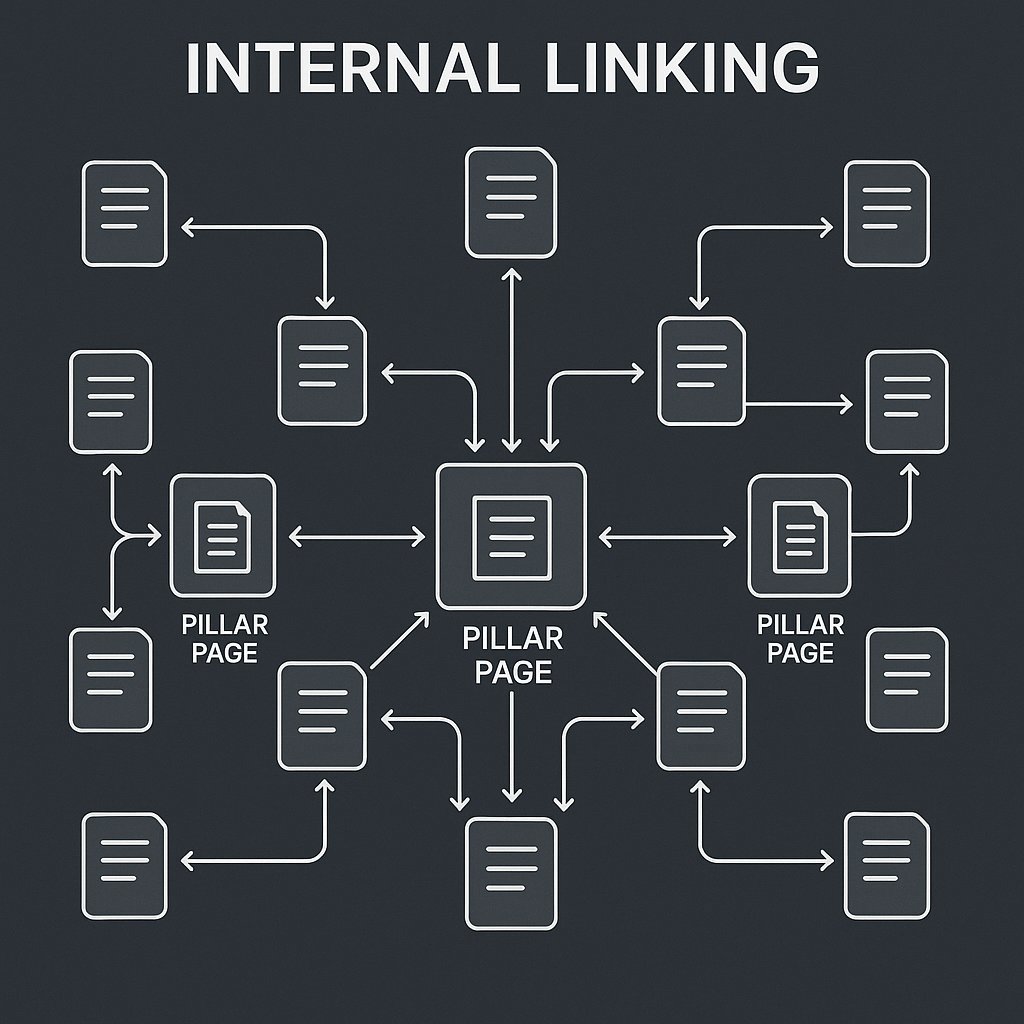
Your homepage shouldn’t be your hub. It’s a landing page, not a map. Instead, identify 3-5 pillar pages — comprehensive guides on your core topics. These are the pages you want ranking for head terms. Everything else should support them.
For example, if you run a WordPress performance blog, your pillars might be:
- Complete Guide to WordPress Speed Optimization
- WordPress Hosting: What Actually Matters for Performance
- Core Web Vitals for WordPress: The Full Breakdown
Every related post you publish — whether it’s about caching plugins, CDN setup, or image optimization — should link back to the relevant pillar. Not just once, buried at the bottom. Early in the post, with natural anchor text that tells readers (and Google) what they’ll find.
Map Your Topical Clusters First
Once you’ve defined pillars, group your existing content into clusters around those topics. This isn’t about categories or tags — WordPress taxonomies are for users, not for Google. You’re building a semantic web of related articles.
Look at your post list and ask: which posts support Pillar A? Which ones expand on a subtopic from Pillar B? Which ones are standalone (and maybe shouldn’t be)? You don’t need a tool for this yet. A simple spreadsheet works at this stage — not to maintain links, but to see the gaps.
You’ll probably find orphan posts that don’t fit anywhere. That’s useful data. Either rework them to fit a cluster, merge them into a pillar, or deprecate them.
Identify Orphan Pages Before You Build
An orphan page is any post with zero or one internal link pointing to it. These pages are invisible to Google’s crawlers unless they’re in your sitemap — and even then, they carry no authority because nothing on your site signals they matter.
Run a crawl with Screaming Frog or use Google Search Console’s Internal Links report. Sort by fewest inbound links. Anything with 0-2 internal links is a candidate for either aggressive linking or deletion. If a post is worth keeping, it’s worth linking to from at least 3-5 contextually relevant articles.
Don’t just link to orphans from your homepage or a hub page. That’s a patch, not a fix. Connect them to the posts your audience is already reading.
Anchor Text Optimization: The Part Everyone Skips
You’ve planned your architecture. You know what should link where. Now comes the part that separates good internal linking from great: how you phrase those links.
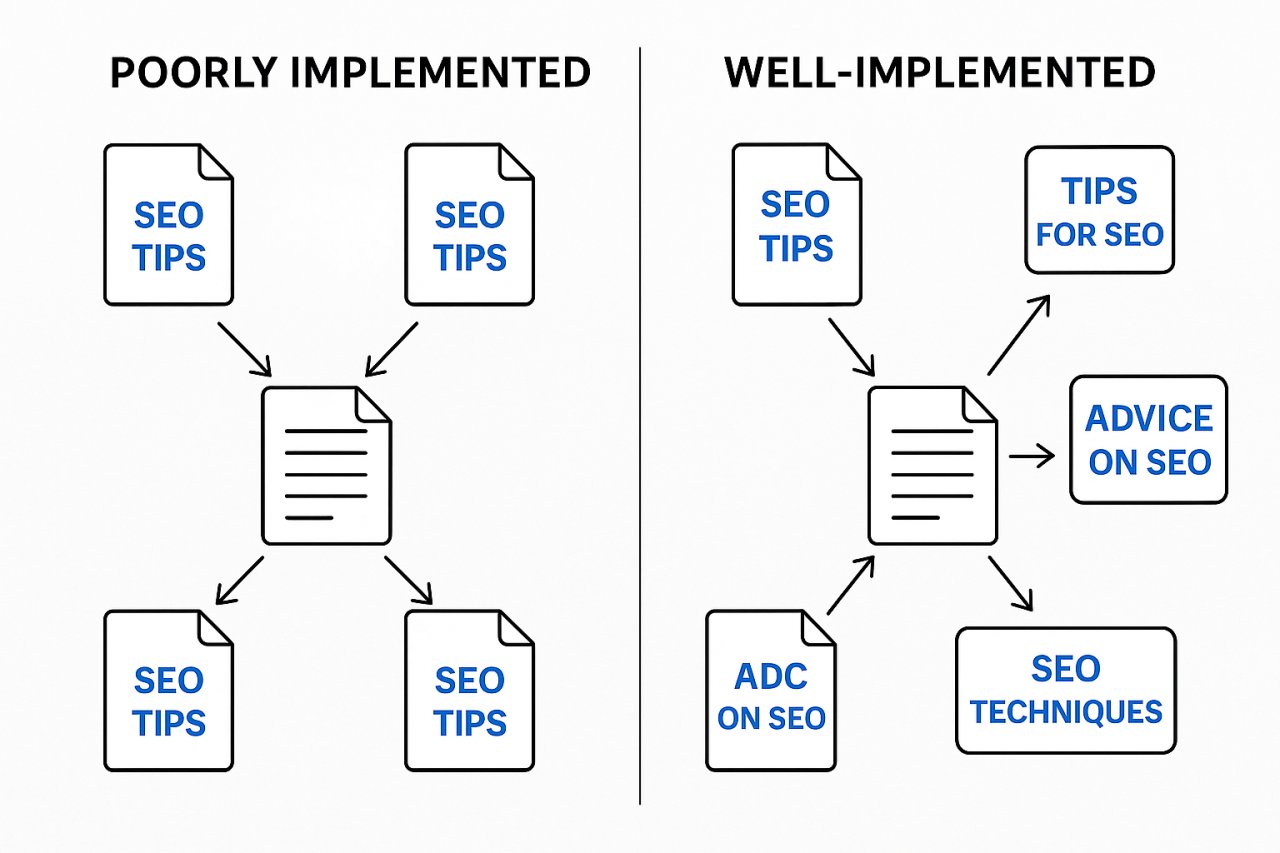
Most WordPress users default to one of two extremes: exact-match keyword anchors (“WordPress speed optimization” linking to a post about WordPress speed optimization) or generic CTAs (“click here,” “read more”). Both are suboptimal.
Variation Beats Repetition
If 15 posts all link to your pillar page with the anchor text “WordPress speed optimization,” you’re not building topical relevance. You’re over-optimizing. Google doesn’t need that much repetition to understand what a page is about — and repetitive anchors look unnatural.
Instead, vary your anchors:
- “How to optimize WordPress for speed”
- “Our complete performance guide”
- “Speed optimization fundamentals”
- “Everything you need to know about WordPress performance”
Each one signals the topic differently. Together, they paint a richer picture than 15 identical anchors ever could.
Context Anchors Outperform Exact Match
Here’s a pattern that works better than exact-match anchors: contextual phrases that include the keyword naturally. Instead of linking the isolated phrase “internal linking,” link a full sentence: “Most sites underestimate how much internal linking affects crawl efficiency.”
Why? Because the surrounding words add semantic weight. Google doesn’t just see the anchor — it sees the sentence the anchor lives in. A link embedded in a relevant explanation carries more topical signal than a naked keyword floating in a generic list.
This also makes your content more readable. Links feel like part of the narrative, not SEO inserts.
How AI Changes the Internal Linking Game
Here’s where strategy meets execution. You’ve built the plan. You know your pillars, your clusters, your anchor text principles. Now you need to implement it across hundreds of posts — and keep it updated as you publish new content.
Manual linking breaks down here. But AI doesn’t.
From Manual Spreadsheets to Automated Suggestions
AI-powered internal linking tools analyze your content at scale, identify semantic relationships between posts, and suggest contextually relevant links. Instead of you reading 50 old posts to find linking opportunities, the tool surfaces the best matches based on topic overlap.
For example, you publish a new post about WordPress caching. An AI tool scans your site, finds 8 existing posts that mention caching, page speed, or performance, and suggests where to insert links — both in the new post and in those older articles. You review, approve, and the links go live. What used to take an hour now takes five minutes.
Tools like AI Internal Links automate this process directly inside WordPress. You’re not exporting CSVs or managing a separate dashboard. The plugin integrates with your editor, suggests links as you write, and updates old posts automatically when relevant opportunities appear.
Scale Without Losing Control
The fear with automation is losing editorial quality. If the tool just spams links everywhere, you’ve traded one problem for another. The key is suggestion-based automation, not blind execution.
A smart AI plugin won’t insert links without your approval. It flags opportunities, shows you the context, lets you edit the anchor text, and gives you final say. You’re still in control — you’re just not doing the discovery work manually.
This matters especially if you’re publishing AI-generated content at scale. You might be pushing 10-20 posts per week. Without automated internal linking, those posts stay siloed. With it, they integrate into your existing architecture as they publish, strengthening clusters instead of diluting them.
Step-by-Step: Building Your Strategy Today
Enough theory. Here’s how to implement this, starting today, even if you have 500 posts and no linking strategy in place.
Audit What You Have
First, crawl your site. Use Screaming Frog, Sitebulb, or the Google Search Console Internal Links report. Export a list of every page and its inbound internal link count. Sort by fewest links. You now have a prioritized list of orphan and under-linked content.
Next, categorize your content by topic. Don’t overthink this. Create a simple spreadsheet with columns for URL, topic cluster, and pillar page (if applicable). This gives you a map of what content exists and where the gaps are.
Define Your Architecture
Pick your 3-5 pillar pages. If you don’t have them yet, write them. These are the foundation. Everything else is support.
Then assign existing posts to clusters. A post can belong to multiple clusters if it’s genuinely relevant to multiple topics — but don’t force it. If a post doesn’t fit anywhere, it’s either a new cluster seed or a candidate for deletion.
Set linking rules:
- Every cluster post links to its pillar at least once, early in the content
- Cluster posts link to 2-3 related posts within the same cluster
- Pillar pages link out to their top 8-10 cluster posts
- Orphan posts get linked from at least 3 contextually relevant articles
You don’t need to map every link in advance. You need rules that generate the right patterns.
Automate the Execution
Once you have your architecture and rules, you need a system to maintain it. This is where AI plugins become non-negotiable. You can’t manually update 100+ posts every time you publish. You need a tool that:
- Scans new posts and suggests internal links based on topic relevance
- Identifies opportunities to link to new posts from older content
- Varies anchor text automatically while respecting your keyword targets
- Integrates with your WordPress editor so linking happens as you write
The goal isn’t to set it and forget it. The goal is to reduce the manual work from hours to minutes, so you spend your time reviewing suggestions instead of hunting for link opportunities.
If you’re publishing regularly, this compounds fast. A post published today gets linked from 5 relevant older posts automatically. Next week’s post links back to this one. The network builds itself, guided by your rules, executed by AI.
Your Internal Linking Strategy Is Infrastructure, Not Tactics
Here’s the shift: stop thinking of internal linking as a checklist item and start treating it like site architecture. Your link structure determines which pages Google prioritizes, how authority flows through your site, and whether your topical clusters actually function as clusters or just exist as isolated posts.
A smart WordPress internal linking strategy isn’t built in a weekend. But it doesn’t require a custom CMS or a development team either. It requires a plan (pillars and clusters), principles (anchor variation and contextual linking), and automation (AI tools that scale your effort).
If you’ve been manually adding links and hoping for the best, you’re working harder than you need to. Build the system once. Let AI maintain it. Your rankings — and your sanity — will thank you.