Introduction
AI Internal Links is a revolutionary WordPress plugin that uses artificial intelligence to analyze your content and automatically generate relevant, SEO-optimized internal links.
With just one click, transform your articles into perfectly interlinked content that:
- Improves search engine rankings
- Increases time spent on your site
- Distributes page authority intelligently
- Enhances visitor navigation
- Strengthens your site’s semantic structure
Quick Start Guide
1. Installation
- Download the plugin from your account or from the WordPress directory
- Go to Plugins → Add New in your WordPress admin
- Click Upload Plugin
- Select the ZIP file and click Install Now
- Activate the plugin
2. Initial Configuration
Before generating links, you need to configure your API key:
- Go to Settings → AI Internal Links
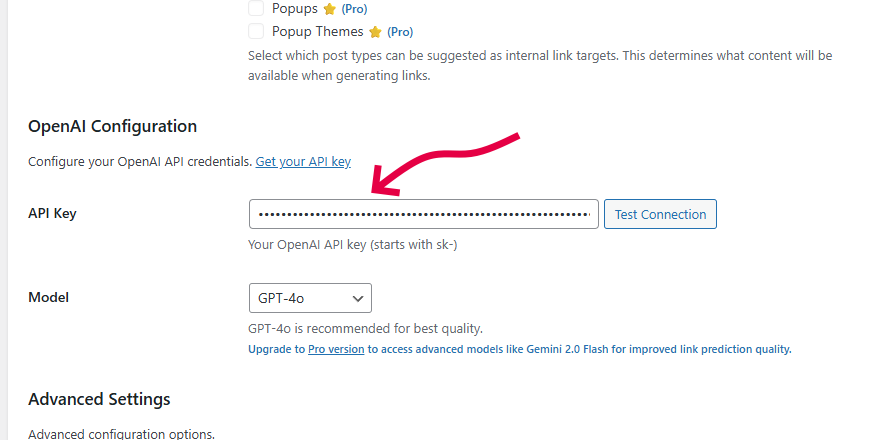
- In the OpenAI Configuration section, enter your OpenAI API key
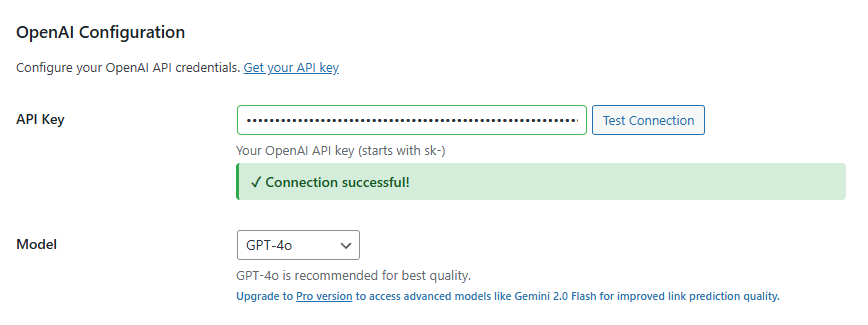
- Click Test Connection to verify everything works
- Save your settings
 Note:
Note: Don’t have an OpenAI API key?
Get one here
3. First Use
Let’s generate your first internal links:
- Open an existing post or page
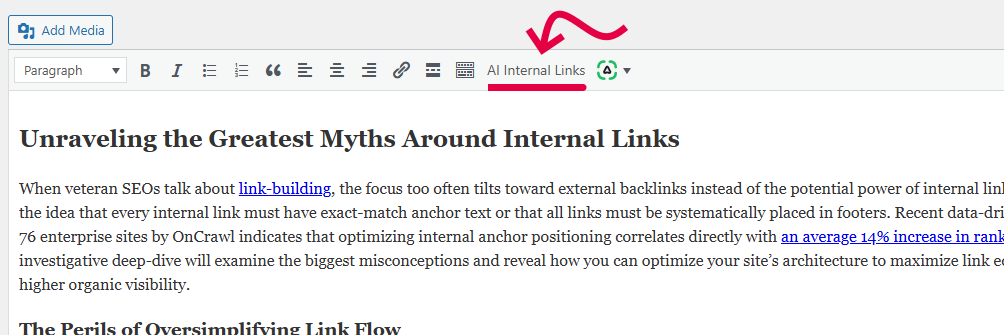
- Locate the AI Internal Links button in the editor toolbar
- Click on it
- Wait for the AI to analyze your content (5-15 seconds)
- Links are automatically inserted into your content!
Settings Configuration
Access settings via
Settings → AI Internal Links
General Settings
| Setting |
Description |
Recommended Value |
| AI Provider |
Choose the AI provider to use. Free version: OpenAI only. Pro version: Claude, Gemini, Grok, DeepSeek, Mistral |
OpenAI (free)
Gemini 2.0 Flash (Pro) |
| Maximum Links |
Maximum number of internal links to generate per article. Value between 1 and 20. |
5 links (optimal for SEO) |
| Enable for Post Types |
Select content types where the AI Internal Links button will appear. Free version: Posts and Pages. Pro version: all custom post types (WooCommerce, etc.) |
Posts + Pages minimum |
| Available Post Types for Linking |
Defines which content types can be suggested as link targets. For example, if you check “Products”, the AI can create links to your product pages. |
Same as “Enable for Post Types” |
OpenAI Configuration
| Setting |
Description |
Recommendation |
| API Key |
Your OpenAI API key (starts with sk-). Get an API key |
Required to function |
| Model |
OpenAI model to use:
- GPT-5.2: Best quality
- GPT-4o: Good, cheaper
- GPT-4o Mini: More economical, good value
- GPT-4 Turbo: Performance/cost balance
- GPT-4: Classic version
|
GPT-5.2 for quality
GPT-4o Mini for economy |
 Pro Version:
 Access more powerful AI models like Gemini 2.0 Flash which offers better accuracy for contextual link prediction.
Advanced Settings
| Setting |
Description |
Availability |
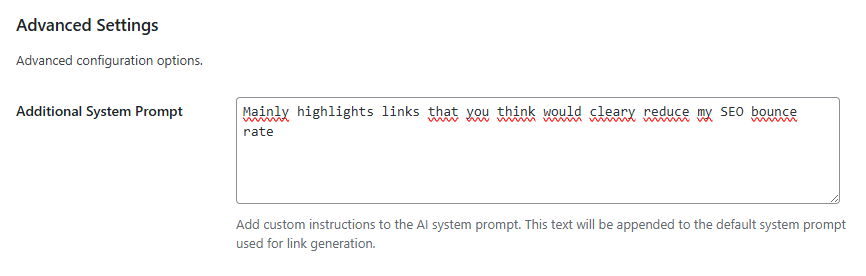
| Additional System Prompt |
Customize the instructions given to the AI. Examples: “Prefer links to articles over 1000 words” or “Avoid creating links in headings”.
This text is appended to the default system prompt to fine-tune AI behavior according to your needs. |
Pro Version Only |
Pro License
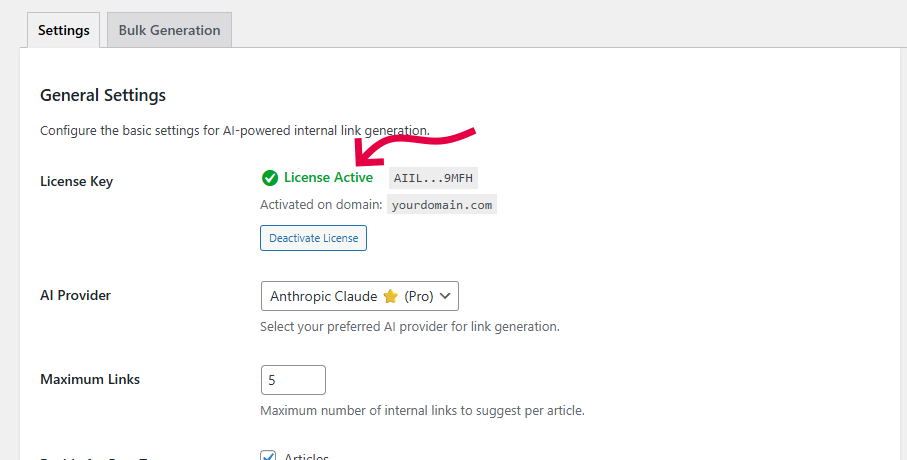
If you purchased the Pro version, a license field appears at the top of settings:
- Enter your license key received by email
- Click Activate License
- Once activated, all Pro features are unlocked
License Status:
- License Active: All Pro features are available
- Not activated: Basic features only
Pro Features
Upgrade to Pro to unlock:
1. 6 Additional AI Providers
Beyond OpenAI, enjoy:
| Provider |
Available Models |
Advantages |
| Claude (Anthropic) |
Claude 4.5 Opus etc. |
Excellence in contextual understanding |
| Gemini (Google) |
Gemini 3 Flash, Gemini 2.5 Pro… |
Best value, very fast |
| Grok (xAI) |
Grok Beta, Grok Vision |
Advanced semantic analysis |
| DeepSeek |
DeepSeek Chat |
Excellent for technical content |
| Mistral AI |
Mistral Large, Mistral Medium |
Optimized for multiple languages |
2. Gutenberg Support (Block Editor)
The AI Internal Links button is integrated directly into the Gutenberg toolbar for a seamless experience.
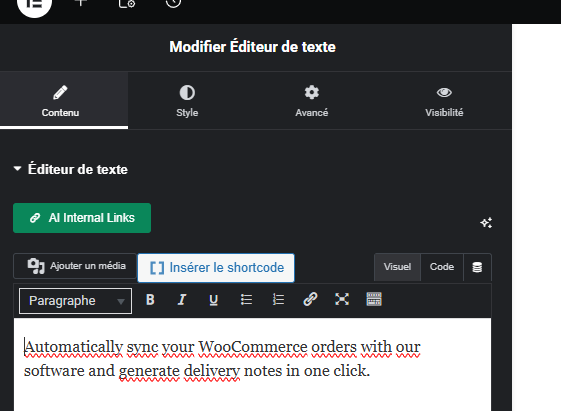
3. Page Builder Support
Elementor and
WPBakery Page Builder are fully supported. Generate links in pages created with these visual builders.
4. Bulk Generation
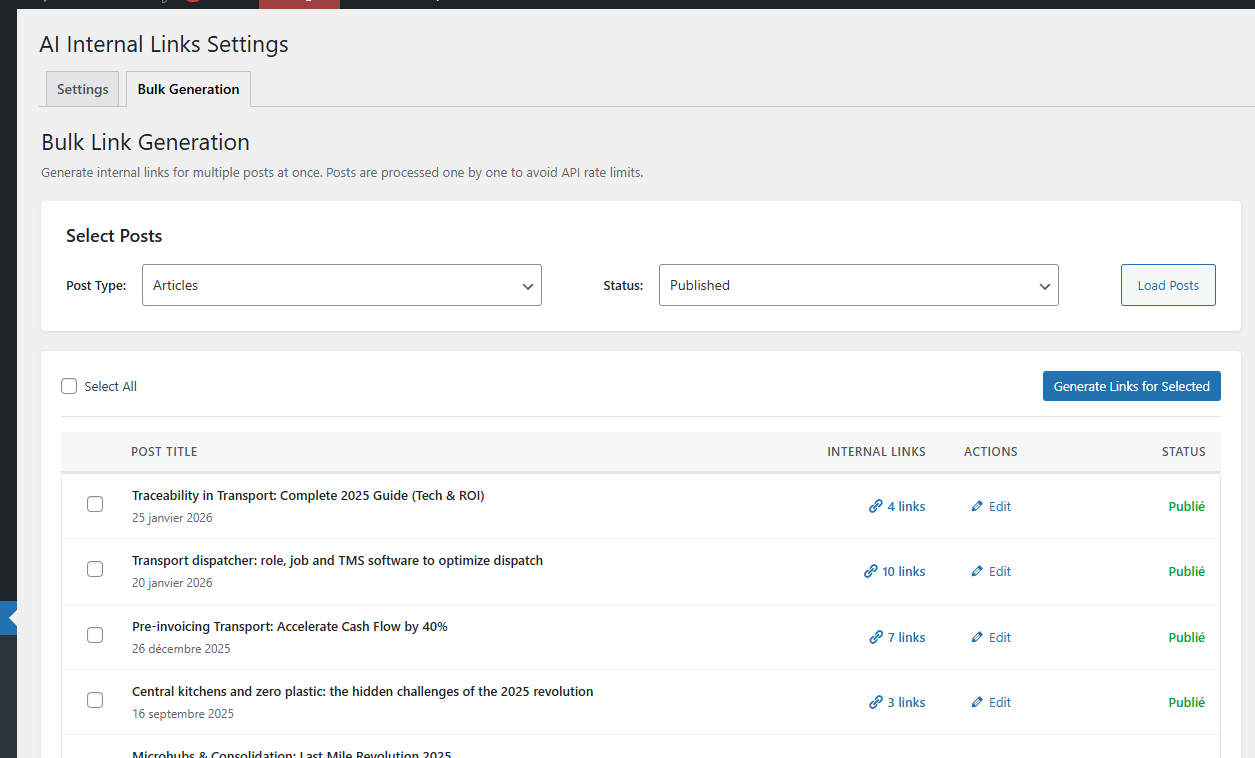
Process multiple posts at once!
- Go to Settings → AI Internal Links
- Click on the Bulk Generation tab
- Select posts to process
- Click Generate Links for Selected Posts
- The plugin automatically processes all selected posts
Perfect for:
- Optimizing an existing site with hundreds of articles
- Quickly improving your blog’s internal linking
- Saving hours of manual work
5. All Content Types
Generate links in:
- Posts and Pages (included in free version)
- WooCommerce Products
- Custom Post Types
- Any content type on your site
6. Prompt Customization
Thanks to the
Additional System Prompt field, you precisely control AI behavior:
Usage Examples:
# Prefer recent articles
"Favor links to articles published in the last 6 months."

# Avoid certain categories
"Never insert links to the 'Drafts' category."

# Specific link style
"Use short anchor text (2-4 words maximum)."

# Thematic focus
"Prefer links to articles in the same category as the current article."
7. REST API
Automate your internal linking with our REST API.
8. Priority Support
Pro users benefit from dedicated email support with response within 24 business hours.
Developer Documentation
WordPress Hooks & Filters
AI Internal Links is extensible via WordPress hooks. Here are the main ones:
Actions (do_action)
| Hook |
Description |
Parameters |
aiil_core_init |
Executed after plugin core initialization. Allows adding custom integrations. |
None |
Usage Example:
add_action( 'aiil_core_init', function() {
    // Your custom initialization code
    // Ex: load a custom editor
    My_Custom_Editor_Integration::init();
} );
Filters (apply_filters)
| Filter |
Description |
Parameters |
aiil_sanitize_settings |
Filter settings after sanitization |
$sanitized (array), $input (array) |
aiil_available_providers |
Modify the list of available AI providers |
$providers (array) |
aiil_supported_post_types |
Modify supported content types (where button appears) |
$post_types (array) |
aiil_linking_post_types |
Modify content types available as link targets |
$post_types (array) |
aiil_available_links_args |
Modify query arguments for retrieving available links |
$args (array), $exclude_post_id (int) |
aiil_provider_settings |
Filter settings sent to AI provider before generation |
$settings (array), $provider_name (string) |
aiil_generated_suggestions |
Modify suggestions generated by AI before return |
$suggestions (array), $content (string), $post_id (int) |
aiil_content_with_links |
Filter content after link insertion |
$content (string), $suggestions (array), $post_id (int) |
Code Examples
1. Limit links to articles in same category:
add_filter( 'aiil_available_links_args', function( $args, $exclude_post_id ) {
    // Get current post categories
    $categories = wp_get_post_categories( $exclude_post_id );

    if ( ! empty( $categories ) ) {
        $args['category__in'] = $categories;
    }

    return $args;
}, 10, 2 );
2. Add custom post type to supported types:
add_filter( 'aiil_supported_post_types', function( $post_types ) {
    $post_types[] = 'portfolio'; // Your CPT
    return $post_types;
} );
3. Modify link count based on content type:
add_filter( 'aiil_provider_settings', function( $settings, $provider_name ) {
    // More links for long articles
    global $post;
    if ( $post && str_word_count( strip_tags( $post->post_content ) ) > 1500 ) {
        $settings['max_links'] = 10;
    }

    return $settings;
}, 10, 2 );
4. Exclude certain links from suggestions:
add_filter( 'aiil_generated_suggestions', function( $suggestions, $content, $post_id ) {
    // Remove links to specific pages
    $excluded_urls = [
        get_permalink( 123 ),
        get_permalink( 456 )
    ];

    return array_filter( $suggestions, function( $suggestion ) use ( $excluded_urls ) {
        return ! in_array( $suggestion['url'], $excluded_urls );
    } );
}, 10, 3 );
5. Log all link generations:
add_filter( 'aiil_content_with_links', function( $content, $suggestions, $post_id ) {
    // Log to custom file
    error_log( sprintf(
        '[AI Internal Links] %d links generated for post #%d',
        count( $suggestions ),
        $post_id
    ) );

    return $content;
}, 10, 3 );
Utility Functions
| Function |
Description |
Return |
AIIL_Core::get_setting( $key, $default ) |
Retrieve a plugin setting |
mixed |
AIIL_Core::update_setting( $key, $value ) |
Update a setting |
bool |
AIIL_Core::is_premium_active() |
Check if Pro version is installed |
bool |
AIIL_Core::is_licence_active() |
Check if Pro license is active |
bool |
AIIL_Core::get_available_providers() |
List all available AI providers |
array |
AIIL_Core::log( $message, $level ) |
Log a message (if logging enabled) |
void |
Usage Example:
// Check if Pro is active before using Pro feature
if ( AIIL_Core::is_licence_active() ) {
    // Use Pro function
    $custom_prompt = AIIL_Core::get_setting( 'additional_system_prompt' );
}

// Get configured max links
$max_links = AIIL_Core::get_setting( 'max_links', 5 );
FAQ – Frequently Asked Questions
How much does it cost to use the plugin?
The plugin is free, but you’ll need an API key from your chosen AI provider (OpenAI, Claude, etc.). Costs vary based on usage:
- OpenAI GPT-4o Mini: ~$0.15/1000 tokens (~$0.01 per article)
- Gemini 2.0 Flash (Pro): ~$0.075/1000 tokens (~$0.005 per article)
Will my existing links be overwritten?
No! The plugin never overwrites existing links. It analyzes unlinked text and only adds new links in areas without links.
Can I preview links before insertion?
Currently, links are inserted automatically. However, you can always use Ctrl+Z (or Cmd+Z on Mac) to undo the operation immediately after.
Does the plugin work with Gutenberg?
- Free version: Compatible with Classic Editor (TinyMCE)
- Pro version: Fully compatible with Gutenberg, Elementor and WPBakery
Can I use the plugin on a multilingual site?
Yes! The plugin works with all translation plugins (WPML, Polylang, etc.). The AI automatically adapts to the content language.
How long does generation take?
Between 5 and 15 seconds depending on:
- Your article length
- Number of available articles on your site
- Chosen AI model
Are generated links good for SEO?
Absolutely! The AI is trained to:
- Choose natural, contextual anchor text
- Create thematically relevant links
- Distribute links evenly throughout content
- Avoid over-optimization
Can I use the plugin on multiple sites?
- Free version: Yes, on as many sites as you want
- Pro version: One license = one domain. Multisite licenses available
Does the plugin slow down my site?
No. Generation only happens when you click the button, in the admin area. No impact on frontend performance.
What if I have few articles?
The plugin requires a minimum of 2-3 published articles to start generating relevant links. The more content you have, the better the results.
SEO Best Practices
Recommendations for Optimal Links
- Use 3-7 links per article
Not too few, not too many. This is the perfect balance for SEO according to experts.
- Generate links after content finalization
Avoid generating links on incomplete drafts. Wait until the article is ready.
- Review suggestions
Although the AI is very accurate, human review is always beneficial.
- Vary target pages
Don’t always use the same pages as destinations. Distribute authority.
- Prioritize quality articles
Via the
aiil_available_links_args filter, you can exclude certain weak content.
- Update regularly
Re-run generation every 3-6 months on your evergreen articles to integrate new content.
Mistakes to Avoid
- Don’t generate links on articles under 300 words
- Don’t create more than 10 links in a single article (over-optimization)
- Don’t always link to the same 2-3 pages (lack of variety)
- Don’t ignore thematic consistency (linking a cat article to a car article)
Support & Contact
Need Help?
Documentation: ai-internal-links.com/docs
Free Support: WordPress Forum (48-72h response)
Pro Support: support@ai-internal-links.com (24h business hours response)
Official Website: ai-internal-links.com
Upgrade to Pro Version
Unlock your SEO’s full potential
€39 – Lifetime License • Free Updates
Pro Features:
- Compatible with all content types (WooCommerce, CPT…)
- Gutenberg + Elementor + WPBakery support
- 6 premium AI providers (Claude, Gemini, Grok…)
- Bulk Generation
- AI prompt customization
- Priority support
Upgrade to Pro Version →