
Table of Contents
- Why Most Beginners Get WordPress SEO Backwards
- Start Here: Keyword Research That Actually Makes Sense
- Content Structure That Google Can Actually Understand
- Internal Linking: The Most Underrated SEO Lever Beginners Ignore
- Essential WordPress SEO Settings You Can’t Skip
- Creating Content That Ranks: The Practitioner’s Approach
- Measuring Progress Without Drowning in Data
- The First 90 Days: Your Action Plan
Here’s the truth nobody tells beginners: WordPress doesn’t make your site SEO-friendly by default. It gives you the foundation, sure. But that’s like buying a gym membership and expecting abs to appear. The tools exist. You still need to use them correctly.
This guide walks you through exactly what to do, in what order, to turn your WordPress site into something Google actually wants to rank. No jargon walls. No fifteen-step technical rabbit holes. Just the roadmap that works.
Why Most Beginners Get WordPress SEO Backwards
Most people start by installing Yoast or RankMath, filling in some meta descriptions, and wondering why nothing changes. The plugin turns green. The traffic stays flat.
The problem? You’re optimizing for a plugin, not for search engines. Those tools are checklists, not strategies. They catch technical errors, but they don’t tell you what content to create or how to structure your site so Google understands what you’re about.
Real WordPress SEO starts with understanding what Google is trying to do: match search queries to the best possible answer. If your site doesn’t clearly signal what questions it answers, no amount of meta tag tweaking will save you.
Start Here: Keyword Research That Actually Makes Sense
Stop Guessing What People Search For
You think people search for “best running shoes.” They actually search for “running shoes for flat feet under $100” or “lightweight running shoes for marathon training.” Specificity wins.
Use free tools first. Google’s own search suggestions (start typing in the search bar), the “People also ask” boxes, and the related searches at the bottom of results pages. These aren’t sophisticated, but they’re real queries from real people.
The Beginner-Friendly Keyword Filter
Once you have a list, apply this simple test to each keyword:
Can you write something genuinely better than what’s already ranking? If the top three results are comprehensive guides from sites with ten years of authority, move on. Find gaps where you can compete.
Look for keywords where:
- The search intent matches what you can deliver (if they want a product page, don’t write a blog post)
- Existing results miss important details or feel outdated
- The topic connects naturally to other content you’re planning
Build Your Content Foundation First
Don’t chase a hundred different topics. Pick 5-7 core themes your site will be known for. If you’re a running blog, maybe that’s training plans, injury prevention, gear reviews, nutrition, and race strategy.
For each theme, plan:
- One comprehensive pillar guide (2000+ words)
- 5-8 supporting articles that dive deeper into specific aspects
This structure gives you something valuable: topical authority. Google doesn’t just rank individual pages. It evaluates whether your entire site demonstrates expertise on a subject.
Content Structure That Google Can Actually Understand
Your Title Tag Is Doing One Job
It tells both Google and humans what the page is about. Keep it under 60 characters. Front-load your target keyword. Make it compelling enough that someone would click it in search results.
Bad: “Running Shoes – My Blog”
Good: “Best Running Shoes for Flat Feet: 2026 Buyer’s Guide”
The difference? Specificity and clarity. One attracts clicks. The other gets ignored.
Meta Descriptions Don’t Rank You, But They Get Clicks
Google uses your meta description as the snippet below your title in search results — sometimes. If you don’t write one, Google pulls random text from your page. Usually the wrong random text.
Write meta descriptions like ad copy. You have 155 characters to convince someone your result is worth clicking. Include your keyword naturally, but prioritize being interesting.
Header Tags Are Your Content Outline
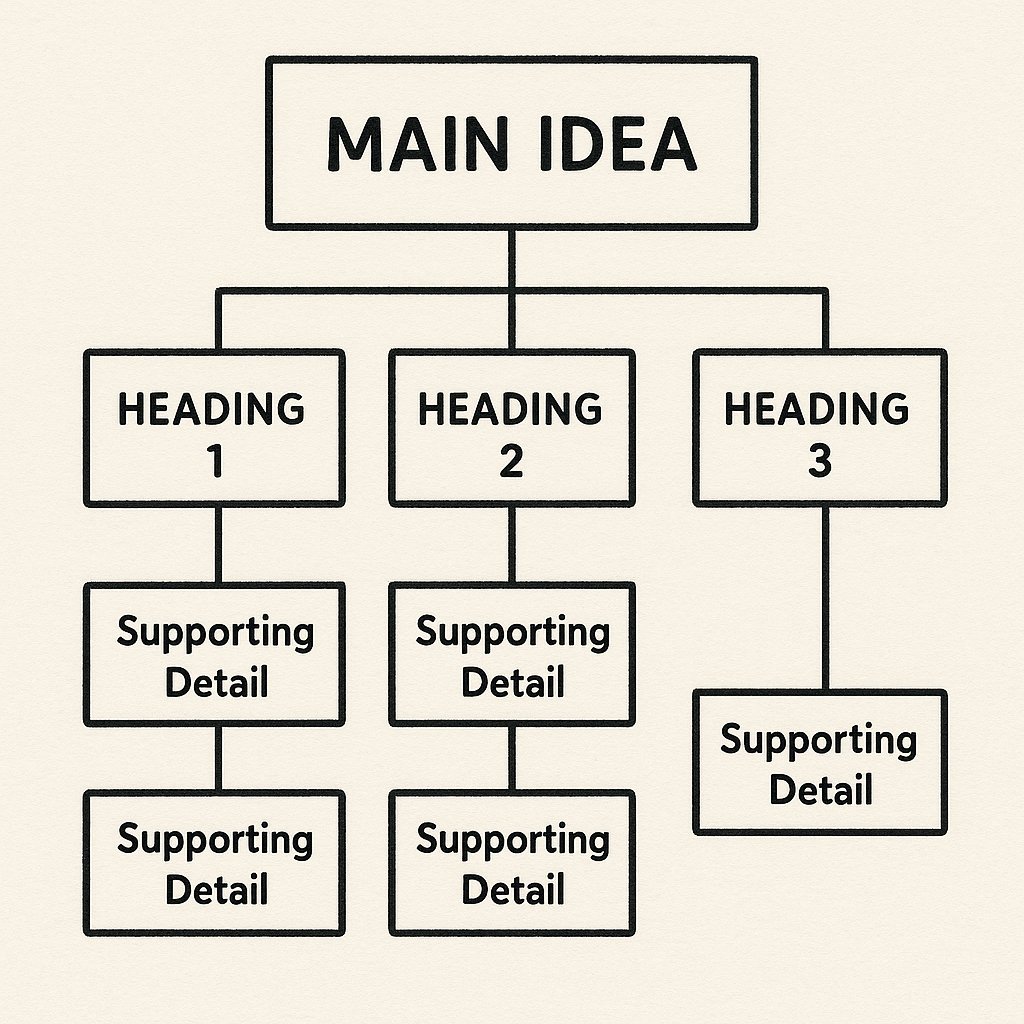
Every page needs exactly one H1 — your main headline. Then use H2s for major sections, H3s for subsections under those. This hierarchy isn’t just formatting. It’s how Google understands the structure of your content.
Think of it like a table of contents. Someone should be able to scan just your headers and know exactly what your article covers.
Internal Linking: The Most Underrated SEO Lever Beginners Ignore
Why Links Between Your Own Pages Matter So Much
You publish a great article. Google crawls it. Then… nothing. Because that article sits isolated, disconnected from the rest of your site. Google can’t figure out how important it is or how it relates to your other content.
Internal links are votes. They tell Google: “This page matters. It’s connected to this topic cluster. Rank it accordingly.”
The Simple Internal Linking Strategy That Works
Every new article should link to:
- Your main pillar guide on that topic (if one exists)
- 2-3 related articles that provide context or deeper dives
- Your most important pages (homepage, key service pages)
And here’s what most beginners miss: go back and update old content to link to new articles. If you just published a detailed guide on marathon training plans, find your general “how to train for a marathon” post and add a contextual link to the new piece.
This bidirectional linking creates a web of related content that Google can crawl efficiently. It’s not about quantity — it’s about relevance.
Anchor Text Doesn’t Need to Be Complicated
Your link text should describe what the linked page is about. Natural, descriptive phrases work best.
Bad: “Click here for more info”
Good: “Learn more about marathon training for beginners”
The second version tells Google and readers exactly what they’ll find if they click.
Automation Makes This Scalable
Here’s the problem: as your site grows to 50, 100, 200 posts, manually maintaining internal links becomes impossible. You forget which articles exist. Opportunities get missed.
Tools like AI Internal Links analyze your content and automatically suggest relevant internal linking opportunities based on semantic relationships. It’s the difference between remembering to link things yourself and having a system that catches what you miss.
For beginners especially, this removes the cognitive load of tracking every connection manually.
Essential WordPress SEO Settings You Can’t Skip
Permalinks: Set These Once and Never Touch Them Again
Go to Settings > Permalinks in WordPress. Choose “Post name” structure. This gives you clean URLs like yoursite.com/running-shoes-guide instead of yoursite.com/?p=123.
Do this before you publish content. Changing permalink structure later creates redirect headaches.
XML Sitemaps: Your Site’s Table of Contents for Google
Most SEO plugins (Yoast, RankMath, All in One SEO) generate XML sitemaps automatically. This file lists all your pages and tells Google when they were last updated.
Once it’s enabled, submit your sitemap to Google Search Console. That’s it. Google handles the rest.
Stop Search Engines From Indexing Junk
WordPress creates archive pages, tag pages, author pages — lots of thin content that dilutes your site’s quality in Google’s eyes. Use your SEO plugin to:
- Noindex tag archives (unless you actively curate them)
- Noindex author archives (unless you’re a multi-author site where author pages add value)
- Noindex search results pages
You want Google crawling your actual content, not auto-generated lists with no unique value.
Creating Content That Ranks: The Practitioner’s Approach
Length Matters Less Than Depth
You’ll hear “aim for 2000 words” everywhere. That’s not a rule. It’s an observation: comprehensive content tends to be long because thorough answers require space.
Don’t pad articles to hit word counts. Answer the question completely, then stop. If that takes 800 words, great. If it takes 3000, also great.
Write for Humans, Optimize for Robots Second
Include your target keyword in:
- Your title tag and H1
- At least one H2 or H3 subheading
- The first paragraph
- Naturally throughout the content (2-4 times per 1000 words)
But never force it. Awkward keyword stuffing is worse than no optimization at all. Google’s natural language processing is sophisticated enough to understand synonyms and related concepts.
Update Old Content Regularly
One of WordPress’s biggest advantages: you can edit published content anytime. Use this.
Every quarter, revisit your top 10 pages by traffic (check Google Analytics). Update outdated information. Add new sections. Improve clarity. Refresh the publication date.
Google rewards freshness for topics where recency matters. And your existing pages already have authority — they’re easier to improve than starting from zero with new content.
Measuring Progress Without Drowning in Data
Google Search Console Is Your Best Friend
This free tool shows you exactly which queries bring traffic, which pages rank, and what Google thinks your site is about. Check it weekly.
Focus on:
- Total impressions (how often you appear in search results)
- Average position (where you rank for your keywords)
- Click-through rate (percentage of people who click when they see you)
If impressions are growing but clicks aren’t, your titles and meta descriptions need work. If you’re ranking positions 6-10 for important keywords, those are targets for content improvement.
Track the Right Metrics, Ignore Vanity Numbers
Organic traffic growth is the metric that matters. Not social media followers. Not email subscribers (though those help). The question is: can people find you through Google?
Set a simple goal: increase organic traffic by 20% quarter over quarter for your first year. That’s aggressive but achievable with consistent effort.
The First 90 Days: Your Action Plan
Here’s what execution looks like:
Days 1-30: Set up WordPress correctly (permalinks, XML sitemap, noindex settings). Install an SEO plugin. Do keyword research and plan your content pillars.
Days 31-60: Publish your first pillar guide. Write 3-4 supporting articles. Implement internal links connecting them. Submit your sitemap to Google Search Console.
Days 61-90: Add another pillar guide and supporting content. Start tracking rankings in Search Console. Identify which content is getting traction and double down on related topics.
You won’t see dramatic results in 90 days. That’s fine. SEO is a compounding investment. The content you publish now builds authority that pays off in months 6, 9, and 12.
The beginners who succeed are the ones who publish consistently, connect their content intelligently, and resist the urge to chase every new tactic they read about. Pick this roadmap. Execute it. Adjust based on what Search Console tells you.
That’s how you build organic traffic that compounds.